The mower is standing in the middle of open space, reports “lost” or “trapped,” doesn’t return to the station properly—and yesterday everything was still working. Reports like these are currently showing up with WORX mainly around Vision Cloud and firmware updates. With the classic Landroid M models, the frustration is different: “Wire Missing,” a red LED, a weak loop signal, and hours of searching for a corroded cable connection. Both cases show: WORX can work very well, but the right model series depends heavily on the garden, your own tolerance for technical issues, and maintenance.
In this buying guide, we’re not looking at brochure promises, but at typical problems from forums, user reports, and workshop practice. We regularly have cutting disc, mowing disc, and blade(s) from CUT GUARD in our hands; in the cut pattern, you can quickly see whether a robot is working cleanly or just somehow getting over the lawn. If you’re already using your WORX and are more looking for cutting disc or mowing disc accessories, you’ll find an early overview of suitable WORX cutting disc and replacement parts before we dive into the model series.
WORX Landroid overview: separating cables, Vision, and Vision Cloud cleanly
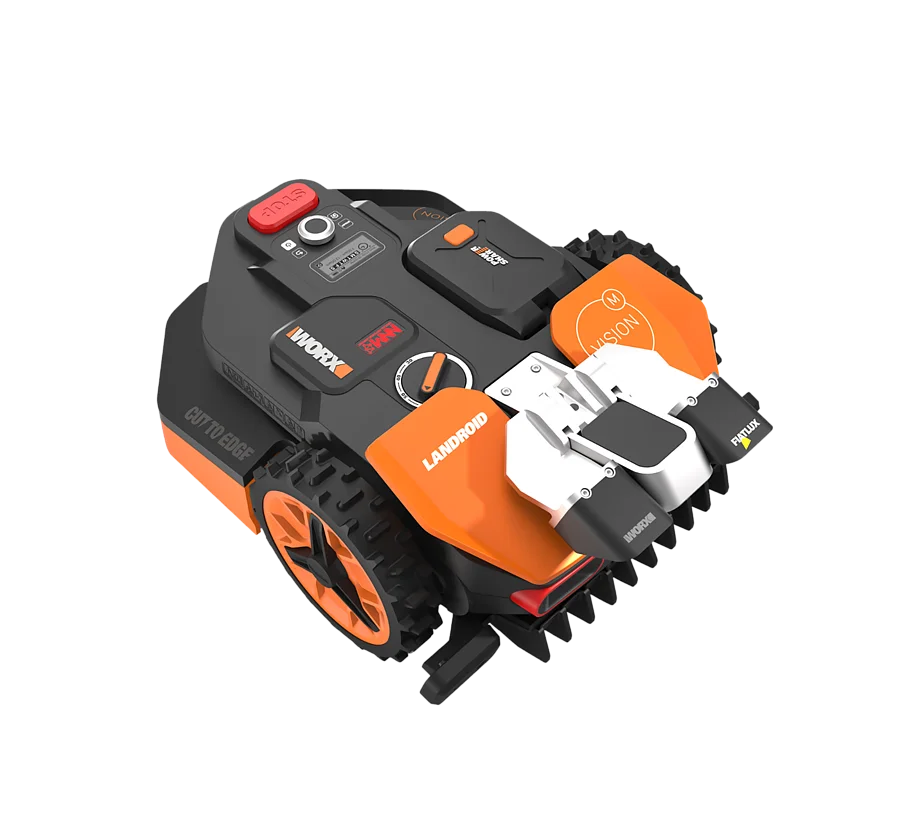
With WORX, you first need to keep the generations apart. The classic Landroid models like M500, M700, WR141E, or WR167E work with a boundary wire. The robot follows the wire, uses it to find the station, and uses the app for schedules, zones, and firmware. This is technically well known, but the wire remains the Achilles’ heel.
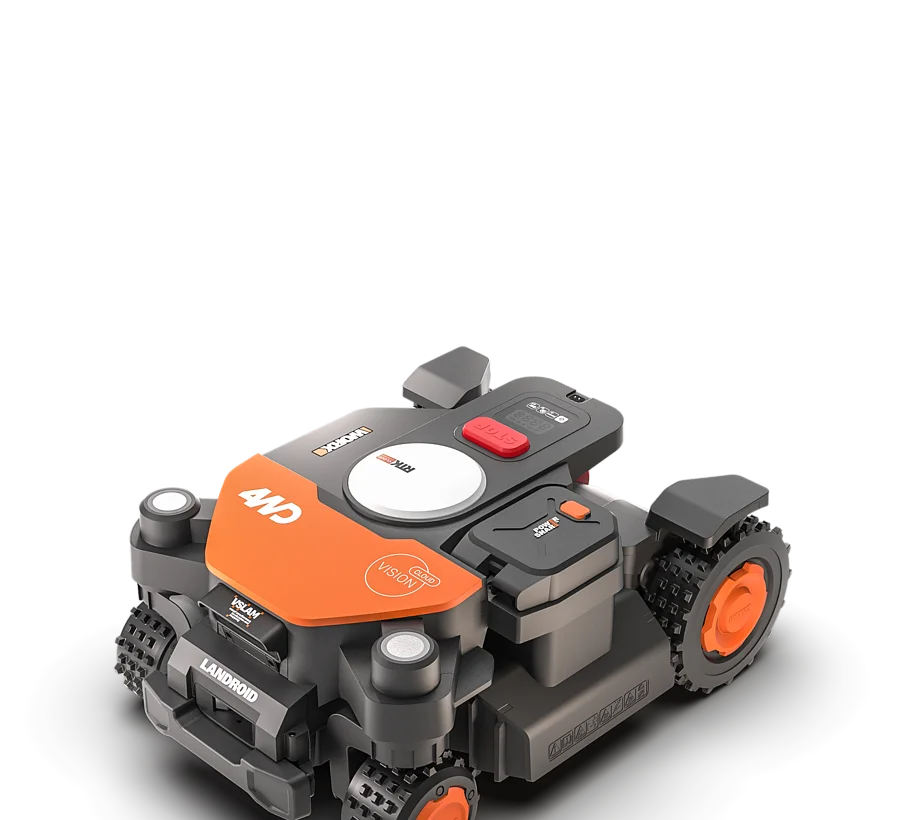
Vision M600 and the newer Vision Cloud models take a different approach. They rely on a camera, visual lawn recognition, and depending on the version, additional cloud, RTK, V-SLAM, or positioning logic. The big advantage: no classic boundary wire in the ground. The big disadvantage: the system is more dependent on software, WLAN, the cloud, the camera image, lawn color, and garden layout.
Many users report that Vision Cloud can be impressively easy to get started with in suitable gardens: set up the station, pair the app, and have the area scanned. Others struggle even before mowing for the first time with WLAN, firmware, or cloud connection. This range is important. A wireless robotic mower is not automatically less problematic—it just has different sources of errors.
| Model series | Navigation | Typical garden | Strengths from a user perspective | Weaknesses from a user perspective |
|---|---|---|---|---|
| Landroid M500 / M700 / WR141E / WR167E | Boundary wire | Clear lawns, normal edges, little setup | Proven system, affordable entry, many spare parts | Wire breakage, corrosion, “Wire Missing”, return-to-home tracks |
| Vision M600 | Camera / visual recognition | Manageable areas without extreme narrow passages | No boundary wire, simple core idea | Dependent on lawn image, edges, lighting, and software |
| Vision Cloud WR303E-WR308E | Camera, cloud, structured navigation | Small to medium areas with a solid WLAN/cloud setup | Can be very convenient if setup and garden match | Firmware, missed patches, edges, narrow passages |
| Vision Cloud WR312E / WR318E / WR330E | Camera, cloud, larger-area logic | Larger lawns, multiple zones, longer operating paths | More area capacity, more systematic working | Software dependency, return-to-home, network, shadows, passages |
Who is a WORX Landroid M500 or M700 still a good fit for?
A Landroid M500, M700, WR141E or WR167E still fits well for users who have a clearly defined lawn area and are willing to lay the boundary wire carefully. Rectangular or slightly intricate gardens, neat lawn edges, and a sensibly positioned charging station are the ideal environment. However, if you have many islands, wet cable connectors, long loops, moles, or constantly redesigned garden areas, you’re essentially buying yourself maintenance work along with the wire.
In forums, “Wire Missing” is particularly often criticized for the cable-bound Landroids. The error pattern is tricky: the station can light up green, the mower can dock correctly—yet when it starts, it still reports missing wire. In practice, the causes are often not in the mower itself, but in the overall system of cable, plug connectors, moisture, corrosion, damaged insulation, damage caused by rodents, or weak connections.
If you buy a used or older Landroid M model, you shouldn’t just look at the battery and housing. Ask questions: Has the wire been patched? Are waterproof connectors installed? Is there a sketch of the loop? Has the charging station ever been replaced? A wire locator, spare cable, and proper gel or waterproof couplings are practically part of the basic equipment.
When changing the blade, the Landroid M models are straightforward, but the cut pattern depends heavily on the condition of the blades. If the original mowing disc is worn, grass clippings get stuck between the blades and the disc, or the cut pattern still looks frayed despite new blades, it’s worth taking a look at a 6-fold mowing disc with a matching adapter for the M500, M700, WR141E, WR167E and Vision M600, because in practice more blades often cut more quietly and evenly.
Another point is the return trip home. Classic Landroids often drive along the wire to the station. On soft ground, along narrow edges, or with poorly laid wire, the wheels can keep scraping the same spots. Users then report disturbed lawn at the edge—especially when the robot makes aggressive corrections or experiences wheel slip when it’s wet.
Remember: The Landroid M is not a bad choice if the wire is laid cleanly. But if you hate cable breaks, you should honestly factor in the maintenance time when making your purchase decision.
Is Vision Cloud without boundary wire really the better solution?
Vision Cloud solves the wire problem, but replaces it with questions of sensors, software, and recognition. Many users buy the series because they don’t want to lay boundary wire. That’s understandable. Especially with finished gardens, paved paths, or rented properties, a cordless lawn mower robot is appealing. In practice, however, the robot must reliably recognize what is lawn, where the boundary is, and which area may be driven over.
That’s exactly where the well-known complaints come from: the Vision Cloud always leaves the same strip, bypasses a patchy spot, recognizes bare soil or discolored lawn as a boundary, or avoids an area even though, from the user’s perspective, “nothing special” is there. This is not a classic cutting problem. The blades can be sharp—if the robot doesn’t drive over the area, the patch will still remain.
Transitions between grass and paving, mulch beds, dried-out areas, shadow edges, wet soil, and seasonally patchy lawn are especially critical. Some users report that the behavior seems different at night because color differences are less dominant. But that doesn’t mean that mowing at night is always the solution. With camera systems, you also have to consider visibility, lighting, animals, and safety behavior.
Vision Cloud works best for gardens where the lawn area is visually unambiguous: uniform green, clear edges, wide transitions, and little wild vegetation along the sides. The more the garden looks like a puzzle of islands, paths, narrow passages, and shadows, the more you should read experience reports for the specific model series before buying.
WORX Vision M600: sensible for simple areas, critical at the edges
The Vision M600 is aimed at users who don’t want a boundary wire but also don’t need to mow a huge area. For a flat, manageable garden with a clearly recognizable lawn area, this class can make sense. However, the expectation shouldn’t be: unbox it, get every edge perfect, and never need to do any touch-ups. Camera orientation requires recognizable contrasts—and exactly those contrasts can also be misinterpreted in edge zones.
From a workshop perspective, we see the same basic rule with the Vision M600 as with larger Vision models: a clean cutting pattern is only created when navigation and the blade condition match. When the Klingen are dull, blades are more likely to tear the grass than cut it. This shows up as a gray haze, frayed tips, or an uneven mowing area. In damp corners, the mowing disc clogs faster, which means the mower needs more energy and discharges less effectively.
For that reason, the Vision M600 is less a model for very complex gardens with narrow passages and side growth, and more for users who are looking for a wireless solution on a manageable area. If you often have to touch up lawn edges, you should check whether the problem really lies in the mower’s behavior—or whether the mowing disc, Klingen, and underside cleaning are also involved.
Vision Cloud WR303E to WR308E: small to medium areas with software risk
The WR303E, WR304E, WR305E, WR306E, and WR308E models are aimed at users with small to medium lawn areas. In a simple townhouse garden, they can offer exactly what many people want: no wire, more structured mowing, app control, and less installation effort. At the same time, these newer models are heavily dependent on firmware, the app, and the cloud connection.
Many users report that a firmware update can noticeably change the behavior. This is especially frustrating when the mower initially ran well and then suddenly starts avoiding areas, getting stuck more often, displaying a “lost” message, or finding the station less reliably. For newer model lines, there are often still not enough long-term experience across multiple seasons. Weaknesses don’t always show up on the first weekend; they can appear after weeks: mapping, return trips, edges, app logic, damp corners, and narrow passages.
When buying the smaller Vision Cloud series, you should therefore not only look at the square meter rating. A coverage figure of 300, 500, or 800 m² is only a rough guideline in a real garden. Short mowing windows, multiple zones, long routes back to the station, shaded areas, and skipped patches all require some buffer. If you’re choosing between two variants, in practice you often do better with a bit more battery and area reserve—so long as the mower doesn’t become too large for tight station corners.
If it’s specifically about WR303E through WR308E, we recommend comparing it with a more detailed practical article: If you want to assess mainly edges, smart trimming, battery behavior, and accessories, you’ll find in the practical check for WR303E through WR308E a deeper classification for exactly this compact Vision Cloud class.
Key takeaway: Vision Cloud can be more convenient than wire models, but only when software, cloud, lawn mapping, and garden layout work together. In practice, an update can change more than a new cutting disc set.
Vision Cloud WR312E, WR318E and WR330E: more area doesn’t automatically mean fewer problems
WR312E, WR318E and WR330E are designed for larger lawns. More mowing power helps when the garden has multiple zones, longer return trips, or short permitted mowing times. This is a real advantage: a mower that constantly has to charge quickly falls behind in changeable weather or tight time windows.
At the same time, the larger the area, the higher the number of critical situations. At 1,200, 1,800 or 3,000 m², there are more often shadows, bare patches, paths, slopes, bottlenecks, trees, winding return trips, and areas at the edge of WLAN coverage. The higher model number doesn’t automatically solve these points. It provides more buffer, but no guarantee against track misalignment, missed islands, cloud problems, or incorrectly recognized boundaries.
With the larger Vision Cloud models, the condition of the cutting unit is particularly important, because more mowing time also means more wear. Anyone looking for a cleaner cutting pattern and more cutting points with WR312E, WR318E or WR330E can check a 9-blade cutting disc for Vision Cloud when changing the blade, especially if the robot runs long area intervals and the original setup visibly reaches its limits.
For large areas, a more detailed model consultation is also worthwhile. If you’re deciding between the WR312E, WR318E, and WR330E, you shouldn’t only compare the number of m², but also mowing windows, zones, return paths, narrow passages, and the station corner; in-depth guidance is provided by the practical consultation for large Vision-Cloud areas, because the larger variants are considered separately there.
Why don’t WORX Landroid and Vision Cloud connect to WLAN or the cloud?
WLAN and cloud problems are not a side issue with WORX. With the older Landroid M models, users report app setups that don’t work properly despite a 2.4 GHz network, reboots, and manual firmware. With Vision Cloud, the connection is even more important, because cloud, updates, and map logic intervene more strongly in operation.
In practice, diagnosis starts simply: enable 2.4 GHz WLAN, avoid special characters in the SSID and password, don’t place the router too far from the station, and temporarily bypass the guest network and repeaters. In some setups, a fixed WLAN channel helps, while in others a USB configuration does. If the mower doesn’t get into the cloud properly at all, you should check the router firewall and outgoing connections. In user reports, TCP port 8883 specifically comes up as a possible stumbling block.
It’s also important: A good Wi-Fi connection on the terrace does not automatically mean a good connection at the charging station. The station is often positioned low, next to a wall, behind metal, in a corner, or under a roof. That’s exactly where the connection needs to be stable. With Vision Cloud, you should test whether the app, updates, and startup run reliably before finally screwing the station in place.
How well do Edge-to-Zero, Smart Trim, and edging mowing really work?
Edge-free mowing is a strong selling point for WORX, but in practice it’s not guaranteed. Many users expect the mower to overlap cleanly over paths and that little trimming will be needed. However, user reports about Vision Cloud complain that Edge-to-Zero or Smart Trim do not always work the way the advertising suggests.
The decisive factor is the edge. A level paving path at lawn level is much easier than a mulch bed, a deep lawn edge, loose soil, or a step. With height differences, the robot protects itself more often by turning away, backing off, or leaving a gap. Even side growth can confuse the camera. Then a border strip remains, even though the blades could technically cut close enough.
With classic Landroid M models, another effect comes into play: the robot orients itself by the wire. If the wire is too far inside, a border remains. If it’s too close to a critical edge, you risk wheel slip, the robot getting stuck, or leaving tracks. Good edge performance therefore doesn’t come only from the mower, but also from the wire position, ground firmness, blade condition, and regular cleaning.
How wide do passages need to be with the WORX Vision Cloud?
For Vision Cloud, passages should be planned significantly wider in practice than many marketing images suggest. In user reports, a path about 30 inches wide with growth along the sides was problematic; as a recommendation, roughly 36 inches—about 3 feet—was mentioned. This is not a lab rule for every garden, but a good warning value.
The reason is not only the vehicle width. Vision Cloud must recognize the corridor, assess obstacles on the sides, be able to turn, and it must not permanently interpret ferns, ivy, bed plants, or overhanging blades as a blockage. A bare, straight passage between two clean lawn edges is easier than a narrow path with lively vegetation.
If you connect multiple zones via paths, you should mentally “drive” the transition before buying: Are there non-grass areas? Does the mower need to cross paving? Does the lawn color change? Is there shadow from hedges or walls? Exactly these points determine whether “wire-free” really becomes convenient—or whether you have to intervene manually all the time.
Remember: With Vision Cloud, it’s not only the width of the passage that matters, but also what grows to the left and right of it. Growth along the sides can turn a theoretically suitable corridor into a problem area.
Slope, dew, and soil: When do 4WD or AWD pay off?
2WD or FWD models are often sufficient for flat, firm, and homogeneous lawn areas. It becomes critical on slopes, dew, damp depressions, bare patches of soil, and uneven ground. Users report that a Vision Cloud in manual mode can handle a slope, but in automatic operation it reduces speed earlier or avoids it. This may be intentional to prevent lawn damage—but for the owner it feels like a lack of performance.
4WD or AWD improves traction, but it doesn’t replace good navigation. That’s an important distinction. All-wheel drive helps with starting off, on damp surfaces, and on inclines. However, it doesn’t guarantee that the mower will recognize every edge better, handle every reverse maneuver, or produce no missed strips. Traction and orientation are two different issues.
For sloped properties, damp north-facing sides, shady depressions, or soil under trees, we would rather lean toward the stronger drive class. For small, flat townhouse gardens, a more powerful all-wheel-drive mower can be unnecessary, because it needs more turning space and has to maneuver more in tight station corners.
Buying decision by garden type: Which WORX fits whom?
Flat townhouse garden with a clear lawn edge
Here, both the Landroid M and smaller Vision Cloud models work well—provided the expectations are right. If you want to keep the technology simple and don’t mind laying the wire, M500 or M700 is a solid choice. If you don’t want a wire, you can consider Vision Cloud, but you should critically review WLAN and the edges beforehand.
Complex garden with narrow passages and multiple zones
Things get more difficult here. A wire model can be reliable if the loop is planned carefully. Vision Cloud may feel more convenient, but narrow passages, side overgrowth, and visual misinterpretations are real risk points. More area buffer helps, but it doesn’t replace a good passage width.
Sloped property with rope and damp areas
For slopes, you should view 2WD/FWD critically. 4WD or AWD is more sensible if the mower regularly works on inclines. Still, the garden needs firm turf, clean transitions, and as little loose soil as possible—otherwise tracks or evasive maneuvers will occur.
Large area with long reverse paths
WR312E, WR318E, or WR330E offer more reserve, but the station must be positioned strategically. Long reverse trips, weak WLAN signals, and multiple zones cost time. On large areas, a sharp cutting system is especially important, because dull Klinge(s) noticeably worsen the cut pattern over many square meters.
Blade wear with WORX: When to replace?
For all WORX series, the rule is the same: dull Klinge(n) aren’t only noticeable by the blade itself, but also by the lawn. The blade tips turn light gray, frayed, or split. The mower sometimes sounds more strained, the underside collects more damp grass clippings, and the cut pattern looks uneven. In small, dry gardens, Klinge(n) last longer; with sand, pegs, branches, damp grass, and many edges, they wear out faster.
At CUT GUARD, we don’t just check cutting discs for hole pattern and fit—we also make sure the blades swing freely, that there’s enough clearance to prevent grass clumping, and how smoothly the disc runs. Especially for mowing robots with frequent direction changes, a clean-running disc is more important than many users think. It won’t solve a navigation problem, but a good cutting pattern requires mechanically clean work.
Frequently Asked Questions
Does Vision Cloud really not need a boundary wire?
Yes, Vision Cloud works fundamentally without a classic boundary wire. Still, transitions, paths, patchy lawns, and non-grass areas may require additional planning or manual corrections, because the camera has to interpret boundaries.
Why does my Vision Cloud leave stripes or islands?
Most of the time, it’s due to how the area is recognized—not first of all because of the blades. Patchy grass, bare soil, shadows, color differences, or side growth can cause the robot to avoid certain areas or evaluate them differently.
What to do with “Wire Missing” on the Landroid M500 or M700?
First, check the test loop at the station, then systematically narrow down the cable, connectors, and corrosion. Often, the cause is damaged wire sections, damp couplings, weak transitions, or damage from rodents.
Can a firmware update make a WORX mowing robot worse?
Yes, users repeatedly report changed behavior after updates. Especially with software-dependent Vision Cloud models, you should consciously check mapping, return travel, edges, and any skipped areas after updates.
Should I buy 2WD or 4WD for WORX instead?
For flat, dry and simple surfaces, 2WD is often enough; on slopes, mud, damp soil and uneven ground, 4WD/AWD is the more robust choice. All-wheel drive improves traction, but it does not automatically enhance camera recognition or cloud stability.
Conclusion: Buy WORX – but matched to the real garden, not the advertising surface
WORX has a strong base of existing users, and many Landroid owners have been satisfied for years. That’s why the criticism often doesn’t come from brand opponents, but from users who know how a robotic mower is supposed to work in everyday life. That’s exactly why you should separate the model lines objectively: Landroid M means wire, proven technology and possible cable searching. Vision M600 and Vision Cloud mean less ground work, but more dependence on software, camera, WLAN and the garden image.
For simple areas, WORX is still an interesting option. For complex gardens, narrow passages, hillside locations, patchy lawns or long zone paths, you should plan one class higher, take user problems seriously and not assume that “wireless” automatically means “maintenance-free.” And regardless of whether it’s the M500, M700, Vision M600 or Vision Cloud: sharp Klingen, a clean mowing disc and regular checks of the underside remain the foundation for a clean cutting pattern.
Comments