The Ecovacs GOAT models are among the most exciting robotic mowers without boundary wires: O500 Panorama, O600, O800 RTK, O1200, O1200 LiDAR Pro, as well as the older G1 family with G1, G1-800, and G1-2000. On paper, this sounds like little work: unpack, set up the station, start the app, let it create a map, and mow. In real gardens, it is often a bit more complicated.
Many users report in forums and on Reddit very good results when the garden, station, and mapping fit. At the same time, problems with mapping, positioning, edge mowing, firmware, Bluetooth, charging station, and support keep arising. Therefore, this article is not a manufacturer brochure, but a practical classification from a maintenance perspective: For whom is which GOAT worthwhile, what should you look at more closely before buying, and what influence do blades, blade discs, and blade changes have on the cutting pattern?
Important Note: Messerscheibe24 does not sell robotic mowers. We evaluate the models from an accessory and service perspective: blades, blade discs, wear, cleaning, cutting pattern, and typical maintenance points.
1. Ecovacs GOAT O500, O600, O800, O1200, and G1: Where are the real differences?
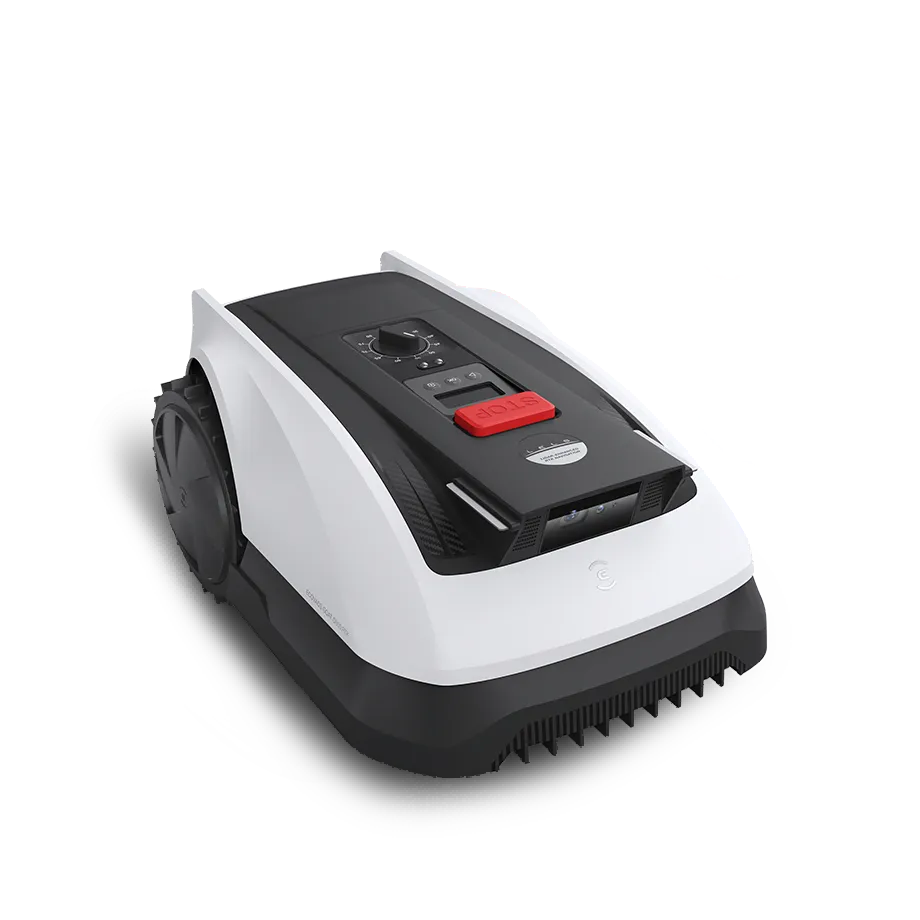
The most important distinction is not only the area specification in the model name but also the type of navigation. The O500 Panorama is mostly perceived by users as a compact vision/panorama mower for smaller areas. The O600, O800, and O1200 rely more on RTK-supported positioning depending on the variant, sometimes combined with camera and LiDAR. The O1200 LiDAR Pro is additionally interesting due to its integrated trimmer, which, however, does not convince everyone in practice.
The G1 series is the older generation. GOAT G1, G1-800, and G1-2000 work with navigation beacons or older mapping logic. This can work, but it is riskier when buying used and in complicated gardens because updates, spare parts, sensors, and beacon positioning weigh more heavily.
Key data in practice
| Model | Manufacturer Area | Cut | Navigation | Practical Assessment |
|---|---|---|---|---|
| GOAT O500 Panorama | up to approx. 500 m² | approx. 22 cm, 30–80 mm | Vision/Panorama, without boundary wire | Interesting for small, clear areas; users sometimes criticize positioning and striping. |
| GOAT O600 | up to approx. 600 m² | approx. 22 cm, 30–80 mm | depending on market RTK/Vision combination | Few user issues found; therefore evaluate cautiously and do not automatically derive from the O800. |
| GOAT O800 RTK | up to approx. 800 m² | approx. 22 cm, 30–80 mm | RTK, camera, LiDAR support | Good price-performance possible, but take forum topics on Bluetooth, firmware, station, and mapping seriously. |
| GOAT O1200 / O1200 LiDAR Pro | up to approx. 1200 m² | approx. 22 cm, 30–80 mm | RTK or Dual LiDAR depending on variant | More reserves, but trimmers, U-turns, and no-go zones are controversially discussed by users. |
| GOAT G1 / G1-800 / G1-2000 | approx. 800 to 2000 m² | approx. 22 cm, 30–60 mm | Beacons, camera, older platform | Only makes sense for large areas if beacon setup, spare parts, and support risk are taken into account. |
When it comes to area performance, one should plan cautiously. A rectangular, open 500 m² lawn is closer to the manufacturer’s specification than 500 m² with three zones, bottlenecks, trees, shade, flowerbed edges, and a long return to the station. From a service perspective, if the garden is convoluted, it is advisable to buy a class larger or to expect more mowing time.
2. Navigation and Mapping: When Does Wireless Really Work?
The most common complaints do not revolve around the blades, but rather the question: Does the GOAT really know where it is? Users of the O500 Panorama report disappointing positional accuracy, contradictory signal maps, and even areas where the robot scrapes along obstacles outside the desired zone. Another O500 user describes narrow unmowed strips of about 5 cm between the lanes.
With the G1, there are particularly clear reports of frustration regarding multiple separate lawn areas. A user with around 2000 m² recounts numerous mapping attempts where driveways or concrete areas were recognized as mowing areas, only to end with “Mapping failed.” This is a typical problem in gardens that make sense to humans but consist of separate islands, passages, open boundaries, and hard edges for the robot’s map.
While the O800 and O1200 benefit from RTK or LiDAR support, the station is crucial here as well. An RTK base under an eaves, balcony, dense hedge, high wall, or tree crown can lead to GPS loss, track offset, interruption, poor return, or incorrect operation. Typical symptoms include “cannot find station,” “stopped in front of the charging station,” “mowing offset from the map,” or “interrupts mapping.”
Practical Tip for Setup
Before the first mapping, the garden should be clearly prepared. Open transitions to driveways, terraces, gravel, flat paths, or neighboring areas require virtual boundaries, no-go zones, or visually distinct edges. Especially with vision and LiDAR systems, one should not rely on the robot to automatically interpret every open boundary as one would.
- Place the station as freely, level, and with a good field of view as possible.
- For RTK: do not mount directly on a wall, under a roof, under a balcony, or close to trees.
- Realistically test narrow passages: 70–80 cm are lab values; not every real garden path works cleanly.
- Pay special attention to round beds, dark curbs, and flat stone paths during mapping.
- Start a control run after firmware updates before leaving the robot unattended for several hours.
3. Edge Mowing and Trimmers: How Much Manual Work is Really Left?
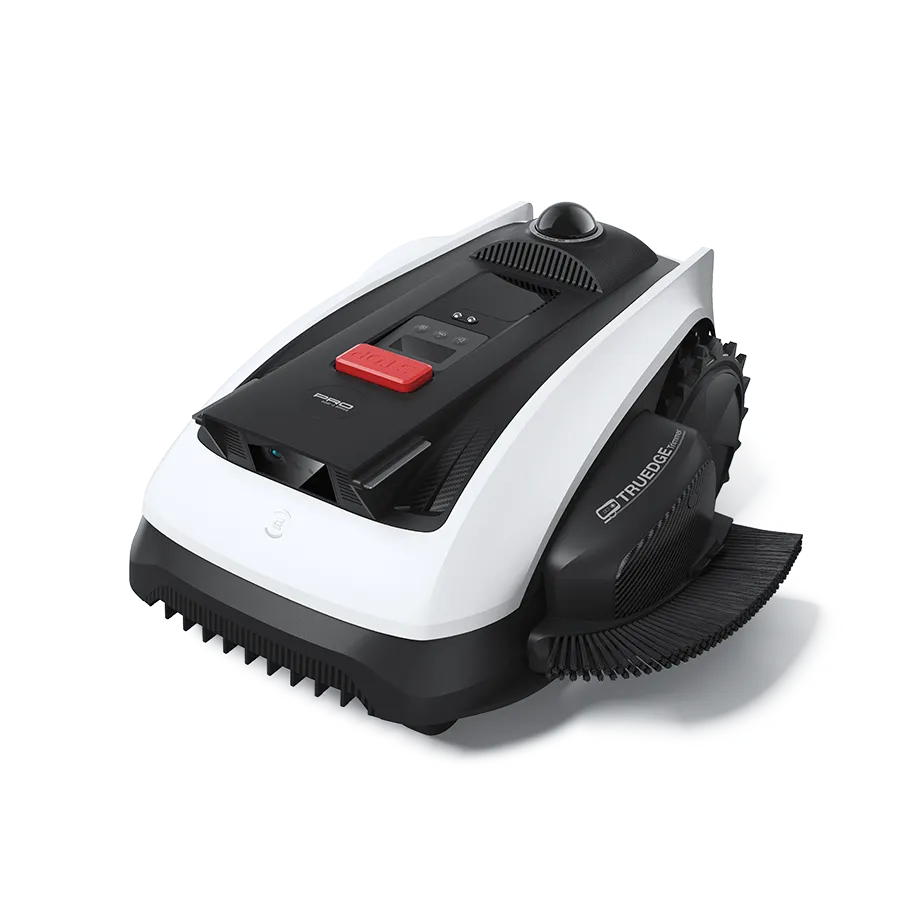
“Mows right to the edge” is one of the biggest selling points of the GOAT-O series. In practice, this needs to be differentiated. Several users report that the O800 and O1200 provide a good cut across the area, but manual touch-ups remain necessary at walls, fences, no-go zones, and irregular garden edges.
A satisfied user of the O800 accepts about 10 cm of touch-up work. This is perfectly fine for many gardens, especially if one regularly trims along walls and lawn edges every one to two weeks. However, those who expect the robotic mower to completely replace every edge will likely be disappointed.
The integrated trimmer of the O1200 LiDAR Pro is particularly controversially discussed. User reports mention cases where the robot did not get close enough to fences or no-go zones due to safety distances. Others describe that the trimmer operates 10 to 60 cm away from the desired spot. This may sound like a minor detail, but it is crucial in everyday life: A trimmer that does not hit the edge does not save any work.
The design also plays a role. Longer robots with a centrally positioned blade disc follow tight contours worse than expected. Rear-wheel drive and U-turns can cause additional problems in soft areas. If the robot maneuvers multiple times at a corner, it can leave tracks or even dig a hole in wet soil or loose earth.
Blades and Blade Disc: What Improves the Cutting Quality?
A well-adjusted GOAT can mow very neatly, but dull or dirty blades amplify any navigation errors. If narrow strips are left uncut, frayed blades and untidy paths become more noticeable. Therefore, it is worthwhile to regularly check under the mower for these models.
For many GOAT models, a more stable accessory solution is interesting, such as a blade disc with protection and 6 blades for Ecovacs GOAT. The protection can help make the blade holder more robust and guide the blades cleanly. Those who want more cutting points per rotation can also find a blade disc with 7 blades for Ecovacs GOAT or a blade disc with 9 blades for Ecovacs GOAT.
Important: A different blade disc does not solve mapping errors, RTK interruptions, or incorrectly set no-go zones. However, it can improve the cutting quality if the robot is fundamentally driving correctly and needs to cut the blades cleanly.
4. Typical Problems: Firmware, Bluetooth, WLAN, RTK and Charging Station
Forums frequently discuss connection and update issues with the GOAT O800. Users report interrupted firmware updates, timeouts, Bluetooth problems during initial setup, and cases where the robot cannot find the charging station after an update. One Reddit user even describes an O800 that got stuck in a sort of endless loop after an update: stopping after 5 to 10 minutes, error 650, no WLAN, no Bluetooth, and no response to buttons.
Such cases are not the norm, but they are important for buyers. A robotic mower without a boundary wire relies more heavily on the app, firmware, sensors, and cloud/connection logic than a very simple wire mower. If Bluetooth does not pair cleanly during installation or the app does not recognize the mower stably, the entire setup is at a standstill.
Troubleshooting Order
- Check app and account: correct region, current app version, stable internet connection.
- Re-pair Bluetooth/WLAN: keep the phone close to the robot, briefly disable other Bluetooth devices.
- Do not start firmware during poor connection: better to update near the station with good WLAN.
- Check station: clean contacts, let the robot enter straight, check power supply.
- Check RTK base: clear view upwards, no mounting directly on metal, wall, roof edge, or dense vegetation.
- Perform test run after update: start short zone, observe return, only then activate schedule.
Dirty contacts are a classic issue when it comes to charging problems. Especially when the mower collects wet grass clippings under the chassis, residues and dirt can reach the blade area, wheels, and station. However, never clean while the safety key is inserted or the device is active. Only touch the blade area with gloves.
5. O500 Panorama vs. O800/O1200 RTK: Which variant is suitable for which garden?
The O500 Panorama is interesting for smaller, clear gardens. If the area is between 200 and 350 m², relatively open, well-defined, and without many shaded areas, it can be economically attractive. With 500 m² on paper, I would take a closer look in practice: as soon as there are winding zones, narrow passages, many flower beds, or long edge lines, the reserve shrinks.
O800 and O1200 are the more obvious choice when RTK and additional sensors are desired. However, that does not automatically mean they solve every garden better. RTK requires a good location for the base. Under a roof, directly against the house wall, next to a dense hedge, or under old trees, even the best technology can become unstable. Then you may see track offsets, position loss, or illogical driving patterns.
From a user’s perspective, the O800 seems like the best value for money candidate. There are positive reports from more complex gardens with trees, bushes, and flowers, where the mower works well after setup. At the same time, reports about firmware, Bluetooth, station, and updates are accumulating for the O800. Anyone buying it should document the return period and warranty process carefully.
The O1200 offers more area reserve and the interesting trimmer with LiDAR Pro. It is more suitable for users who are willing to adapt the garden: small ramps, clear virtual boundaries, no-go zones, refilled soil in problem areas, and occasional remapping. Those expecting plug-and-play may be disappointed.
6. GOAT G1, G1-800 and G1-2000: Is the older generation still worth it?
The G1 series is not automatically bad. Many devices run reliably when beacons, maps, and garden structure fit. But the platform is older, and this must be considered when purchasing. The older a robotic mowing system is, the more important future updates, app support, spare parts, battery condition, sensors, and mechanical wear become.
With the G1-800 and G1-2000, user reports mention issues with boot processes, sensor errors after winter breaks or firmware updates, navigation beacons, and spare parts. A G1-2000 user reported a problem with the left wheel immediately after unpacking: during mapping, one wheel stopped, and the robot only spun in place. Another user searched for a damaged wheel as a spare part and initially got the impression that they should send in the entire robot.
For large areas up to 2000 m², the G1-2000 is only sensible if the garden is very well structured and one accepts the beacon issue. With several separate areas, driveways, concrete paths, and long transitions, I would be cautious. If the map fails during setup, the large area specification won’t help either.
Used Purchase Checklist for G1 Models
- Are all beacons present and functional?
- Is battery life realistically tested, not just “still charging”?
- Wheels without cracks, no one-sided drive failure?
- Sensors without error messages after winter break?
- Original invoice, warranty, and serial number available?
- Blade disc, screws, and blades not worn out?
7. Support, Warranty, and Spare Parts: What Buyers Should Pay Attention To
Support and spare parts are an emotional topic at Ecovacs-GOAT. Several users report tedious return, warranty, or spare parts processes. The O500 Panorama was described as complicated for returns: missing information, issues with documents, and long phone calls. Later, the case was apparently resolved, but the initial contact remained a negative memory.
Another user reports that their mower could no longer be paired with the station after the winter break. Replacement was promised, but the processing took a long time. Such reports do not mean that every buyer will encounter problems. However, they show that the choice of dealer, invoice, return period, and clear documentation are more important for cordless lawn mowers than for simple accessories.
Our advice from a service perspective: Do not just buy based on the lowest price. Check who is responsible in case of warranty, how long the return period lasts, and whether replacement blades, screws, wheels, station parts, and trimmer parts are available. Keep screenshots of error messages, app versions, and firmware statuses. This significantly speeds up communication.
Frequently Asked Questions
Does mapping work with multiple separate lawn areas?
Partially, but not always reliable. Especially with G1 and O-series, users report issues with driveways, concrete surfaces, open transitions, and separated zones. Before purchasing, one should check whether the areas are connected or if the robot needs to be moved.
How close do the O800 and O1200 really mow to walls and fences?
It can work well on free edges. However, there is often follow-up work needed at walls, fences, no-go zones, and irregular bed edges. For the O800, about 10 cm of remaining edge is mentioned as an acceptable practical value; for the O1200 LiDAR trimmer, there are reports of significantly larger deviations.
What to do in case of error 650, Wi-Fi or Bluetooth issues?
First, check the app, Wi-Fi, Bluetooth pairing, and the robot’s location. Then check the station and power supply. If the robot does not respond after an update, document error messages and start the warranty process. Multiple wild resets can complicate diagnosis.
Is RTK better than O500 Panorama without RTK?
RTK can be more precise but requires a good base position with a clear view. In an open garden, the O800/O1200 is usually the stronger choice. In a small, clearly defined garden, the O500 may be sufficient. Under a roof, next to walls, or under trees, RTK can also cause problems.
Does a different blade disc improve navigation?
No. The blade disc and blades improve cut quality, cutting frequency, and wear behavior, but not mapping. If the GOAT drives incorrectly, mapping, station, RTK, camera, or firmware must first be checked.
Conclusion: For whom is an Ecovacs GOAT recommended?
An Ecovacs GOAT can fit very well if the garden is flat to moderately sloped, clearly defined, not too heavily shaded, and not overly convoluted. Especially the O800 and O1200 offer a good cutting pattern, quiet operation, and attractive technology without boundary wires when set up properly. The O500 is more suitable for smaller, manageable areas; the specific user experience with the O600 is still limited, so one should be cautious about generalizing.
Users should be cautious with multiple separate lawn islands, low branches at heights of 60–80 cm, open boundaries to paths, many no-go zones, soft soil at turning points, or very high expectations for perfect edge mowing. There, users most frequently report mapping errors, positioning issues, trimmer disappointment, getting stuck, or return problems to the station.
From a maintenance perspective, it is important: If the robot is set up cleanly, sharp blades, a clean cutting disc, tight screws, and regular cleaning determine the cutting pattern. Those who keep these points in mind and do not consider the technology completely maintenance-free have significantly better chances of achieving a well-kept, even lawn cut with the GOAT series.
Tip: You will find all matching replacement blade discs and mowing plates for ECOVACS in our overview: Blade discs for ECOVACS.
Comments