The mower sets off, the map looks clean in the app—yet a strip is still left standing along the edge of the flower bed, one area is only mowed halfway, or the trimmer simply doesn’t work exactly where you need it most. This is precisely where it’s decided with the ECOVACS GOAT A1600 LiDAR PRO whether the new 2026 concept is truly practical for everyday use—or whether “cordless and close to the edge” quickly turns back into manual work with a lawn trimmer and app patience.
The A1600 LiDAR PRO is neither a classic GOAT with boundary wire nor a pure RTK mower with an antenna. ECOVACS relies here on LiDAR navigation, camera/ToF obstacle detection, systematic mowing in lanes, and a side TruEdge trimmer. On paper, it sounds impressive: up to 1,600 m², 33 cm cutting width, 3 to 9 cm cutting height, fast charging, IPX6, and an integrated edge trimmer. In practice, however, early users report very specific issues: mapping is clunky, the trimmer doesn’t work everywhere as expected, individual cases of map loss, illogical zone mowing, and getting stuck.
Important for Messerscheibe24 readers: We don’t sell robotic mowers, but accessories and spare parts for robotic mowers. With the A1600 LiDAR PRO, the cutting technology is set up differently than in many previous GOAT models. If you own an ECOVACS GOAT from the O or G1 series and you’re dealing with blade wear, the cut pattern, or the blade plate, you’ll find suitable solutions in our overview for ECOVACS GOAT cutting discs from the O and G1 series; for the A1600 LiDAR PRO, however, this compatibility explicitly does not apply.
ECOVACS GOAT A1600 LiDAR PRO: Who is the cordless robotic mower intended for?
The A1600 LiDAR PRO is aimed at owners of larger gardens who don’t want to lay a boundary wire and don’t want to set up an RTK antenna. Typical target group: lawns from 700 to 1,600 m², multiple trees, terrace edges, paths, flower beds, and the desire for the robot to drive systematically rather than chaotically. The device is especially interesting for gardens where RTK would be uncertain due to trees, house walls, or a complex layout.
But manufacturer data and a real garden are two different worlds. A rectangular 1,500 m² lawn with clear sightlines, wide transitions, and neat edge design is far easier than 1,000 m² with narrow passages, island flower beds, fruit trees, sloped sections, play equipment, and long reverse trips back to the station. Many users in this class don’t just buy capacity for area—they also buy buffer: short mowing windows, damp corners, taller spring grasses, and multiple zones take time and require battery reserves.
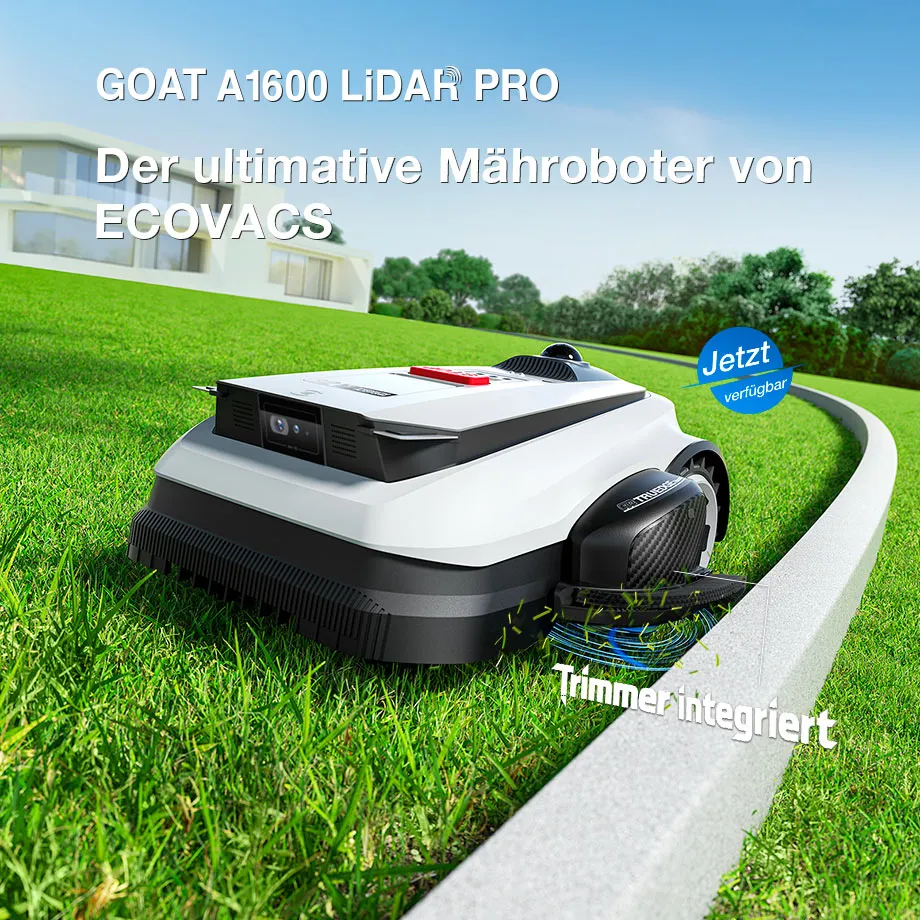
Key details in practice
| Model / Series | Navigation | Garden profile | Strengths | Weaknesses from a user perspective |
|---|---|---|---|---|
| GOAT A1600 LiDAR PRO | Dual-LiDAR, camera, ToF | up to 1,600 m², larger areas, trees, more complex edges | cordless, no RTK mast, systematic paths, integrated trimmer | early reports on app, mapping, edge logic, and getting stuck |
| GOAT O-Series | depending on model RTK, LiDAR, or panorama/vision | smaller to medium-sized gardens | more compact, often cheaper, depending on the garden sufficient | navigation and edge performance strongly depend on the model |
| GOAT G1-Series | older GOAT generation with its own navigation concept | existing GOAT users, classic zone care | a lot of hands-on experience, established accessory market | do not equate with the A-Series cutting system |
If you’re coming from an older GOAT, you should separate the generations cleanly. The A-series, O-series, and G1-series differ not only in navigation and app features, but also in the cutting system. A comparison with the previous ECOVACS family is especially worthwhile if you already have a GOAT and want to know whether switching to LiDAR really solves your garden problems; our honest hands-on assessment of GOAT O and G1 evaluates the older models from the perspective of the cutting image, blade, and everyday use.
Workshop takeaway: The A1600 LiDAR PRO is especially interesting for large, cordless gardens—but 1,600 m² on the box doesn’t automatically mean 1,600 m² of stress-free everyday use.
How well does setup and mapping work with the GOAT A1600 LiDAR PRO?
Setup is one of the points where early user reports diverge. ECOVACS advertises fast automatic or manual mapping. That’s technically plausible because LiDAR helps the robot detect contours, obstacles, and the structure of the areas. In reviews and forums, however, it keeps coming up that the first mapping doesn’t always go as smoothly as the product page suggests.
A recurring pain point is manual mapping via joystick. Users report that even the smallest movements on the smartphone can lead to unintended driving movements. If you want to drive a clean boundary along the edge of a flower bed, a fence, or a wall, you then need steady hands, patience, and sometimes several attempts. It sounds like a minor issue, but it’s crucial: an imprecise map later results in imprecise edge behavior.
In some reports, the A1600 LiDAR PRO leaves the charging station, but does not set a sensible starting point or does not start mapping correctly. Even more frustrating are cases where the mower has to be paired multiple times, disappears from the app, or where the map and settings are lost. This has not yet been sufficiently widely documented to speak of a recurring series defect, but as an early buyer you should check exactly this point: Does the device remain stable in the app? Does the map remain after a restart, update, and overnight charging?
Practical tips before the first map
- Only place the station permanently once the entry and exit are truly clear.
- Bring the lawn to its normal height before mapping so the robot can recognize contours cleanly.
- Remove narrow passages, toys, loose hoses, and temporary obstacles.
- After the first map, don’t automate all zones right away—first let it drive a small test area.
- Document the firmware version, the WLAN/Bluetooth connection, and the app login before you reset it if problems occur.
Especially with a young model, long-term experience is still limited. Weaknesses in mapping, the app, return-to-base, the station, and zone logic often don’t show up on the first sunny afternoon, but after two weeks with rain, a growth surge, a firmware update, and several mowing windows.
Mowing on 1,600 m²: How reliably does it handle zones and large areas?
On the property, the A1600 LiDAR PRO has good prerequisites. Systematic strip mowing is usually more pleasant in everyday use than random navigation, because the robot works in a visibly structured way and covers areas more evenly. In forums, the cut pattern is generally described positively: clean, tidy, and clearly more controlled than with older random movers.
The 33 cm cutting width and the two blade discs are sensible for larger areas. The electric cutting height adjustment from 3 to 9 cm is also practical, because you can start higher in spring and then fine-tune later. Still, the following applies: if you really want to make full use of 1,600 m², you shouldn’t look only at the area specification. Zones, narrow corridors, play areas, slopes, and long return trips all cost performance.
A clear user report describes that the A1600 LiDAR PRO mows seemingly random sections, stops in the middle, returns to the base, or suddenly starts again along the edge. In this case, apparently only a factory reset with complete re-mapping helped. Such cases are not the normal state, but they show what you need to watch out for: it’s not only the hardware that decides, but also the stability of the map and zone logic.
For large gardens, we therefore recommend a step-by-step start. First test the main area, then edge mowing, then No-Go zones, then separate areas. If the mower already behaves illogically on a small zone, it rarely gets better on 1,600 m². If you set up the entire garden right away with many special rules, you make troubleshooting unnecessarily difficult.
Workshop takeaway: A good LiDAR mower needs not only sensors, but also a stable map. If zones seem chaotic, first simplify—don’t immediately create ten new blocked areas.
Side trimmer in everyday use: a real edge solution or just a partial improvement?
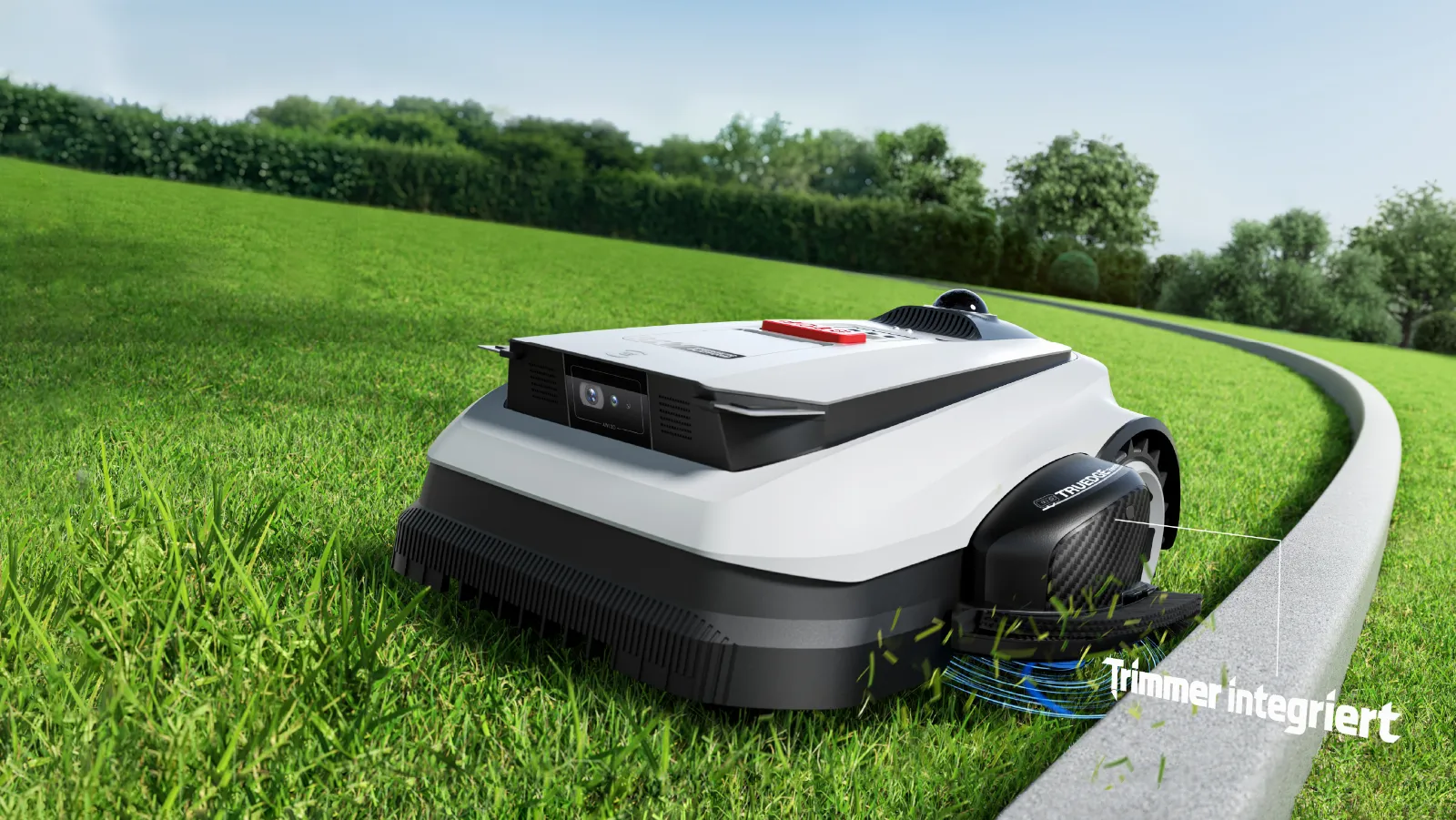
The TruEdge trimmer is the main promise of the A1600 LiDAR PRO. Many users buy this model specifically for that reason: the typical 5 to 15 cm wide edge strip along walls, lawn edges, fences, and garden bed borders is supposed to disappear. The idea is strong because conventional robotic mowers with a centrally mounted mowing deck, by design, cannot cut directly up to obstacles.
In practice, however, you have to differentiate. On straight outer edges, clear walls, or stable curb stones, the side trimmer can indeed provide a real advantage. The robot drives close along the edge, the trimmer works laterally, and manual touch-up cutting is reduced. Many user reports sound positive on this point: better than a purely central mowing deck, with visibly less grass left standing at the edges.
It becomes more critical with internal boundary areas: no-go zones, around tree trunks, fruit trees, flower beds, play equipment, fence posts, and tight corners. Several users report that the trimmer does not work everywhere as expected there. Workarounds such as newly created no-go zones, artificial edges, or automatic detection do not always solve the problem. This is exactly the decisive practical difference: an outer edge is not the same as an inner edge.
Another factor is the trimmer height. From a user perspective, it’s criticized that the trimmer height cannot be adjusted freely like the mowing height. If the mower cuts at 6 or 7 cm, but the trimmer appears to work differently, visible differences in the cut pattern can occur. In addition, trimmer lines wear out faster when they regularly hit fixed edges, walls, or hard borders.
Our honest assessment: The side trimmer is not a marketing gimmick, but it’s also not a complete replacement for a hand trimmer. If you previously had to touch up all edges after every mowing pass, you can benefit significantly. If you expect tree bases, bed islands, fence corners, and tight inner edges to always be perfect, you should be cautious.
Obstacles, pets, and toys: How safely does the A1600 detect small objects?
ECOVACS combines the A1600 LiDAR PRO with LiDAR, 3D ToF, and a camera. Large obstacles such as trees, walls, garden furniture, or clear play equipment should, in principle, be detected better by such a system than by simple bump sensors. Initial practical reports confirm exactly that: large objects are rarely the main problem.
More problematic are small, flat, or soft objects: toys, thin branches, balls, loose cables, flat garden edges, or small animal objects. In forums, it’s described that smaller obstacles can be driven into or run over. For family gardens, that means: tidy up before mowing anyway. No AI-enabled lawn mower robot replaces a quick visual check when children, pets, or hedgehogs are in the garden.
With the A1600, an additional side trimmer is included. A rotating trimming line works differently than a protected cutting disc underneath the device. That’s why, especially around play areas, sandboxes, pool edges, and animal areas, you should map conservatively and leave a bit more distance. A perfect edge is worth less than a damaged toy or a risky contact area.
Slopes, turning maneuvers, and getting stuck: Where the GOAT can run into problems
For the A1600 LiDAR PRO, ECOVACS specifies a climbing ability of up to 50 percent, or 27 degrees. That’s a strong lab value, but the real-world question is different: how does the robot behave when turning on damp ground, at the edge of a no-go zone, next to a fence, or in a narrow slanted spot?
With LiDAR-GOATs, users repeatedly report getting stuck, sliding, or digging in. There are fewer reliable cases for the A1600 than for some sister models, but the indications fit typical lawn mower robot problems: If a device gets stuck and still tries to keep driving or return to the charging station, the wheels can dig holes. After that, the robot sometimes avoids the problematic spot or needs a map adjustment.
An additional point with the A1600 is the side trimmer module. In comments, it’s speculated that the asymmetric weight during certain turning maneuvers on slopes could play a role. This is not yet a clearly proven series weakness, but a realistic test point: Don’t have the mower work first on the most difficult edge of the slope—test turning areas first on dry ground and later on slightly damp ground.
Good practice: Don’t only address problem areas once the robot has already left deep tracks. Widen narrow passages, create No-Go zones with a buffer, avoid slippery edges, and position the charging station so that the return trip doesn’t lead over the most difficult part of the garden.
Workshop takeaway: LiDAR improves orientation, not physics. Wet ground, tight turns, and slope edges will remain the places where a lawn mower robot fails first in 2026 as well.
App, software, and updates: the real sticking point?
From a hardware perspective, the A1600 LiDAR PRO feels well thought-out: a wide cutting area, LiDAR, camera, trimmer, and fast charging. Most of the real question marks are in the app, firmware, and logic. Many users don’t report dull blades or insufficient motor power, but issues with pairing, maps, zones, start points, and illogical sequences.
This is typical of young cordless lawnmowers. In boundary wire models, the limit is physically embedded in the ground. With LiDAR, vision, and RTK models, a lot depends on software: saving the map, finding the position again, prioritizing zones sensibly, correctly classifying obstacles, planning the return trip, and processing updates properly. If any of these layers wobbles, the entire mower feels unreliable.
That’s why before buying, you shouldn’t only ask: “Can the A1600 handle 1,600 m²?” Better questions are: How good is my Wi-Fi signal in the garden? Does Bluetooth at the station work reliably? Is there a sensible LTE/mobile option for my location? How often does ECOVACS update the firmware? Can I export maps, or do I have to start completely over after a reset? How quickly does support respond if the mower loses the connection?
From a workshop perspective, software frustration is especially annoying because it can’t be solved with a sharp blade set. A frayed cutting pattern can often be fixed with new Klinge(n). A lost map or a mower that skips zones requires app logic, firmware, or remapping.
Compatibility: Do CUT GUARD cutting disc(s) fit the A1600 LiDAR PRO?
No, CUT GUARD cutting discs for ECOVACS GOAT O500 to G1-2000 do not fit the GOAT A1600 LiDAR PRO. The A-series uses a different cutting system with trimmer logic and dual-blade discs; it must not be equated with the O- or G1-series. If you own an A1600, you should look for replacement blades, trimmer lines, and cutting parts that are exactly compatible with the A1600 LiDAR PRO.
It’s different for owners of the GOAT O and G1 models. If the cutting pattern becomes uneven there, the original disc wears out, or you want to test a different blade pattern, a 9-blade cutting disc for GOAT O500 to G1-2000 is an option for users who mow more often and are aiming for a very fine cutting result.
For many O-/G1 gardens, a smoothly running, robust solution with fewer blades is completely sufficient; in such cases, the 6-blade cutting disc for GOAT O and G1 is often the more sensible choice when runtime, easy maintenance, and a clean cutting result matter more than the maximum number of blades.
With our CUT GUARD cutting discs, we pay special attention to a clean seating surface, stable material thickness, and blade positioning that works in practice. For the A1600 LiDAR PRO, this experience value can only be transferred indirectly because the cutting system is built differently. That’s exactly why we say clearly: for the A-series, there are now dedicated CUT GUARD cutting discs (double pack with 7 blades each), while for the O-/G1-series we continue to offer the proven O/G1 discs.
First conclusion: No cables, but not without compromises
The ECOVACS GOAT A1600 LiDAR PRO is one of the most exciting cordless lawn mowers of 2026, because it combines several real user wishes at once: no boundary wire, no RTK antenna, systematic mowing paths, high area performance, and an integrated side trimmer. For large gardens with trees, clear outer edges, and a desire for less rework, this concept can fit very well.
But “without compromises” would be too strong. Early user issues point to clear checkpoints: mapping via the app can be tedious, some users report pairing and map loss, zone logic is not always error-free, small obstacles remain critical, and the TruEdge trimmer doesn’t solve every inner edge. Satisfaction or frustration is determined especially by No-Go zones, tree bases, flower beds, narrow fence areas, and damp turning spots.
Our recommendation: If you buy the A1600 LiDAR PRO, don’t treat it like a finished household appliance that you unpack and forget. Start with a small area, then edges, then zones, then the more difficult areas. Note the firmware version, observe how the maps behave, and evaluate the trimmer performance realistically. Then the A1600 can be a very strong lawn mower—but it remains a young LiDAR system where software and garden layout are just as important as motor power and sensors.
Frequently Asked Questions
Does the side trimmer of the GOAT A1600 LiDAR PRO work on all edges?
No, according to early user reports, the side trimmer works well mainly on clear outer edges, but not reliably on all inner edges. Especially No-Go zones, tree circles, flower beds, and tight corners may still require manual rework.
Do I still need to trim manually despite the TruEdge trimmer?
Yes, in complex gardens you should continue to expect manual trimming. The A1600 can significantly reduce edge strips, but it does not replace a hand trimmer for fence corners, around tree bases, in garden bed islands, and in very narrow areas.
What to do if the A1600 LiDAR PRO skips zones or mows chaotically?
First, reduce the map complexity and test a single zone thoroughly. If the problem persists, user reports indicate that sometimes only a factory reset and a complete remapping help; before that, you should check the firmware version, the docking station, and the app connection.
Is LiDAR on the A1600 better than RTK?
LiDAR can be an advantage in gardens with trees, shadows, and difficult satellite visibility, because no RTK antenna is needed. However, it does not automatically solve software, edge, traction, or zone problems.
Do CUT GUARD cutting discs fit the ECOVACS GOAT A1600 LiDAR PRO?
No, CUT GUARD cutting discs for the ECOVACS GOAT O500 to G1-2000 do not fit the A1600 LiDAR PRO. Yes – since July 2026, there are compatible CUT GUARD cutting discs for the GOAT A series: a double pack with 7 blades each for A1600 RTK, A2500 RTK, A3000 LiDAR, as well as A1600 & A3000 LiDAR PRO. For the O-/G1 series, there are still separate discs.
Update (July 2026): Starting now, there are compatible CUT GUARD cutting discs for the GOAT A series (A1600 RTK, A2500 RTK, A3000 LiDAR, A1600 & A3000 LiDAR PRO) – as a double pack with 7 blades each.
Comments