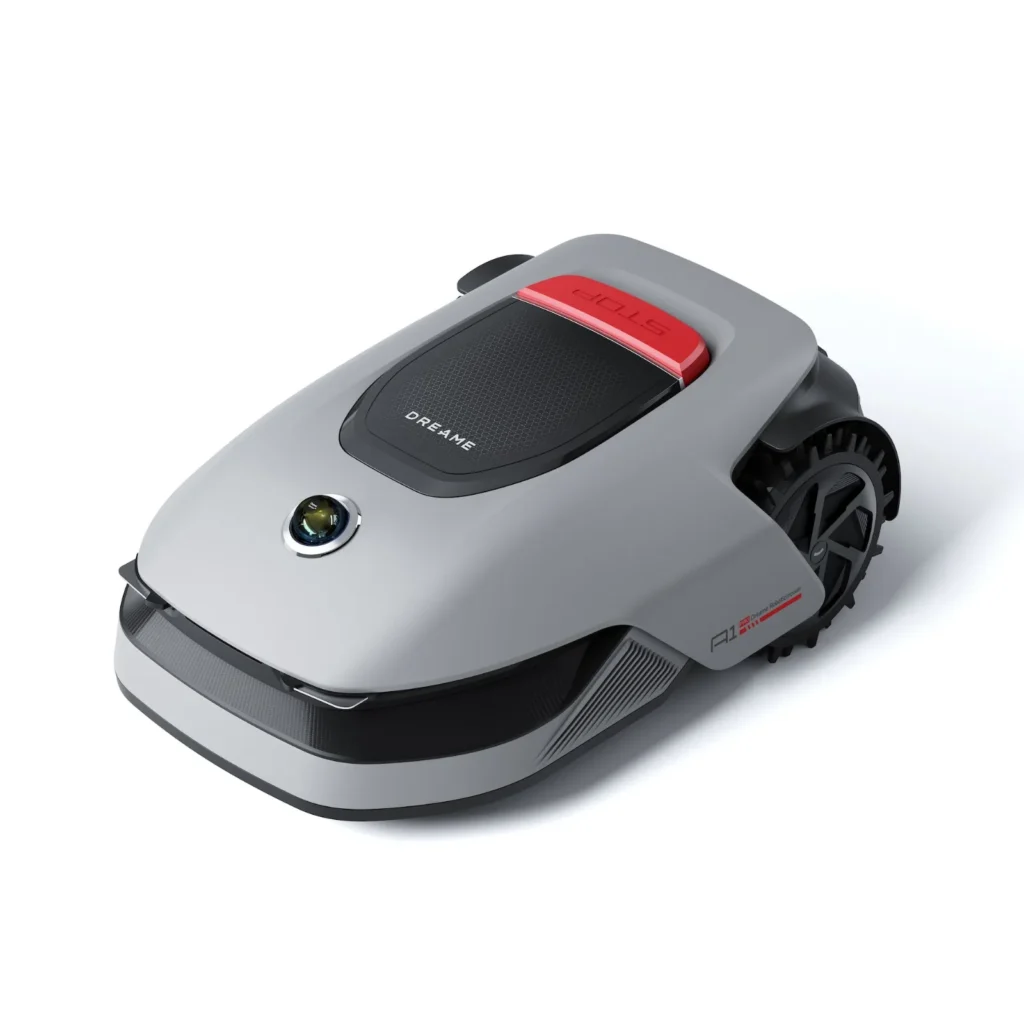
The Dreame lawn mowers A1, A1 Pro, and A2 are particularly interesting for garden owners who do not want to lay boundary wire and fear bad experiences with RTK mowers due to trees, house walls, or narrow passages. The great appeal lies in the LiDAR navigation: unpack, set up the charging station, create a map, and let it mow systematically.
However, practice is not quite as carefree. Many users report very clean navigation and a decent cutting pattern, but recurring problems with Wi-Fi, firmware, traction, obstacle detection, edge mowing, and stuck blades appear in forums. This article is therefore not a promotional brochure, but an honest assessment from the perspective of a practitioner: Which Dreame mower is suitable for whom, what should you pay attention to during setup, and what maintenance around blades and mowing discs should you plan?
Important: Messerscheibe24 does not sell lawn mowers, but accessories and spare parts for lawn mowers. Therefore, with Dreame, it is particularly about blades, mowing discs, cutting patterns, cleaning, and typical wear issues.
Dreame A1, A1 Pro, and A2 in user review: Where are the real differences?
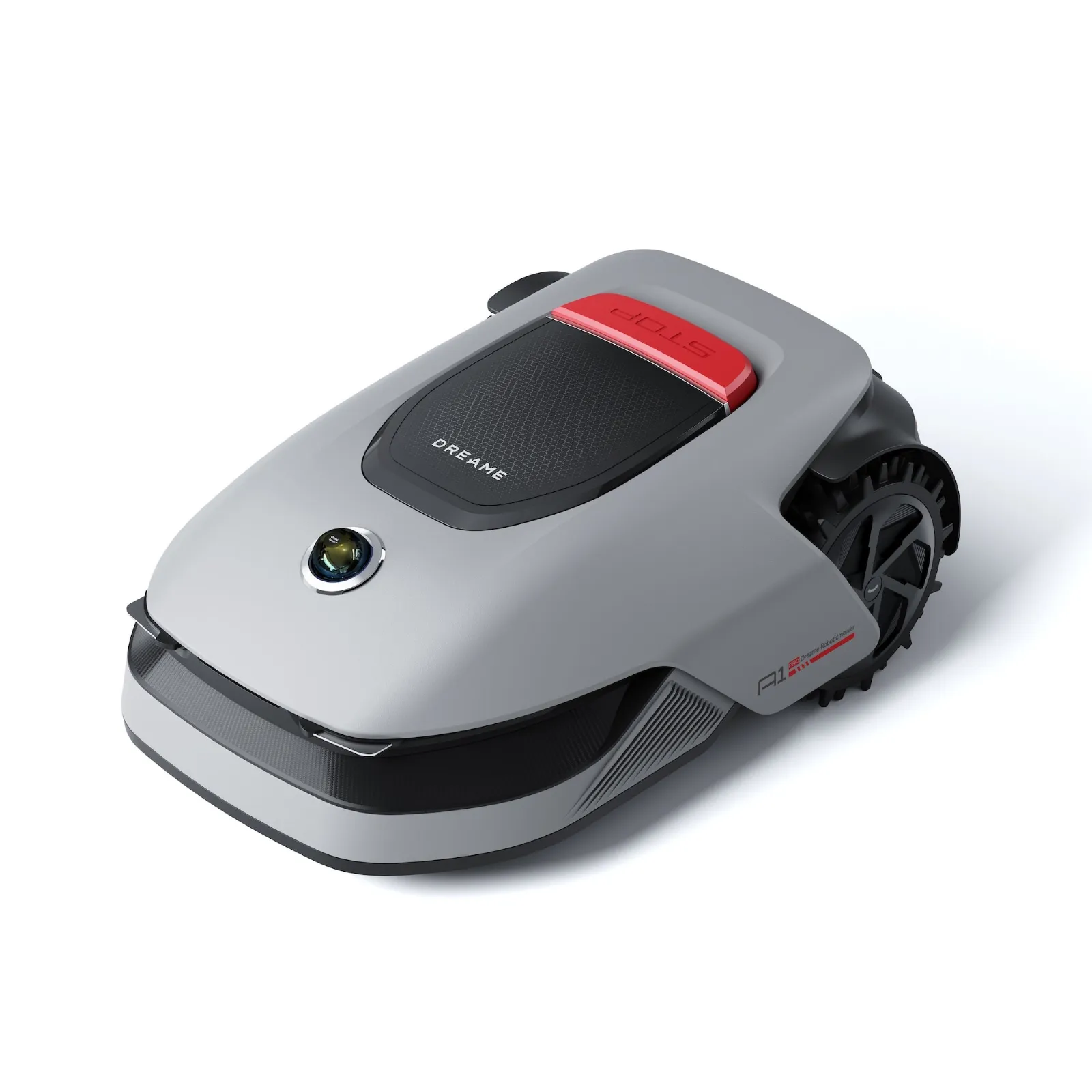
The Dreame A1 is the entry point into Dreame’s wireless LiDAR mower world. It is best suited for relatively clear lawns where precise navigation is more important than perfect traction or the safe detection of every small object. User reports often praise it for its systematic mowing pattern, but it is also criticized for weak traction on damp, mossy, or uneven ground.
The A1 Pro feels like the slightly more robust variant in practice. It comes with off-road tires, dual map management, and similar basic technology. Many users see it as a more sensible choice when the garden is larger or the ground conditions are not quite ideal. Nevertheless, app and firmware issues, front heaviness, and getting stuck remain a topic even with the Pro.
The A2 is the more modern and expensive variant. It combines LiDAR with a camera or AI-supported obstacle detection and is supposed to perform better when mowing edges. Expectations are high in that regard. However, initial user reports show that the A2 can also react too cautiously to plants, taller grass, or edge areas, leaving spots unmowed and thus consuming more time and battery.
Key data in practice
| Model | Manufacturer Area | Cutting Width / Cutting Height | Navigation | Practical Assessment |
|---|---|---|---|---|
| Dreame A1 | up to approx. 2,000 m² depending on market indication and mode | 22 cm / 30–70 mm | OmniSense LiDAR | Very strong in navigation without RTK, weaker in traction and small obstacles. |
| Dreame A1 Pro | approx. 2,000 m² recommended | 22 cm / 30–70 mm | OmniSense LiDAR, dual maps | Good everyday choice for larger areas, but with software and maintenance risks. |
| Dreame A2 | up to approx. 3,000 m² | 22 cm / 30–70 mm | OmniSense 2.0 with LiDAR and camera | Exciting for obstacles and edges, currently not free from criticism regarding app, Wi-Fi, and oversensitivity. |
When selecting an area, one should not only look at square meters. A simple rectangular garden may be closer to the manufacturer’s indication. Angled gardens, multiple zones, narrow corridors, many obstacles, slopes, and frequent edge mowing take time. In such cases, a class reserve is more sensible than a tightly calculated mower.
Navigation without RTK: Why LiDAR is the biggest advantage of Dreame mowers
The strongest point of A1, A1 Pro, and A2 is the navigation without boundary wires and without an RTK station. Many users report that the setup is significantly more relaxed than with traditional wired systems: place the charging station, connect the app, map the garden, create zones and no-go areas, done.
The big advantage shows in gardens where RTK robotic mowers often struggle. This includes areas next to high house walls, under trees, in narrow corridors, between walls, or in areas with poor satellite visibility. LiDAR does not look at the sky but captures the surroundings. For this reason, users often praise the Dreame devices for stable positioning in situations where GPS or RTK mowers become uncertain.
However, this does not mean that every garden automatically works perfectly. When mapping, edges must be driven cleanly. Low steps, flat paths, very dark edge areas, or unclear transitions between lawn and flowerbed can still cause rework later. If you drive too close to walls, ponds, pools, or flowerbeds during the initial mapping, you risk the mower working too closely in these areas later.
Practical setup idea: Preferably keep zones cleanly separated
In the case of multiple garden areas, a clean zone logic is more important than a large overall plan. If the front garden and back garden are physically connected, a path between the zones can help. If the mower cannot reach the area by itself, separate zones must be created, and the robot must be manually moved.
This may sound trivial, but it prevents a lot of frustration. Users report that paths, no-go zones, and separate maps in the app are not always intuitive. If you have to completely recreate the map after two weeks, you lose time. It’s better to take it slow during the initial setup, plan narrow passages generously, and not push edges to the last centimeter.
The biggest problems: Wi-Fi, app, and firmware updates
The most common annoyance in current user reports concerns not the blades, battery, or mowing motor, but software. Especially with the A1 Pro and A2, connection issues between the mower, app, Wi-Fi, and cloud repeatedly arise. Typical symptoms include: The mower is displayed as offline, the 3D map does not load, the map download stops at around 80 percent, or the robot can only be controlled to a limited extent via the app.

Some users describe that after firmware updates, previously stable devices suddenly became harder to reach. There are reports with the A1 of mowing jobs being displayed as completed, even though about a third of the area remains unmowed. The A2 is also reported to have firmware versions after which the Wi-Fi connection no longer works as before.
Practically, this means: Anyone buying a Dreame mower should consider software as part of the system. A good robotic mower is not just a casing with blades, but a combination of app, cloud, Wi-Fi, firmware, and map. If one of these fails, the mower may be fully charged in the station but will not mow reliably.
What to do about app and Wi-Fi issues?
- Use 2.4 GHz Wi-Fi and check if the reception at the charging station is stable.
- Evaluate the router not only from inside the house but also from the perspective of the station: concrete, metal gates, and exterior walls significantly dampen the signal.
- After updates, do not immediately delete the entire map; first, test restarting, logging out of the app, and restarting the router.
- In case of repeated offline issues, document screenshots, firmware version, and exact times.
- Avoid unnecessary experiments with new maps, zones, or beta features before important vacation periods.
Users often miss a real rollback option. Therefore, caution is advised: If the mower is running stably, one should not make major changes to the map, mowing plans, and Wi-Fi simultaneously. Otherwise, it will be unclear later whether the cause is firmware, app settings, or the garden map.
Traction, slopes, and uneven lawns: When A1 and A1 Pro reach their limits
No matter how precise the navigation is: If the wheels spin while turning, the robot will still get stuck. The Dreame A1 is particularly criticized for traction in user reports. The problem occurs less during straight driving and primarily when turning on soft, damp, mossy, or uneven ground.
Typically, the following pattern occurs: The mower works systematically, drives a path, turns at the edge, and slightly digs in with its wheels there. If the mowing direction remains the same, these spots keep appearing at similar points. Therefore, forums recommend varying mowing directions and observing critical turning areas.
With the A1 Pro, the stronger tires help, but they do not solve every problem. There are also reports of front heaviness, getting stuck, and digging. Particularly critical are slope edges: When the mower has to turn at the edge of a slope, the official incline specification alone is not sufficient. The question is not only whether it can go up a slope, but whether it can turn cleanly there.
When should one be cautious?
- Lawn with a lot of moss or permanently wet spots.
- Uneven areas with small dips, roots, or molehills.
- Narrow, winding passages between beds.
- Slopes where the mower has to turn sideways or at the edge.
- Lawn edges with soft earth instead of a solid edge.
Anyone with such areas in their garden should not choose maximum efficiency right away for the first mowing plan. It is better to start with a higher cutting height, dry conditions, and an observed test run. If the mower keeps digging in the same spot after several passes, often a changed zone boundary helps more than another reset.
Obstacles, hedgehogs, toys, and hoses: How reliably does Dreame detect objects?
With the A1, obstacle detection is a mixed topic. Larger objects like trees, plant pots, garden furniture, or a standing umbrella are usually recognized well in user reports. Small items are the weak point. These include hoses, sprinklers, toys, cones, fallen fruit, and in the worst case, even animals like hedgehogs.
The problem is technically understandable: a lawn mower should not stop for every bump in the ground, but it must recognize real obstacles. If the detection is set too sensitively, the sensor suddenly sees obstacles on uneven grass that are not there. If it is set less sensitively, the mower can run over small flat objects.
The A2 is supposed to improve this issue with additional camera and AI detection. In theory, this makes sense. In practice, however, some users report excessive caution: plants at the edge, taller grass, or unclear contours are avoided, causing the mower to skip areas and return to them later. This can increase battery consumption and make the mowing pattern more uneven.
Practical rule: The lawn must be clear before mowing
Even with the A2, one should not leave hoses, small balls, dog toys, or hedgehog houses on the mowing area. Those who have their lawn mowed in the evening or at night should be particularly careful, as hedgehogs are active during this time. From the perspective of blade maintenance, this is also important: a run-over hose or hard cone can damage, bend, or block the blades.
After contact with foreign objects, the underside should be checked. If the blades no longer rotate freely, the cutting pattern suffers immediately. Suitable replacement and upgrade solutions like a 6-blade cutting disc for Dreame A1, A1 Pro, and A2 can help if the original mowing disc is worn, damaged, or no longer clean enough for the desired cut.
Edge Mowing and Cutting Pattern: What Really Remains?
The cutting pattern of the Dreame A1 is praised in many user reports. The robot mows systematically in lanes, rather than randomly driving over the area. This creates a clean, calm impression, especially with regular use. Even taller grass is often cut better than some users expected before purchasing.
However, the edge remains a classic robotic mower issue. With the A1, the cutting disc is relatively centered in the housing. This leaves a visible uncut strip along walls, raised beds, curbs, and solid obstacles. Those who previously pushed a traditional lawn mower almost to the edge may quickly expect too much here.
The A2 addresses this issue more constructively and is designed to mow closer to edges. Nevertheless, one should not expect miracles here either. User reports show that edge positioning, plants at the edge, and overly cautious obstacle detection can influence the result. A clean lawn edge made of stone or paving is easier for any robotic mower than an unclear transition into a flower bed.
How Can the Edge Appearance Be Improved?
- When mapping, do not drive too close to risky edges.
- Plan beds and walls with clear, solid boundaries.
- Realistically test the edge mowing mode and do not judge it solely based on manufacturer images.
- Regularly check the blades, as dull knives particularly fray at edges.
- For large edge areas, it is better to mow frequently and briefly rather than rarely and very deeply.
For a denser cutting pattern, the mowing disc can also play a role. Those aiming for a finer, more even result with the Dreame often look at variants with more blades. A 7-blade mowing disc for Dreame A1, A1 Pro, and A2 is particularly interesting if the mower runs regularly and the cut should appear as clean as possible.
Maintenance and Spare Parts: Blades, Mowing Disc, LiDAR Dome, and Front Wheels
With Dreame, much is often discussed about the app and navigation, but a lot is determined underneath. Blades, screws, mowing disc, and bearing areas get dirt, plant sap, moist cuttings, and small foreign objects. In forums, there are specific reports about the A1 Pro having glued blades that could no longer rotate freely after a short time.
This is more than a minor issue. The small blades must remain movable so that they can yield and cut cleanly upon contact. If they become stuck due to dirt and plant sap, the mower tends to tear, the cutting pattern worsens, and vibrations may increase. Some users also report strong vibrations in the chassis or mowing disc, even though no external damage was visible.
When dealing with vibrations, one should proceed systematically: turn off the mower, secure it, clean the underside, check all blades for free movement, replace any missing or damaged blades, and check the mowing disc for imbalance. A single missing blade is enough for the disc to no longer run smoothly.
Cleaning: better to do it regularly and lightly than rarely and brutally
Wet grass is the main adversary. Those who mow frequently after rain or in the morning when there is dew will get deposits under the mower more quickly. Dreame does indicate good water resistance for the mower, but one should not indiscriminately use high pressure. A brush, gloves, careful removal of deposits, and a look at the blade holder are better options.
When changing the blades, the rule is: always work with gloves, safely turn off the mower, and do not underestimate the blades. The small razor blades are sharp enough to cause deep cuts if one is careless during cleaning. If the original disc is damaged or a particularly fine cutting pattern is desired, a 9-blade disc for Dreame A1, A1 Pro, and A2 can be a sensible option.
In user reports, besides blade parts, LiDAR domes, front wheels, and hard-to-find spare parts are also mentioned. This is an important point to consider before purchasing. While blades and mowing discs are typical wear parts, sensor components or chassis parts may require more patience with support and warranty.
Who benefits from which Dreame mower?
Dreame A1: for clear areas with difficult satellite visibility
The A1 is suitable if the garden is relatively straightforward, the area is not permanently wet or very uneven, and the LiDAR navigation is the main reason for purchase. It performs well around trees, near the house, and with systematic mowing. Caution is advised if there are many small obstacles lying around, the lawn is mossy, or it needs to be turned on a slope.
Dreame A1 Pro: for more reserve and everyday usability
The A1 Pro is the more rounded choice if a bit more robustness, larger area reserve, and dual map management are important. Users report very reliable everyday use, sometimes over many mowing sessions. At the same time, one should not sugarcoat the software side: Wi-Fi, cloud, and app issues after updates are among the more frequent points of criticism.
Dreame A2: for users focused on obstacles and edges
The A2 is especially worthwhile for buyers looking for camera/AI detection, better edge functions, and higher area performance. It is technically more exciting, but currently not automatically the worry-free premium solution. Those with many border plants, taller grass, or complex flower beds should take reports of overly cautious object detection seriously.
My practical recommendation: It’s better to honestly assess the garden than just buy the largest model. A simple lawn with trees can be ideal for a Dreame. A winding, damp, toy-filled family garden with narrow passages, on the other hand, requires more control, more maintenance, and more realistic expectations.
Frequently Asked Questions
Is the extra cost from the A1 Pro to the A2 worth it?
Only when obstacle detection, edge functions, and more modern sensors are really important. The A2 comes with more technology, but users also report overly cautious behavior, missed spots, and firmware or Wi-Fi issues. For many regular gardens, the A1 Pro may be the more sensible choice.
Do Dreame A1, A1 Pro, and A2 work better under trees than RTK mowers?
In many cases, yes. The LiDAR approach is a significant advantage when trees, house walls, or narrow corridors would obstruct satellite visibility. Nevertheless, the map, charging station, and zones must be set up correctly.
Can the Dreame detect small obstacles like toys, hoses, or hedgehogs?
You shouldn’t rely on that. The A1 usually detects larger objects better than small flat things. The A2 is better equipped with a camera and AI but can also react too cautiously. The lawn should be clear before mowing, especially during night operation.
Why does the mower report “Task Complete” even though not everything has been mowed?
This may be related to software, routing, obstacles, or map logic. Users particularly report such symptoms after updates. It makes sense to document affected zones, firmware version, and process before deleting the entire map.
How often should blades and the mowing disc be checked?
With dry, clean grass, a regular visual inspection is often sufficient. With wet grass, soil, moss, or many foreign objects, one should check under the mower much more frequently. Blades must be freely movable; stuck or damaged blades worsen the cutting quality and can cause vibrations.
Conclusion: Dreame is strong in LiDAR, but not maintenance-free
Dreame A1, A1 Pro, and A2 are exciting lawn mowers for gardens where boundary wires are undesirable and RTK would be unreliable due to trees or buildings. The LiDAR navigation is the clear advantage. Many users praise the easy setup, precise positioning, and systematic cutting pattern.
The weaknesses are more evident in practice than on the data sheet: Wi-Fi and cloud can be annoying after updates, traction becomes critical on wet or uneven ground, small obstacles remain a risk, and the edge is not automatically perfect. Additionally, there is maintenance required for blades and the cutting disc, especially when wet grass and plant sap cause the blades to stick.
Those who plan for these points will get a powerful wireless mower with Dreame. On the other hand, those who expect the robot to handle every garden situation without control, cleaning, and occasional blade maintenance will likely be disappointed. Therefore, the best setup idea is not the prettiest app map, but a realistically planned garden: clear zones, clean edges, free mowing area, and a well-maintained cutting disc.
Tip: You will find all matching replacement blade discs and mowing plates for Dreame in our overview: Blade discs for Dreame.
Comments