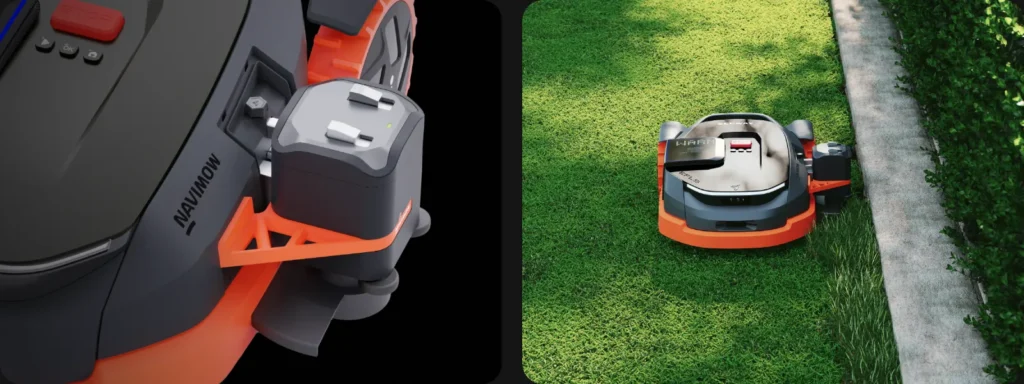
The Navimow X3 runs its routes cleanly, the large area looks neat—and yet right by the fence there’s still a green beard. This is exactly where the X3 trimmer becomes interesting: finally edge care with the robotic mower? Or do you end up walking around with your smartphone behind it and controlling it via joystick, while a normal cordless trimmer would be faster?
This exact frustration comes up frequently in user reports. Many X3 owners expect largely automatic edge-care accessories. But in forums and Reddit comments, it’s repeatedly criticized that, in practice, the trimmer is strongly shaped by manual app control. On top of that, there are questions about the replacement spool, the trimmer head, the lack of height adjustment, concealed camera/sensor technology, and the Blade Assembly Plus. We’ll look at it from a workshop perspective: what’s technically plausible, what do you need to know before buying, and where should you stay realistic?
What is the Segway Navimow X3 Trimmer Pioneer Edition—and what is it not?
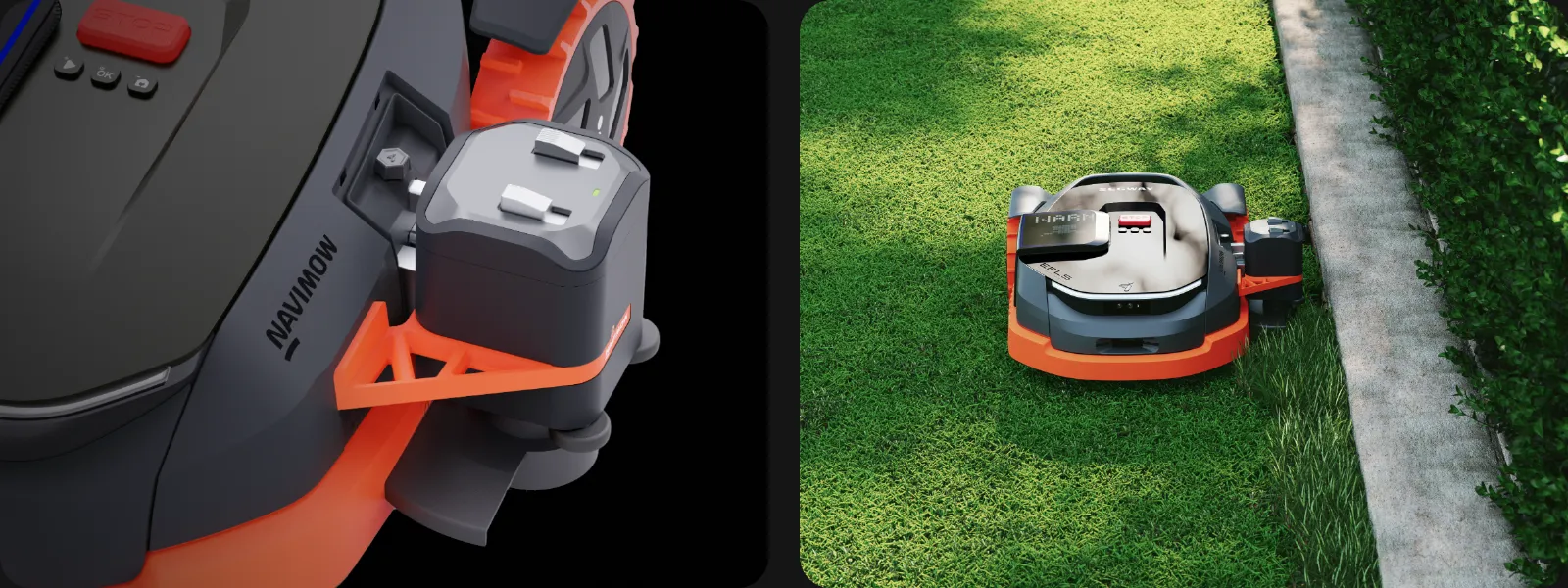
The Segway Navimow X3 Trimmer Pioneer Edition is an official accessory for the X3 series. It is mounted on the mower and uses the expansion approach of the X3 platform: the robotic mower is not only supposed to mow, but also take on additional tasks with extra modules. In the package, the trimmer is described with a trimmer head and filament spool; a replacement spool and replacement trimmer head are offered separately.
But what matters is the expectation: based on the user experiences visible so far, the X3 trimmer is not a classic fully autonomous edge cutter that, without supervision, independently handles all fence lines, walls, and bed edges once a week. Many users report that they have to guide the trimmer via the app or joystick, or at least stay very close to the device. That is where most of the criticism comes from.
In the workshop, we would therefore not classify the accessory as “a mowing robot that now does everything on its own,” but rather as a powered add-on tool for the mowing robot. This can be useful in certain gardens—for example, if you already have an X3, don’t want to buy a separate cordless trimmer platform, and only need to touch up a few edges. However, anyone who expects the mower to drive automatically along every wall and clean up the edge perfectly will likely be disappointed.

The right classification in one sentence
The X3 trimmer is most accurately described as a semi-automatic or app-guided edge maintenance accessory—not a replacement for a fully independently working edge cutter.
Does the Navimow X3 trimmer trim automatically, or do you have to control it manually?
Based on the current user situation, you have to expect manual app control with the X3 trimmer. This exact point is at the heart of the criticism: several users describe the accessory, in essence, as not very useful if you still have to walk alongside it and guide the trimmer with your smartphone.
From a technical perspective, this limitation is not surprising. A rotating line trimmer is not a normal mowing disc with blades hidden under the housing. The line works to the side and can react differently to stones, metal edges, toys, roots, or fence posts than a protected blade plate. As soon as a device trims to the side out of the mower, safety distances, obstacle detection, and operating instructions become significantly more critical.
In discussions, possible safety requirements are also mentioned, especially in the EU context. Without a binding manufacturer approval for a true automatic mode, you therefore should not assume that the X3 trimmer runs autonomously in Germany like a second mowing mode. For your purchasing decision, that means: it’s not the promotional image that matters, but whether you can live with app control.
| Expectation | Realistic assessment | Impact in the garden |
|---|---|---|
| The X3 trims edges completely on its own | According to user reports, this is rather not the norm | Disappointment is likely if you expect true autonomy |
| You guide the trimmer along problem areas using the app | This fits better with the practice described | It can work, but it doesn’t necessarily save a lot of time |
| The trimmer fully replaces a cordless string trimmer | Only realistic for a few, simple edges | With many corners, walls, and flower beds, hand work is often faster |
Many users therefore view the price critically. If an accessory costs around 200 to 300 euros, but in the end it has to be operated like a remote-controlled trimmer, owners automatically compare it to a classic cordless string trimmer. And in intricate flower beds, steps, posts, and tight corners, that is often more direct, faster, and less sensitive to small driving mistakes.
Practical rule of thumb: Only buy the X3 trimmer if you’re willing to accept app control. Anyone expecting “install it and never cut edges again” is setting the bar too high.
Edge care in the test: fence, wall, flower bed, curb, and walkway
With mowing robots, edge care is almost always the leftover issue. On the lawn, the devices are strong, but at the edge the geometry decides: Can the mower drive over a fixed edge with a wheel? Is the transition level? Is there a wall? Is there gravel next to it? Does a fence post get in the way? That’s exactly where useful accessories separate from frustration.
With level transitions to paving slabs or a terrace, a mowing robot can often drive closer to the edge. If the wheels sit securely and there is no risk of falling, less grass is left behind. Next to a wall, it’s different: the mower body needs clearance, the blades don’t sit on the outside of the housing, and a strip remains. That’s where the trimmer should help.
In practice, we would check five scenarios separately, instead of only generally talking about “edge cutting”:
- Fence line: Many posts, wire, base plates, or corners. Here, the trimmer can quickly stop or get caught.
- Wall: The line can work close by, but app control and the spacing must be extremely precise.
- Flower bed edge: Critical with bark mulch, stones, and plant overhang.
- Curbstone: Works better when the height difference is small and the edge is stable.
- Path/terrace: Often the easiest case, because the mower can already approach closely during normal mowing.
Another user point: Some X3 owners report, regardless of the trimmer, issues with mowing logic, missed areas, or repeated follow-ups. This doesn’t directly concern the trimmer head, but it is important. If the basic navigation along the edge is unstable, edge care won’t get any better either. A trimmer can’t fix poor mapping.
Replacement spool and trimmer head: Change, line guidance, and possible jamming
So far, there’s only limited reliable user experience regarding the replacement spool, but one specific report stands out: A user with two X3 devices describes that the spool jams or gets caught. This is not yet proof of a series problem. For real-world use, however, it’s still an important check point, because a line trimmer only saves work if the line reliably feeds and changing the spool doesn’t turn into fiddling every time.
In the workshop, we check four things on the trimmer head: Can the spool be installed without force? Does the line feed evenly? Does cut grass get stuck in the head? And after contact with the ground or the edge, can the head still be opened cleanly? Especially with damp, long grass, it can quickly wrap into a tough mat around rotating parts.
The replacement spool is officially described as having about 3 meters of line. That sounds sufficient, but it says little about the actual service life. On soft lawn edges, a line lasts significantly longer than on concrete, clinker, metal profiles, or natural stone. If you have many hard edges, you shouldn’t buy replacement spools only once the line is empty. Otherwise, the accessory will be out of action exactly when you want to test or use it.
Common mistakes when changing the spool
- Line pulled out too short: The trimmer works unevenly and cuts hardly at all.
- Spool inserted at an angle: The line doesn’t feed properly or gets blocked.
- Grass clippings left in the head: Moisture and dirt increase friction.
- Using the wrong line diameter: Too thick a line can jam, while too thin a line wears out quickly.
With the replacement trimmer head, the situation is similar: so far, there are hardly any real long-term experiences regarding durability, storage, or break points. That’s why we wouldn’t buy it in large quantities just as a precaution, but we would check availability. Especially with limited Pioneer accessories, spare-part supply is more important than with a standard blade that you can get anywhere.
Practical rule of thumb: With the X3 trimmer, it’s not only the motor that matters, but the spool. If the line jams, what was supposed to save time quickly turns into rework.
Does the X3 trimmer have height adjustment—and why is the scalping risk important?
According to user reports, the X3 trimmer doesn’t have real height adjustment, and that’s exactly what creates the risk of scalping. Scalping means: the trimmer cuts too deeply into the lawn at individual spots, resulting in yellow or bare patches.
The problem is especially noticeable on wavy lawn edges. On straight, level lawn, the mower runs cleanly, the trimmer stays at a usable height, and the edge looks neat. But in a real garden, there are small depressions, sunken curb stones, molehills, roots, slopes toward the flowerbed, or a slightly raised lawn edge. Without height adjustment, the filament can only shave off the tips at one spot and then touch the ground again 50 centimeters further on.
Many users underestimate this point because they assume the normal mowing deck. With the mowing robot, the cutting height is set via the blade plate. The trimmer, however, works sideways and is guided differently. Traction is not the same as orientation: even if the X3 drives well on slopes, that doesn’t mean the side trimmer automatically maintains the perfect height along an uneven edge.
For a meaningful practical test, we would check three height scenarios:
- Flat edge: Lawn and walkway are almost on the same level. Here, the risk is lowest.
- Wavy edge section: Small dips and bumps quickly show whether the filament is working too low.
- Curb or flowerbed edge: Height differences increase the risk of an untidy cut and ground contact.
If the trimmer peels up the grass in your case, it usually doesn’t help to apply more pressure in the app anymore, but rather using less. Then you should either rework the problematic edge sections in the classic way or make the area less problematic structurally—for example by creating a level mowing edge where the robot can drive stably.
Does the trimmer affect the camera or sensor system of the Navimow X3?
Several users mention that the mounted trimmer, or its holder, can block a camera or sensing. This shouldn’t be dismissed as a mere comfort issue. With the X3, navigation, obstacle detection, and edge behavior depend heavily on sensing, camera, RTK/GNSS positioning, the app map, and firmware. If an accessory changes the viewing angle, that can be a reason why the trimmer module shouldn’t simply be allowed to run fully autonomously.
From a service perspective, the entire chain matters: place the station freely, check RTK or positioning quality, create the map properly, consider the firmware version, test the Bluetooth/WLAN connection, and only then evaluate the trimmer. If mapping already causes problems or if a GPS offset occurs after a firmware update, you shouldn’t expect that a side trimmer module will save the edge work.
Edges with obstacles are especially critical. One user reports that when using the trimmer, the mower stops quickly if it bumps into something. Along a fence line with posts, this can mean: trim two meters, stop, realign, then trim two more meters. That’s safer than blindly continuing to drive, but not necessarily efficient.
Check these points before using the trimmer for the first time
- Is the camera free of film, dirt, and grass blades?
- Is the trimmer securely mounted, or does the holder have any play?
- Does the mower still recognize obstacles plausibly?
- Does the X3 stop too early or too late at walls, posts, and garden bed edges?
- Is the app connection stable enough for controlled joystick operation?
With cordless mowing robots like the X3 series, you also must not overlook app limits, map logic, zones, reverse trips, and firmware. Additional zones do not automatically solve every edge problem. If the mower repeatedly leaves out the same spots in its normal mowing logic, you should first identify and address this cause before spending money on further accessories.
Practical rule of thumb: A trimmer on a mowing robot is only as good as its positioning, sensorics, and map. First stabilize basic navigation, then evaluate edge care.
Blade Assembly Plus: What does the accessory really do?
For Blade Assembly Plus, the found user reports include significantly less concrete hands-on experience than for the X3 trimmer. It should be said openly: While manual trimmer control, missing height adjustment, and coil problems are being discussed, there are currently no reliable long-term reports for Blade Assembly Plus regarding wear, cutting pattern, and replacement intervals.
In principle, however, the blade unit is not a side issue with the mowing robot. A frayed, gray cut often is not caused by poor navigation, but by dull or dirty blades. Especially when an X3 runs on larger areas, makes many charging cycles, and handles multiple zones, you should check the blades regularly. Clean blades reduce frayed tips and relieve the drive.
In our CUT GUARD tests, we keep seeing the same effect: it’s not just the theoretical number of blades that matters, but the clearance versus grass clumping, stable engagement, clean rotation, and a change that can be done without damaged screws. If you’re struggling with Segway due to poor cutting results, grass buildup, or frequent blade changes, you shouldn’t only look at the trimmer, but also check the right blade accessories for Segway Navimow, because the standard mowing disc does the main work.
Blade Assembly Plus can therefore make sense if it fits your own X3 variant and the original blade unit is worn out or damaged. But it’s not a miracle cure for blades that keep getting stuck at edges. The blade unit cuts underneath the mower; at walls, fences, and higher curbs, the housing geometry remains the limiting factor.
Buy or leave it? Who is the X3 trimmer worth it for?
The X3 trimmer is especially worthwhile for tech enthusiasts and X3 owners who know exactly what they’re getting into: app control, limited autonomy, possible stops at obstacles, and a watchful eye on the spool, the line, and the cutting height. If you don’t yet have a separate cordless trimmer and only have a few well-accessible edges, you may find the accessory interesting as an addition.
It becomes critical with complex, hard-to-navigate properties. Many fence posts, wall bases, narrow passages, uneven garden bed edges, height offsets, and hard stone edges are more likely to call for a classic handheld trimmer. It’s also manual work, but it’s guided more directly, can be lifted faster, and is less dependent on app connection, mower position, and sensor logic.
Availability should also not be ignored. The Pioneer Edition has repeatedly been described in user discussions as limited or difficult to obtain. For young accessories, the fact that there are few complaints does not automatically mean that everything is trouble-free. It may simply be that there are still too few genuine long-term experiences. Therefore, before purchasing, check the return policy, the support path, the availability of replacement spools, the availability of the trimmer head, and the firmware version.
Our sober recommendation
- Buy: If you own an X3, have simple edges, and accept app control.
- Wait: If you want to wait for long-term experience with the spool, head, and durability.
- Better to skip: If you expect fully automatic edge care or have many obstacles along the edge.
Frequently asked questions
Does the Segway Navimow X3 trimmer really trim automatically?
No, based on the user experiences that have been visible so far, you should not assume fully automatic edge care. Many users report app or joystick control and that you have to accompany the mower while trimming.
Is the X3 trimmer autonomously allowed in Germany?
Without a clear manufacturer approval, you should not expect a freely running automatic mode in Germany. For trimmers that work sideways, safety requirements are significantly more critical than for a protected mowing disc under the housing.
Does the Navimow X3 trimmer have height adjustment?
According to user reports, there is no real height adjustment. As a result, on uneven lawn edges, the risk increases that the trimmer cuts too low and causes bare or yellow patches.
What to do if the replacement spool gets stuck?
First remove the spool, clear away any grass clippings, and check whether the line sits properly in the guide. Then insert the spool without forcing it and test by trimming only short sections; repeated jamming indicates dirt, an incorrect line path, or a damaged spool component.
Does Blade Assembly Plus replace the trimmer?
No, Blade Assembly Plus improves or renews the standard blade unit, but it does not replace side edge maintenance. Along walls, fences, and high edges, a strip of uncut grass may still remain.
Conclusion: Good concept, but not a free pass for edge work
The Segway Navimow X3 Trimmer Pioneer Edition is an exciting accessory because it addresses a real robotic mower problem: edges, corners, and border strips often remain even with strong mowing performance. That’s exactly why expectations are high—and that’s exactly why the criticism is so clear when the trimmer doesn’t work fully automatically.
For simple, easily accessible edges, the accessory can be useful if you’re willing to accept app control. For many users, however, the price-to-value comparison is tough: if you’re already walking alongside it, a standard cordless trimmer is often faster. Replacement spool and trimmer head should be viewed as genuine wear-and-check parts, not as a minor accessory.
Our advice from the workshop: First get the X3 running stably as a mower—clean map, good positioning, sharp Klingen, and a proper cutting pattern. Then you can decide whether the trimmer solves your own edge problems. If you expect perfect autonomy, you should wait. If you’re looking to test an experimental, official X3 accessory for manageable edges, you can try it—but make sure you have a return option, keep an eye on the replacement spool, and have realistic expectations.
Comments