The MOVA LiDAX Ultra series is exciting for anyone looking for a lawn mower robot without boundary wires and without an RTK antenna. LiDAR instead of satellite mast sounds like easy setup, less equipment in the garden, and clean navigation along virtual boundaries. Many user reports praise exactly that: quick mapping, quiet operation, straight paths, and an app that is quite easy to use.
However, the series is not without its drawbacks. Those with a garden featuring many 90° corners, narrow curbs, soft soil, sharp bed edges, downspouts, or freshly laid grass should take a closer look. Forums and Reddit reports frequently mention issues such as grass getting stuck in corners, aggressive turning maneuvers, tire tracks, lift errors on uneven ground, difficulties finding the base station, and occasional connection problems.
This article is therefore not a promotional brochure, but a practical classification for owners and buyers of the MOVA LiDAX Ultra models 800, 1000, 1200, and 1600. It addresses the question: Which model is truly sufficient, where does one need to make adjustments, and what role do the blade disc, number of blades, and maintenance play in achieving a clean cut?
MOVA LiDAX Ultra 800, 1000, 1200 or 1600: which model fits which lawn area?
The number in the model name roughly corresponds to the recommended area class: 800 m², 1000 m², 1200 m², and 1600 m². In practice, these values should not be understood as hard performance promises. What matters are not only square meters but also garden shape, narrow passages, slopes, separate zones, mowing frequency, charging breaks, and how much time the robot is allowed to be out each day.
Many users who are torn between two sizes tend to lean towards the larger model after the first few weeks. The reason is simple: a lawn mower that theoretically fits the area can still take a very long time with complex geometry. A user with about 800 m² reported a complete run including charging for the Ultra 1000 over many hours. This is not automatically bad, but those who want peace in the garden in the evening should plan for a reserve.
| Model | Manufacturer Area | Cutting Width / Height | Navigation | Practical Assessment |
|---|---|---|---|---|
| LiDAX Ultra 800 | up to approx. 800 m² | approx. 20 cm / 30–100 mm | 3D-LiDAR, virtual boundaries | Useful for compact gardens with few zones and manageable slopes. |
| LiDAX Ultra 1000 | up to approx. 1000 m² | approx. 20 cm / 30–100 mm | 3D-LiDAR, app mapping, no-go zones | The typical sweet spot for medium-sized home gardens; not oversized at 800 m² actual area. |
| LiDAX Ultra 1200 | up to approx. 1200 m² | approx. 20 cm / 30–100 mm | 3D-LiDAR, UltraTrim, zone control | Interesting if the Ultra 1000 seems tight. Specific user issues with the 1200 are currently less visible. |
| LiDAX Ultra 1600 | up to approx. 1600 m² | approx. 20 cm / 30–100 mm | 3D-LiDAR, more stable connectivity in larger variants | Better suited for larger, more complex gardens; reserve is more important here than the pure maximum area. |
My rule of thumb from a service perspective: For simple, rectangular areas, you can stay closer to the manufacturer’s specifications. For irregular properties, separate lawn areas, frequent bottlenecks, or sloped locations, you should plan for at least one model class reserve. This relieves the battery, charging cycles, and schedule.
LiDAR instead of RTK: how easy are setup, mapping, and separate zones really?
The biggest appeal of the MOVA LiDAX Ultra series is the setup without boundary wires. Instead of laying wire, the area is mapped in the app. The robot uses 3D LiDAR, camera, and environmental data to determine its position and navigate virtual boundaries.
Many users describe the setup as pleasantly simple. Auto-mapping works reasonably well in many gardens, but manual mapping is often perceived as more accurate. This aligns with my experience with wireless lawn mowers: Those who work cleanly during the first mapping save themselves a lot of trouble later on with edges, flower beds, and passages.
Separate lawn areas and paths
A common practical case is the front garden plus back garden, separated by paving, terrace, or a narrow path. The LiDAX Ultra models can handle zones and driveways, but the transition must be realistic. The path should be level, wide enough, and easily navigable for the wheels.
If the robot is to drive over a flat stone surface, the virtual route should not be too close to walls, steps, or edges. In narrow passages, it is worth observing the first trips. Many problems arise not during mowing itself, but during the automatic transition between two areas.
Station, Garage, and Free Space
Forums also raise the question of how much free space the base station really needs. Especially with the LiDAX Ultra 800, users wanted to know if a self-built garage with side walls would interfere with navigation. The point is valid: LiDAR robots need not only space to enter and exit but also reliable environmental recognition around the station.
A garage should therefore not be built too tightly. If side walls are positioned directly next to the station, entering, exiting, or relocating the base can become more difficult. I would first test for a few days without a garage and only then build a cover that remains generously open on the sides and front.
Edges, 90° Corners, and UltraTrim: where users still need to do touch-ups
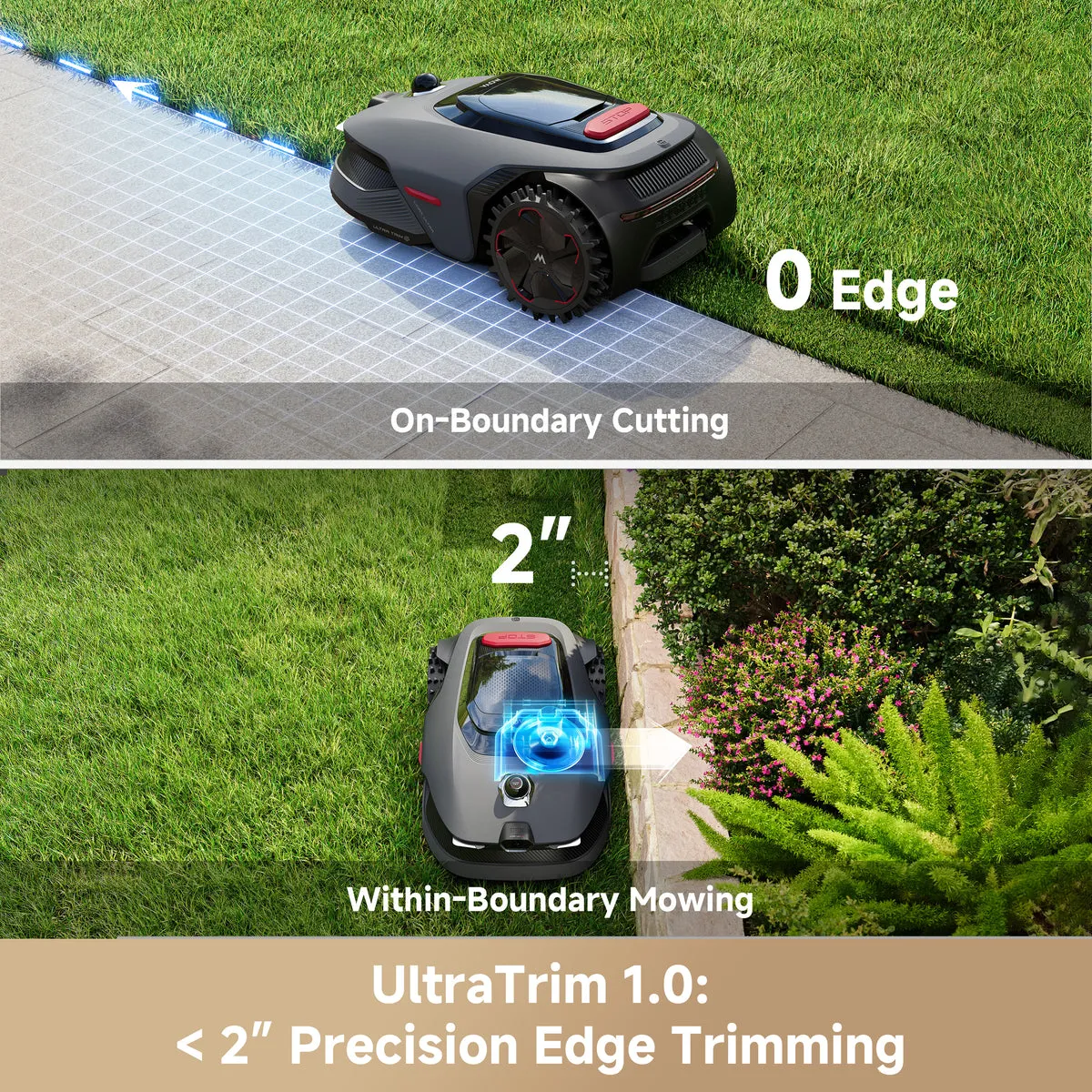
MOVA promotes UltraTrim as a solution for better edge trimming. In practice, the edge performance is indeed one of the more interesting points of the series. Some users praise that the robot approaches boundaries very closely and, due to the adjustable mowing deck, gets better to edges than classic mowing robots with a central blade.
At the same time, this area is a recurring point of criticism. User reports frequently mention that sharp 90° corners are not mowed cleanly. The robot does drive along the edge, but does not actively hit the corner hard enough. The result: A tuft of grass remains in the corner that later needs to be trimmed with a trimmer or scissors.
This is not just a MOVA problem. Almost all mowing robots struggle with inside corners, high walls, narrow curbs, and flowerbed borders. The difference lies in how much touch-up work remains. Those with a garden featuring many right-angled edges, pool surrounds, or raised beds should not consider UltraTrim a complete replacement for touch-up trimming.
Why the blade disc becomes important here
When it comes to edges, not only navigation matters, but also cutting performance. Dull blades fray grass, tear stems more easily, and leave a rough cut appearance at edge areas more quickly. Especially when the robot only passes closely by corners once or twice, the blades should cut cleanly.
For owners of the models 800, 1000, 1200, and 1600, a suitable 6-blade cutting disc can be interesting if a more even cutting pattern is desired and the original equipment needs to be replaced or upgraded. More blades do not automatically mean miracles at every corner, but they can provide a denser and cleaner cutting pattern with regular use.
It remains important: The best cutting disc does not replace correct mapping. If a virtual boundary is too far inside, even a new disc cannot reach the grass that has been left standing. First check the boundary, then assess the blades and disc.
Inclines, wet ground, and uneven lawns: the limits of 2WD and AWD
The LiDAX Ultra models are advertised with good off-road capability. In many gardens, this works well, especially when the ground is dry and the wheels remain clean. Users report that the Ultra 1000 handles some steeper spots as long as there are no deep ruts, molehills, or muddy passages in the way.
The problematic reports are less about normal incline and more about traction and sensors. One user described repeated stops on uneven grass with an AWD device, with the message that the robot had been lifted. Others suspected firmware, sensors, or slipping on the slope as the cause. Such individual cases are not automatically representative, but they show that LiDAR and all-wheel drive are no guarantee for every restless garden.
Tire tracks and aggressive turning maneuvers
Turning maneuvers are mentioned multiple times. Especially on new, soft, or wet grass, U-turns can stress the turf. One user reported that grass was torn out during turning. Another was able to mitigate the problem by changing the mowing direction by 90°.
This is a very practical tip: If tracks always appear in the same places, do not immediately write off the robot. First, check the mowing direction, starting points, mowing frequency, and rain behavior. With fresh grass, the robot should not drive daily with tight turns over the same soft spots.
Soft ground and tire spikes
With the Ultra 1000, it was also reported that stones, branches, or dirt can get stuck in the long tire profiles. This may sound trivial, but it can affect traction and driving behavior. If the robot suddenly drives more erratically, turns poorly, or leaves tracks, it is worth taking a look at the wheels.
Maintenance therefore includes not only blade replacement. The underside, tire profile, blade disc, and mowing deck should be checked regularly. Especially after rainy periods, wet cuttings, or trips through dirt, a green, sticky layer can form.
Battery, Charging Breaks, and Real Area Performance: Why “Buying Bigger” Often Makes Sense
The real area performance heavily depends on the garden. A simple rectangular lawn is quickly done. A property with islands, flower beds, narrow passages, driveways, multiple zones, and many obstacles takes significantly more time. Therefore, manufacturer specifications are always just a starting point.
User reports particularly discuss whether it is better to buy a size larger for the smaller models. The background: If the robot has to charge often, the entire mowing cycle is extended. This is not dramatic as long as the schedule fits. However, it can be bothersome if the mower is constantly out and about throughout the day.
With the Ultra 1000, which has around 800 m² of real mowing area, reports of a long complete run including charging breaks have been noted. This clearly shows why 1000 m² on paper does not mean that 1000 m² can be quickly completed in every garden situation. Those with 900 m² of winding lawn should rather opt for the 1200 or 1600.
More Blades for Shorter Stems and a Clean Cut?
A more powerful blade disc does not increase battery capacity but can stabilize the cut quality. When mowing frequently, usually only a few millimeters of stem are cut. In that case, a clean, sharp edge is more important than raw motor power.
Anyone who regularly runs their LiDAX Ultra and wants a denser cutting pattern can check a 7-blade cutting disc as an alternative to the standard equipment. It is particularly interesting when the robot travels many short paths and should capture the blades as evenly as possible.
However, with taller grass, the rule still applies: Do not demand too much at once. It is better to gradually lower the cutting height and let the robot run more frequently. Long, wet blades increase the load on the mowing deck and dirty the underside more quickly.
Obstacle detection in practice: pipes, downspouts, weeds, pool, and no-go zones
The obstacle detection of the LiDAX Ultra series is described in many reports as good, but not infallible. Larger objects, people, animals, and conspicuous items are generally recognized better than flat, lateral, or dark obstacles. This is where the typical problem cases lie.
A user report on the Ultra 2000 mentions gutter extensions, downspouts, exhaust ducts, and similar low components as weak points. The robot can drive over them, bump into them, or get stuck if the object is positioned unfavorably for the sensors. For the models 800 to 1600, one should learn from this: Do not simply leave critical objects to the obstacle detection.
Cleanly establish no-go zones
Pool edges, play equipment, very flat bed borders, protruding pipes, and deep edges should be included as no-go zones or clear boundaries on the map. When mapping round beds, one should not map too closely. It is better to plan 3 to 5 cm of reserve than to risk scratches on the housing or blocked blades later.
With dog feces, there is no reliable reassurance in user reports. I would not rely on the robot to reliably detect such obstacles. Those who have dogs in the garden should check before the mowing window. This is less elegant but much more pleasant than a dirty blade and a clogged underside.
Tall Weeds and Dandelions
Some users report that taller weeds do not necessarily become a problem. Nevertheless, one should keep expectations realistic: a robotic mower is not a brush cutter. If dandelions, tough stems, or wet clumps are left standing, it is often not due to navigation but rather to blade condition, cutting height, and mowing frequency.
Those who frequently have tough blades or uneven areas should shorten the blade intervals. Dull blades are one of the most common reasons for frayed tips, brown cutting edges, and increasingly loud mower blades.
App, Mowing Patterns, and Zone Control: Crisscross, Checkerboard, and Drive Paths
The app is described in many reviews as solid to extensive. Users particularly praise zones, drive paths, mowing plans, and the ability to adjust mowing directions. These settings are crucial when the robot leaves tracks, slips on slopes, or does not hit corners optimally.
Mowing patterns such as systematic U-paths, changing directions, crisscross, or checkerboard patterns are not only visually interesting. They distribute drive paths better and prevent the wheels from always stressing the same lines. On soft ground, this can make the difference between a clean lawn and visible turning spots.
For separate zones, one should check individual mowing times and heights. A shady, moist area does not need the same plan as a sunny main area. The edge trimming can also be more or less useful depending on the area. At a wall, UltraTrim is more effective than at a soft bed edge where the wheels sink in.
If the cut remains uneven despite a good app
Then it is worth looking under the robot. Are all blades freely movable? Are screws tight but not jammed? Has grass wrapped around the cutting disc? Are there noises that weren’t there before?
For users aiming for a very fine cutting pattern or wanting more cutting points in denser grass, a 9-blade cutting disc can be a suitable solution. Especially with regular short cuts, a higher number of blades can help hit the blades more evenly. However, the prerequisite remains that the mowing deck is clean and the robot is not struggling with too high, wet grass.
Common problems and troubleshooting: base station, orientation, connection, noises
Several problem clusters appear in German forums: base station not found, robot seems disoriented, connection to the app drops, or the cutting disc makes unusual noises. Not all cases can be assessed without a complete error description, but the order of troubleshooting is almost always similar in practice.
1. Base station is not reliably found
First, check the setup. Is the station level? Are there tight walls, metal parts, high obstacles, or a narrow exit nearby? Has it been remapped after moving? A small change to the station can have bigger consequences for wireless robots than expected.
2. Robot drives aimlessly or reports positioning problems
Three steps can help here: check the app and firmware, review the map, compare the surroundings. Has something changed significantly in the garden, such as new furniture, large plant pots, construction materials, or a new garage? LiDAR is robust, but not blind to changes in the environment.
3. Connection to the app no longer works
In case of connection issues, first distinguish between Bluetooth, Wi-Fi, and mobile data. Test close to the robot, check router coverage, and do not hastily assume the app is the sole cause. In larger areas or with a more distant station, a poor Wi-Fi location may be the actual cause.
4. Noises from the blade disc or mowing deck
Strange noises should be taken seriously. Common causes are bent blades, stuck branches, grass wraps, loose screws, or a dirty blade disc. Before any inspection, remember: turn off the robot, secure it, and only work on blades and discs while wearing gloves.
If the noise persists after cleaning and blade replacement, the robot should not continue to operate. A blocked or dragging blade disc can cause further damage. Especially with new model series, it is advisable to document service cases clearly: photo, video, error message, date, and affected area.
Frequently Asked Questions
Is the MOVA LiDAX Ultra 800 sufficient for 700 to 800 m²?
For simple, open areas, the Ultra 800 may be sufficient. In the case of winding gardens, multiple zones, slopes, or many edges, I would rather opt for the Ultra 1000 or 1200. The reserve becomes noticeable during charging pauses and daily runtime.
Is LiDAR better than RTK?
Not necessarily, but LiDAR is more convenient to set up for many home gardens because no RTK station with a clear view of the sky is required. This can be an advantage in the presence of walls, trees, and winding areas. Nevertheless, the map must be created cleanly and the station must be well placed.
Does UltraTrim really mow all the way to the edge?
On straight, easily accessible edges, UltraTrim can work very well. However, in 90° corners, near high walls, tight inside angles, and irregular bed edges, there is often a need for touch-ups. Those expecting perfect corners will also be disappointed with the LiDAX Ultra series.
What to do about tire tracks or torn grass?
First, change the mowing direction, reduce mowing frequency, and avoid mowing on wet or very soft ground. For fresh grass, the robot should be used more cautiously. Additionally, clean the wheels and check if stones or twigs have lodged in the tread.
How often should blades and cutting discs be checked?
Under normal operation, the blades should be checked every few weeks, and more frequently in sandy soil, with many branches, or dense vegetation. If the cutting pattern frays, the robot becomes louder, or blades remain standing, the blades and cutting disc are the first suspects.
Conclusion: MOVA LiDAX Ultra is powerful, but not a magician
The MOVA LiDAX Ultra models 800, 1000, 1200, and 1600 are particularly interesting for users who do not want to lay boundary wire and do not want to set up an RTK antenna in the garden. LiDAR mapping, app zones, systematic paths, and UltraTrim make the series technically very attractive.
However, real user reports also show clear limitations. 90° corners remain difficult, soft ground can suffer during turning maneuvers, low pipes and downspouts should be secured as no-go zones, and for large or complex areas, having a model reserve is almost always worthwhile.
Those with a simple garden will often manage well with the Ultra 800 or 1000. Those with 900 m² or more, multiple zones, slopes, or many edges should seriously consider the Ultra 1200 or 1600. And regardless of the model, it holds true: clean maps, a well-placed station, sharp blades, and a suitable cutting disc ultimately determine whether the LiDAX Ultra just drives – or really mows cleanly.
Tip: You will find all matching replacement blade discs and mowing plates for MOVA in our overview: Blade discs for MOVA.
Comments