The Aspire R6V is freshly docked in the charging station, the LED is glowing green, and WLAN is available according to the phone—yet the app still hangs during pairing with the charging station or EPOS. This exact scenario shows up repeatedly in user reports: hours of setup, resets, good signal values, but no clean pairing. If you’re buying the Husqvarna Automower Aspire R6V, you shouldn’t just look at “no boundary wire,” but at the entire chain of WLAN, app, camera, PIN entry, virtual boundaries—and later also at blade condition and edge work.
We don’t sell lawnmowers; instead, at Messerscheibe24 we deal with lawnmower accessories every day—cutting disc, mowing disc, blade plate, and replacement blades. From this workshop perspective, the R6V is interesting: it’s a modern, cordless Husqvarna with a camera and virtual boundaries, but not a magic box that instantly understands every garden on its own. Many real problems don’t arise from mowing itself, but from setup, weak WLAN, harsh shadow edges, the edge strip, or dull blades that later ruin every nice striping pattern.
Husqvarna Aspire R6V in everyday life: Who is it really suitable for?
The Aspire R6V is designed for smaller to medium-sized lawns. The manufacturer’s specification is up to 600 m² for systematic mowing; in irregular mode, less area is assumed. In a simple, open garden with few narrow passages, good WLAN coverage, and a clear view upward, this can work well. In practice, however, you shouldn’t just count square meters. A complex 350 m² garden with narrow corridors, shade, multiple zones, and a long return trip to the station can be more demanding than a rectangular 550 m² lawn.
The R6V works with virtual boundaries and AI vision. This is a different world from a classic wire-based robotic mower: no boundary cable—instead, app setup, satellite positioning, cloud correction data, WLAN in the working area, and camera support. If you’re coming from a wired model, you’ll need to rethink your approach. The mower doesn’t simply follow a cable; it orients itself using positioning data and recognized lawn area. That’s convenient when the infrastructure is right, but it may require more fine-tuning in areas with dead spots, walls, dense development, or hard-to-assess edges.
The R6V is especially suitable for owners who want to set everything up properly once and are willing to adjust the boundaries after the first mowing runs. It’s less suitable for buyers who understand “wireless” as “place it, open the app, done.” Many users praise the calm mowing pattern after the setup is resolved, the low noise level, and the zone functions. At the same time, the experience reports show: the first few days often determine whether the R6V becomes a pleasure or ends up being returned in frustration.
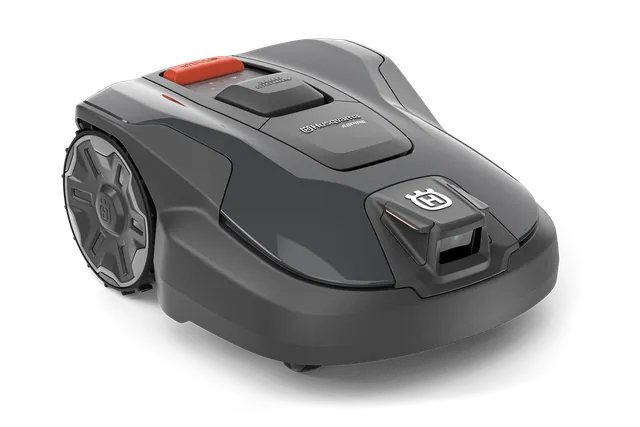
Why doesn’t the Aspire R6V connect to the charging station or EPOS?
The most frequently reported early issue is the setup. Several users report that the charging station charges, the LED is green, and WLAN seems to be available, but the app does not establish a complete connection to the station or the EPOS system. In one case, even multiple resets didn’t help. A German-speaking user described a very similar situation: after two days of ownership and more than five hours of trying, they still hadn’t completed EPOS setup.
From a workshop perspective, this doesn’t automatically sound like defective hardware. With new cordless mowing robots, the order is often crucial: activate the mower, enter the PIN on the physical device, follow the app instructions exactly, keep Bluetooth proximity, check WLAN, position the station correctly, and only then create virtual boundaries. In the reports, the problem was resolved for some users after entering the PIN directly on the mower. For others, it didn’t help, and the device was returned. That’s why, before a return, you should check systematically.
Setup check before returning
- Enter the PIN directly on the device: Don’t just search in the app. If the mower is waiting for input, pairing gets blocked.
- Remove the camera protective film or tape: A user only noticed later that the front camera was still covered. After that, the behavior improved significantly.
- Separate Bluetooth and WLAN: Bluetooth helps with close-range pairing; WLAN is used later during operation. Don’t mix up the two.
- Place the station freely: Unnecessary sources of error occur if you place it directly against walls, under metal, in tight niches, or under dense overhead coverage.
- Wait for the firmware: On newer models, updates can reduce early setup problems. Before passing judgment for the first time, check whether FOTA updates are offered.
It’s also important to set expectations for mapping. The AI vision doesn’t automatically map the garden like a vacuum robot does in an apartment. Users report that you have to drive along the edges and set waypoints. You shouldn’t do that between two appointments. For the first setup, I’d realistically plan a calm afternoon, including readjustment the following day.
Practical rule of thumb: If the R6V hangs during pairing, don’t immediately think it’s “defective.” First, go through the PIN on the device, the camera cover, the app sequence, WLAN, and the station placement properly.
WLAN in the garden: the underestimated must-have
With the Aspire R6V, “without boundary wire” does not mean “without infrastructure.” This is exactly where many buyers get caught off guard. Users repeatedly emphasize that good Wi-Fi coverage throughout the entire garden is important. The R6V needs correction and connectivity data; if the Wi-Fi is only strong on the terrace but drops out at the back near the compost or by the hedge, precision can suffer.
A smartphone test is a useful first step, but it’s not perfect. Walk the later mowing area: along the edges, in corners, behind the garden shed, under trees, and at the lowest point of the property. If the phone there jumps between a bar and no signal at all, the mower won’t magically do better. Many gardens require a repeater for the R6V, a mesh system, or even a better outdoor access point with 2.4 GHz coverage.
The critical point is not only reception at the charging station. The mower must also work reliably in places where it reaches boundaries, avoids restricted zones, or starts long return trips. Especially in gardens with multiple zones, otherwise a pattern emerges: everything works at the front of the house, but at the back the mower stops, shifts its track, or performs illogical maneuvers. Then it’s quickly blamed on the camera or EPOS, even though the wireless coverage is the first problem area.
| Garden situation | Risk with the R6V | Practical preparation |
|---|---|---|
| Open rectangular lawn up to approx. 400–600 m² | Usually easy to manage | Check WLAN at all edges, place the station freely |
| Complex garden with narrow passages | More rework at boundaries and paths | Plan transport routes generously, observe during the first few days |
| Many walls, garage, garden shed | WLAN and satellite shadows possible | Plan for a mesh network or an outdoor AP before purchase |
| Heavy shade from trees | The camera may be confused | Test mowing times; don’t set boundaries too narrowly |
Does the Husqvarna Aspire R6V really mow the edges cleanly?
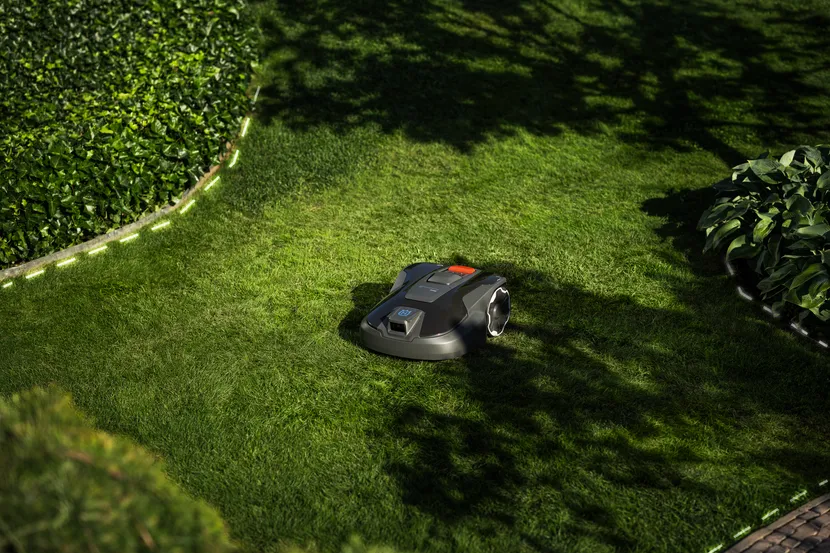
Edge mowing is one of the areas where marketing and real garden conditions diverge. Many users expect a cordless model with virtual boundaries to cut the lawn edge as cleanly as a well-tuned wire robot. However, in experience reports about the R6V, a border strip appears multiple times. It’s often mentioned as about 15 cm that remains at the original boundary and must be trimmed manually or adjusted again via the app.
That’s technically understandable. The mower has to combine its position, the virtual boundary, camera perception, and its mechanical width. At high stone edges, walls, flower beds, or sharp shadows, it will keep more distance rather than risk driving right up to the edge. If you have a lawn edge at the same level with a wide paving strip, you usually get better results than someone with a wall, raised bed, or curb directly next to the grass.
In practice, a two-step approach is worthwhile: don’t set the boundaries to the millimeter during the first mapping—place them securely instead. Then observe two to three mowing cycles and fine-tune critical areas in the app. If you map too tightly right away, you trigger camera interventions, evasive maneuvers, and slow operation near walls. If you stay too conservative, you’ll be trimming 10–15 cm by hand permanently.
A clean edge also depends on the cutting system. Dull or dirty blades turn an edge that was already standing still into a gray, frayed strip. If the R6V manages the area evenly but the cutting edge looks untidy, it’s worth taking a look—along with adjusting via the app—at suitable Husqvarna cutting discs and blade sets, because a stable disc and sharp blades pull less at edge runs and provide a calmer cutting pattern.
Practical rule of thumb: With the R6V, you should expect manual edge trimming, especially along walls, tall edges, and narrow beds. A 15 cm edge strip isn’t a must, but it’s a realistic benchmark from user reports.
AI camera in practice: obstacles, shadows, trees, and night operation
The Aspire R6V’s camera is useful, but it’s not a substitute for a well-kept garden. Users praise that scattered items such as toys, chairs, or other objects can be detected. At the same time, they report clear limitations: A tree about 15 cm wide was not always reliably recognized, hard shadow edges were sometimes interpreted as obstacles, and near walls the camera can intervene so often that the mowing process becomes noticeably slower.
That matches what we generally see with camera- and LiDAR-based mowing robots: sensors help, but they interpret. A human can immediately tell whether a dark strip is just a shadow. A mower has to decide using camera footage, movement, maps, and safety logic. With low sun, wet surfaces, strong light-dark contrast, or dark objects in the grass, this decision becomes more difficult.
How to reduce camera problems
- Don’t leave narrow obstacles to the camera: Small trees, posts, or trellis supports are better than setting up a no-go zone or protecting them mechanically.
- Don’t set boundaries against walls too aggressively: It’s better to move closer step by step than to drive at zero distance during the first mapping.
- Test shadow times: If the R6V rotates along shadow edges at midday or stops, let it mow in the morning or later in the afternoon.
- Keep the camera lens clean: Dust, grass sap, and water spots worsen object recognition.
- Be critical about night operation: For reliability in the dark, there is less dependable real-world experience. If you have many obstacles, you should prefer daytime operation.
With newer models that include AI features, the experience base is still thinner than with long-established wire boundary automatic mowers. A small number of complaints doesn’t automatically mean there are no problems. Often it just means there aren’t enough long-term experiences yet covering summer heat, firmware versions, wear and tear, and different garden layouts. That’s why, for the R6V, it’s important to check before purchase: the return policy, the support path, dealer expertise, firmware policy, and spare parts availability.
Docking and charging station: space requirements, narrow driveway, and return problems
For the Aspire R6V, the charging station is not only a charging spot, but part of the entire orientation system. One user criticized that the docking opening looks quite narrow and that the mower sometimes needs two or three attempts before it docks correctly. Another reported at first that the mower did not reliably find its way back; later it turned out that setup and camera issues were involved.
In practice, this means: don’t just “quickly” push the station into some corner. Before the station, the R6V needs a straight, well-accessible area. There should be enough clearance on the sides so that correction movements are possible. Particularly unfavorable are tight niches between a wall and a flower bed, direct slopes in front of the station, high curbs next to the driveway, or WLAN shadows exactly at the dock.
If the R6V repeatedly fails to dock, I would check in this order: station level, solid ground, no twisting of the base plate, contacts clean, driveway clear, WLAN stable at the station, virtual transport paths not too tight, camera clean. Only once these points fit and the error remains reproducible should support or the dealer be the next step.
What users like about the R6V: quiet, good mowing pattern, app zones, no subscription
The Aspire R6V doesn’t just receive criticism. Many positive responses focus on exactly the points that matter in everyday use: quieter operation, an even cutting pattern, high-quality workmanship, and good app features. In particular, the ability to customize work areas, no-go zones, and mowing patterns is attractive to owners of small, modern gardens. Stripe, checkerboard, or triangular patterns are visually a clear difference from older random mowers.
The range of functions without a paid subscription is also mentioned positively. That’s important because some buyers of wireless mowing robots now fear follow-up costs for connectivity or premium features. With the R6V, however, the technical truth remains: no subscription requirement can replace WLAN planning. If your network is weak, you may need additional hardware or dealer accessories.
For the cutting system, the R6V uses three rotating blades and a working width of 22 cm. The cutting height is in the range of 20 to 50 mm. In our CUT GUARD tests on cutting discs and blades, the same effect keeps showing up: a high-quality mower can only cut as cleanly as the blades, screws, and the condition of the disc allow. If the cutting pattern turns gray, stems fray, or the mower makes noticeably more noise in longer grass, dull blades are often the faster culprit than navigation.
Purchase checklist before ordering
Anyone ordering the Husqvarna Automower Aspire R6V should not only compare price and area specification. Especially with new wireless models, preparation determines whether the first few days run smoothly or end up in support queues.
- WLAN throughout the whole garden checked? Don’t just test the terrace and the station, but every corner of the mowing area later on.
- Garden layout assessed realistically? Intricate areas, narrow passages, and multiple zones require buffer and patience.
- Edge requirements clarified? If you expect zero striping, you’ll likely need to do some touch-up work at walls and raised edges.
- Narrow obstacles present? Thin trees, posts, and play equipment are better planned as part of the route than as no-go zones.
- Observed shade and sun? Sharp shadow edges can influence camera decisions.
- Support route clarified before purchase? Buying directly can be convenient, but with new models, a competent local dealer is worth a lot.
- Return policy and firmware checked? Especially with young technology, a clean return option is a real purchase criterion.
- Replacement blades planned? The best mowing pattern is of little use if you keep mowing after a few weeks with dull blades.
My honest assessment: The R6V is interesting for users who want to mow wirelessly, like modern app features, and are willing to prepare their garden technically. It’s less suitable for everyone who doesn’t have patience for setup, WLAN, and edge touch-up work. With a classic wired mower, the system forgives some wireless issues; with the R6V, they become part of the mower result.
Frequently asked questions
Does the Husqvarna Aspire R6V need WLAN throughout the whole garden?
Yes, the R6V should have stable WLAN coverage across the entire work area. User reports show that weak WLAN affects not only comfort features, but can also influence the precision and reliability of wireless navigation.
Why doesn’t pairing with the charging station work?
Common causes include the pairing order, a PIN that hasn’t been entered on the device yet, app steps, Bluetooth proximity, or an unfavorable placement of the station. In some user reports, entering the PIN directly on the mower helped; in others, the problem persisted and led to a return.
Does the Aspire R6V really leave a 15 cm edge?
Yes, several users report an edge strip of about 15 cm, especially at original boundary lines, walls, or high curbs. This can be improved in part through app fine-tuning, but you shouldn’t plan on achieving completely trimmer-free results.
Does the AI camera reliably detect small obstacles?
No, you shouldn’t blindly rely on the camera for small or narrow obstacles. Problems have been reported with a narrow tree, sharp shadow edges, and close proximity to walls; for such areas, clearly defined safety exclusion zones are the better solution.
Does the R6V map the garden automatically?
No, the R6V shouldn’t be understood as “just set it up and it maps everything by itself.” You need to drive the boundaries, set waypoints, and fine-tune the virtual map after the first trips.
Conclusion: Powerful wireless mower, but no plug-and-play miracle
The Husqvarna Automower Aspire R6V can work very cleanly and quietly in suitable gardens. Its strengths lie in wireless installation, app zones, mowing patterns, a calm cutting image, and modern camera support. Exactly this technology, however, makes it more sensitive to poor Wi-Fi, unclear setup steps, harsh shadows, tight stations, and borders that are set too narrowly.
Anyone who buys the R6V should consider the first few days as a setup phase: measure the Wi-Fi, place the station properly, follow the PIN and app sequence, remove the camera cover, lay out the boundaries carefully, and then fine-tune them afterwards. When it comes to the cutting image, it applies as with any Automower: sharp Klingen and a clean mowing disc are a must. Then the R6V has the best chance of not turning into a frustrating early-adopter purchase, but instead becoming a quiet helper that reliably keeps small and medium-sized lawns in shape.
Comments