The robotic mower suddenly stops in front of a small branch, turns away, and leaves a strip behind—although there would be enough free space right next to it. Exactly at this point, the new Husqvarna Automower 308V and 312V decide whether the Vision technology will truly relieve you in your own garden, or whether it initially requires fine-tuning for mapping, WLAN, and garden layout. These two models are not classic wire robots with a camera as an add-on, but new wireless Vision models for Europe.
The announcement “Available from spring 2026” is now outdated: In June and July 2026, there are already first European user reports, including from Sweden. Still, one thing remains true: long-term experience specifically with the 308V and 312V is still limited. Anyone buying today will get a current model generation with a camera, satellite-based positioning, and an app map—but not yet an everyday track record proven over years.
Husqvarna Automower 308V & 312V in a practical test: What is really new about Vision?
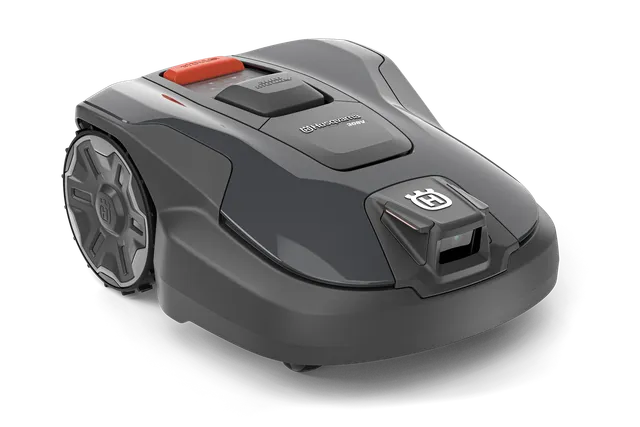
The core difference from the older generation is not in the cutting system, but in the orientation. 308V and 312V work without boundary wire: the area is set up in the Automower-Connect app, the position is provided via satellite-supported technology and correction data via the internet connection. The integrated camera complements this system with AI vision.
This camera is intended to recognize objects on the lawn, avoid collisions, and help the robot keep working when the satellite signal is weaker—as long as it can safely detect grass in front of it. That’s an important difference: Vision is not only obstacle detection, but also not a substitute for a stable positioning foundation. The camera can see a ball, a cone, or a toy. However, it can’t magically fix poor map planning, a charging station that’s been placed incorrectly, or a gap in the WLAN signal.
In practice, that means: boundary setup, mapping, and zone management run via the app, WLAN, and satellite positioning. The camera takes care of the immediate surroundings. The mowing system underneath remains classic Husqvarna: three freely swinging blades on a 22-cm mowing disc. If the cut image turns gray, becomes frayed, or is uneven, that’s therefore almost never an “AI problem,” but first and foremost an issue with blades, the disc, grass clippings, or cutting height.
One point is easy to overlook in marketing: with the 308V and 312V, the vision function works during the day. The robot can still mow at night according to schedule, but the camera-supported vision functions are then not available in the same way. If you have lots of toys, animals, or untidy areas, you should therefore consciously schedule the main mowing times for bright daylight hours.
308V or 312V: The differences explained clearly
The devices are technically closely related. Both use virtual boundaries, Wi-Fi, Bluetooth, Automower Connect, satellite-based navigation, AI Vision, three blades, a 22 cm cutting width, as well as a manual cutting height adjustment from 20 to 50 mm. The key difference is not a “better camera” on the 312V, but rather in area performance and the available time budget.
| Feature | Automower 308V | Automower 312V |
|---|---|---|
| Area with a systematic pattern | up to 800 m² | up to 1,200 m² |
| Area with an irregular pattern | approx. 500 m² | approx. 800 m² |
| Maximum operating time per day | 10 hours | 15 hours |
| Maximum slope in the working area | 40 % | 40 % |
| Cutting system | 3 pivoting blades, 22 cm | 3 pivoting blades, 22 cm |
| Suitable application profile | clear smaller to medium-sized areas | larger, more complex areas with higher mowing time requirements |
The manufacturer’s area specification must not be confused with your own property size. An open rectangle often comes close to the stated figures. In a complex garden with multiple areas, narrow passages, many tree islands, long return paths to the charging station, and short permitted mowing windows, the 312V is usually the more realistic choice—even if the pure lawn area, calculated mathematically, still falls within the range of the 308V.
The mowing pattern also changes the calculation. If you want visible lanes, a checkerboard pattern, or triangles, you can use the systematic area performance. If you prefer a more carpet-like, irregular cut, you should plan with about 500 m² for the 308V and about 800 m² for the 312V. This is not a shortcoming, but the result of the more randomly appearing pattern requiring more passes.
Practical rule of thumb: It’s not just the property size that decides. Many zones, shaded areas, and narrow passages cost mowing time—and they speak more quickly in favor of the 312V than a pure square-meter figure.
Does the 308V reliably detect small branches, toys, and animals?
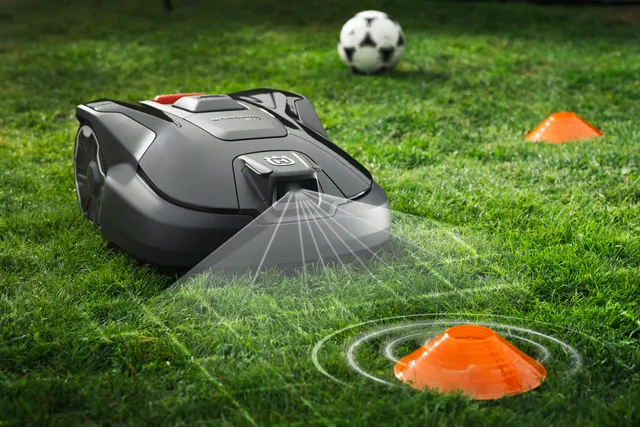
With large, clearly recognizable objects, it is reasonable to expect something from vision: a ball, a garden chair, a toy, or a parked bowling pin are exactly the situations in which the camera can provide real added value. A direct 308V user reports after about two weeks that the obstacle detection works so well on his property that he doesn’t have to set up any additional no-go zones. This is a positive real-world example—but it’s not yet proof for every garden.
Many users of related vision models report the other side as well: small branches, low weeds, or inconspicuous natural objects can make detection overly cautious. The robot then avoids, turns away earlier, or unnecessarily leaves out area. In reviews and forums, the accusation that the camera “sees nothing” doesn’t necessarily come up. More often, the criticism is: it reacts to things that would actually not be a real obstacle for the mowing process.
This is the typical trade-off of cautious object detection. If the system reacts too late, the risk of contact increases. If it reacts very early, the mowing flow decreases. That’s why freshly fallen twigs, tall weeds at the edge, or scattered toys are not a reason to leave the garden entirely to itself. Vision reduces cleanup work—it doesn’t replace it.
How to keep the camera useful in everyday life
- Collect branches after wind and garden work before starting.
- Do not leave toys, lightweight balls, and garden hoses lying around as “test obstacles”.
- Trim back tall individual stalks or overgrown edge areas if the robot noticeably avoids them very often.
- Keep the camera surface clean on a regular basis; dust, pollen, and dried splashes should be checked visually.
- If the robot behaves unusually, first check the app and firmware version before recreating the entire mapping.
Practical reminder: AI Vision is a safety and comfort aid for recognizable obstacles. Small bits of natural debris can still slow the robot down—an uncluttered lawn is the best foundation.
Do I really need WLAN throughout the entire garden for the 308V or 312V?
Yes: For this wireless installation, the WLAN must be stably reachable across the entire mowing area. This is not a comfort recommendation for app control from the lounge chair—it is a technical requirement for position-correction data from the cloud. This is exactly the point users repeatedly highlight in purchase recommendations: the 308V and 312V work well when WLAN is truly available everywhere.
“I have WLAN in the garden” is not enough as a statement. What matters are the problematic meters: behind the house, at the property boundary, next to the garden shed, behind a dense hedge, under dense tree canopies, and in narrow side passages. A router in the living room may still work excellently at the terrace window, but already be unusable at the far end of the lawn.
WLAN test before buying: don’t guess—walk it through
- Log in to the same Wi-Fi network with your smartphone that will later supply the robot.
- Walk the entire planned mowing area—don’t just check the open middle.
- At every corner, in every side garden, and at the charging station, check whether the connection remains stable.
- Repeat the test with the terrace door closed, with wet leaves, or with dense summer planting.
- For weak areas, place the router closer to the garden side or improve coverage with mesh nodes or an outdoor access point.
Bluetooth helps with local setup nearby the device, but it does not replace a reliable Wi-Fi connection across the work area. Also, an LTE or mobile network extension is not automatically the same as a clean solution for every virtual boundary. If you have multiple radio dead zones between the house wall, the equipment shed, and the hedge, you should address the infrastructure before buying the robot—not after the first “Positioning failed”.
Does Vision work under trees and with poor satellite reception?
Partly yes, but Vision doesn’t solve satellite problems without limits. The camera can support the 308V or 312V when the satellite position is temporarily weak: If the robot can still detect grass, it can continue working for a limited distance. If it can’t find any grass, it turns to search; if its orientation remains uncertain, it must find the satellite signal again.
That makes the difference clear: AI vision can support navigation, but it does not replace GNSS/EPOS positioning. Under loose tree canopies, this can be very helpful. Under dense, closed foliage, in a narrow corridor between the house and a tall hedge, or next to reflective glass surfaces, the situation remains challenging. That’s exactly why users ask about real-world suitability under trees—reliable long-term answers specifically for 308V and 312V are still too scarce as of mid-July 2026.
If you’ve already experienced frustrating dropouts with another satellite-based robot under trees, you shouldn’t switch blindly just because of the word “vision.” It’s better to test the garden by areas: open main area, tree zone, edge of the house, passageway, charging station, and the return route. This makes it clear whether the camera truly provides point-by-point support—or whether the overall area has too many difficult orientation points.
Practical rule of thumb: Camera recognition and position determination are two different systems. Vision helps when the signal is weak, but it does not guarantee interference-free operation under dense tree cover.
Fewer no-go zones with vision: For which gardens this is realistically possible
In a clearly structured garden, vision can indeed save virtual restricted zones. This is especially true for things that don’t stay in the same place permanently: a soccer goal, a ball, seasonal play equipment, or a garden chair that’s been temporarily left out. Instead of creating a new zone for every object, the robot can recognize the obstacle and go around it.
Fixed hazardous areas still need to be included in the map. These include ponds, open edges, deep depressions, loose gravel surfaces, flower beds with overhanging plants, particularly sensitive areas, and spots where the robot cannot reliably turn. Even thin objects remain critical: wire, hoses, flat edges, small metal parts, or objects partially hidden in the grass are not things you should rely on solely on camera.
A sensible principle from a workshop perspective is: Anything that could permanently damage the robot or become dangerous in the event of misclassification is mapped or physically secured. Vision can provide convenience. But it should not be the only safety layer.
Edge mowing, cutting image, and the cutting disc: What remains after vision technology
With edge mowing, the new 308V and 312V models have a genuine need for information. In the German robot forum, people specifically ask about the edge-mowing mode. However, there are still not enough reports from multiple seasons to reach a reliable conclusion. Anyone claiming that edge processing is already safely excellent or safely disappointing would be reading more into it than the current data situation allows.
In principle, every lawn robot leaves a narrow edge, determined by the housing width, the disc position, the lawn edge, and the boundary path. A flush mowing edge from paving stones or a neatly set mowing strip reduces rework more than an app menu. With soft bed edges, high curbs, or grass directly by the fence, manual work is still more likely—regardless of how well the camera recognizes objects.
More important than a fixed replacement schedule is the cutting pattern. If the blades at the tips are gray, frayed, or visibly torn off, the blades, screws, and blade plates should be checked. On sandy surfaces, with lots of small branches, or during long mowing hours, blades wear out significantly faster than on clean, level lawn. If you notice grass buildup on the original blade plate, uneven running, or increased maintenance effort, you’ll find a targeted solution for maintaining the mowing system with our cutting discs for Husqvarna Automower—not for WLAN, camera, or GPS issues.
The 308V and 312V have three freely oscillating blades. When replacing, always renew all blades of a set together with the screws, switch off the robot, and check the blade plate for cracks, grass felt, and freely movable blades. A dull blade not only worsens the visual result; it also increases resistance during cutting and can cost unnecessary mowing time.
Frequently asked questions
Does the Husqvarna Automower 308V or 312V require seamless Wi-Fi coverage?
Yes, the Wi-Fi must reliably cover the entire lawn area. The models use the connection for satellite-based correction data and virtual installation. Therefore, check especially edge zones, areas behind the house, garden sheds, hedges, and tree zones.
Does AI Vision replace all no-go zones?
No, permanent hazardous areas should still be set up as no-go zones or secured structurally. Vision can help with balls, toys, or temporary obstacles. Ponds, flower beds, edges, gravel, and problematic narrow passages remain a matter for careful map planning.
Is the 312V just a 308V with a larger area specification?
No, the 312V primarily offers more daily operating time and thus more reserve for larger or more complex areas. Both use the same basic principle of a virtual boundary, satellite navigation, and AI Vision. The 312V is a good choice when zones, reverse trips, and short mowing windows help to compress the day’s schedule.
Do 308V and 312V work under trees?
Yes, Vision can help with temporarily weak satellite signals, as long as the robot recognizes the grass. However, with dense tree canopies or many narrow, shaded areas, the area remains challenging. Before purchasing, this part of the garden should be checked separately.
How often do the blades need to be changed?
Change them based on the cut pattern and condition, not arbitrarily according to a calendar number. Fraying, gray tips, poor cutting performance, or stiff blades are clear control signals. Sand, twigs, and long mowing times noticeably shorten service life.
Conclusion: For whom are Husqvarna Automower 308V and 312V worth it?
The Husqvarna Automower 308V is a good fit for clearly structured smaller to medium-sized gardens, as long as the WLAN reaches every last corner of the lawn and the area doesn’t include too many time-consuming zones. The 312V is the better choice when more square meters, multiple work areas, longer routes, or limited mowing times come together. Its strength isn’t a different vision camera, but more operational reserve.
The new AI Vision is practical because it can recognize large objects, reduce collisions, and may be able to support operation even with a weaker satellite signal. However, it’s not a guarantee that every branch, every clump of weeds, and every shadow zone will be handled without any incorrect reactions. Many user reports so far are positive; at the same time, experiences with related vision models show that small natural obstacles can lead to cautious avoidance maneuvers.
Anyone who honestly checks WLAN coverage, tree zones, narrow passages, the space for the charging station, and mapping before buying will get a modern wireless system with sensible camera support with the 308V or 312V. If, on the other hand, you want to do without seamless WLAN, garden organization, and regular blade maintenance, you won’t be permanently satisfied even with AI Vision.
Comments