Replacement Blades – CUT GUARD & Segway Navimow
Replacement Blades for Robotic Lawn Mowers – Sharp Replacement Knives for Every Lawn Here you will find high-quality replacement blades for robotic lawn mowers – the small, sharp knives that…
-
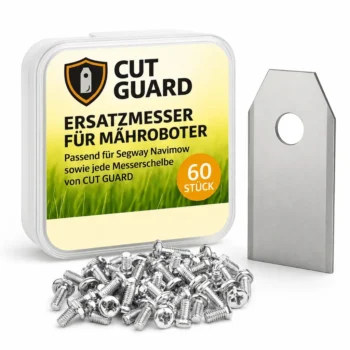
60 replacement blades compatible with CUT GUARD blade discs & Segway Navimow
39,90 € Ready to ship Add to cart
Replacement Blades for Robotic Lawn Mowers – Sharp Replacement Knives for Every Lawn
Here you will find high-quality replacement blades for robotic lawn mowers – the small, sharp knives that are attached to the blade disc and actually cut the grass. They are also called replacement knives or simply blades. They are a classic wear part: Over time, they become dull, leading to a messy cut, higher energy consumption, and a tired-looking lawn. Fresh, sharp blades restore the full cutting power of your robotic lawn mower.
Our replacement blades fit popular robotic lawn mower brands such as Segway, Mammotion, Dreame, MOVA, Eufy, Ecovacs, and Worx and are available in practical sets – so you always have sharp replacements on hand.
Why are sharp blades so important?
A robotic lawn mower works on the principle of many small cuts. Only with sharp blades is each blade of grass cleanly severed instead of torn. Dull knives tear the grass, which can lead to brown tips, diseases, and an irregular lawn appearance. Sharp replacement blades ensure a precise cut, a healthier lawn, and often even a longer battery life due to reduced resistance.
When should you change the blades?
As a rule of thumb: Check blades every 4 to 8 weeks and replace them if necessary. A change is due when the knives are visibly dull, bent, or torn, when the lawn is fraying, or when the robotic lawn mower noticeably requires more power. Since blades are inexpensive, regular replacement is worthwhile for consistently clean results.
How do you change the blades on a robotic lawn mower?
Changing the blades is simple and can be done in a few minutes: Turn off the robotic lawn mower, flip it over, and detach the old blades from the blade disc (depending on the model, with a small screw or via a clip). Then attach the new replacement blades and check if they rotate freely. It’s best to always replace all blades at the same time – this keeps the blade disc balanced.
How many replacement blades do I need?
That depends on your model: Robotic lawn mowers work with 6, 7, or 9 blades depending on the blade disc. Since all blades should always be replaced together, sets that match the exact number of blades for your blade disc are recommended. This way, you always have a complete set for the next change.
Do the replacement blades fit my blade disc?
Our replacement blades are tailored to popular robotic lawn mower brands and their blade discs. Simply choose the appropriate blades for your model or blade disc – this way you get sharp replacement knives that fit perfectly and sit securely.
Blades or complete blade disc – what do I need?
If only the knives are dull, new replacement blades are sufficient. However, if the disc itself is damaged, bent, or worn, you should choose a complete blade disc. When in doubt, it’s worth checking both categories – often, regular blade replacement is the most cost-effective solution for a consistently clean cut.
Frequently asked questions
Which robotic lawn mower models are compatible with the CUT GUARD replacement blades?
The CUT GUARD replacement blades are compatible with common robotic lawn mower brands such as Segway, Mammotion, Dreame, MOVA, Eufy, Ecovacs and Worx. Please check the specific models in the product description to ensure they work with your robotic lawn mower.
How many blades are included in a set of CUT GUARD replacement blades?
A set of CUT GUARD replacement blades typically includes 6 blades. This allows you to replace multiple blades at the same time and ensures that your robotic lawn mower always cuts optimally.
How often should I change the CUT GUARD blades?
It is recommended to replace the CUT GUARD blades every 4-6 weeks, depending on usage and lawn conditions. Dull blades can impair cutting performance and increase energy consumption.
How do I install the CUT GUARD replacement blades on my robotic lawn mower?
Installing the CUT GUARD replacement blades is usually straightforward. Remove the old blade with a screwdriver, attach the new blade to the cutting disc, and tighten the screw. You can find detailed instructions in your robotic lawn mower’s user manual.
How do shipping and returns for CUT GUARD blades work?
Shipping for the CUT GUARD blades usually takes place within 2-3 business days after receipt of the order. If you are not satisfied with the product, you can return it within 30 days, provided it is unused and in its original packaging.