The robot drives its routes cleanly, the lawn looks neat at first glance—and yet those green fringes are back at the fence, along the garden arch, or around the tree. This is exactly where the ECOVACS GOAT A3000 LiDAR PRO becomes interesting: it features an integrated TrueEdge string trimmer, meaning precisely the function that many owners of cordless robotic lawnmowers have been waiting for for years. In practice, however, many users report that this edge logic doesn’t always live up to what you’d expect from the name.
So we’re not looking at the A3000 LiDAR PRO like in a glossy brochure, but like in the workshop: What does the mower do with its blades? What is the job of the trimmer string? Why do stripes, rings, or edge areas remain? And at what point do sharp replacement blades help—and when is the problem more likely with mapping, the app, firmware, or the terrain?
ECOVACS GOAT A3000 LiDAR PRO in a real-world test: What users really report
The A3000 LiDAR PRO is not a classic wire-based robotic lawnmower. It navigates using LiDAR, camera, and ToF sensor technology, works with planned routes, and also has a trimming module on the side. On paper, that sounds like a very well-rounded solution for large, intricate gardens without boundary wire. But in the real garden, the rectangular test area quickly separates from everyday conditions with trees, the pool edge, toys, the end of the flower bed, roots, and narrow passages.
The basic cut is certainly praised. Several users describe the setup, cutting pattern, and navigation as convincing—especially in places where RTK- or GPS-based models might run into problems due to trees, house walls, or poor satellite visibility. Also, area performance and mowing at night are mentioned positively in isolated cases. So the A3000 LiDAR PRO can work—but not equally well in every garden.
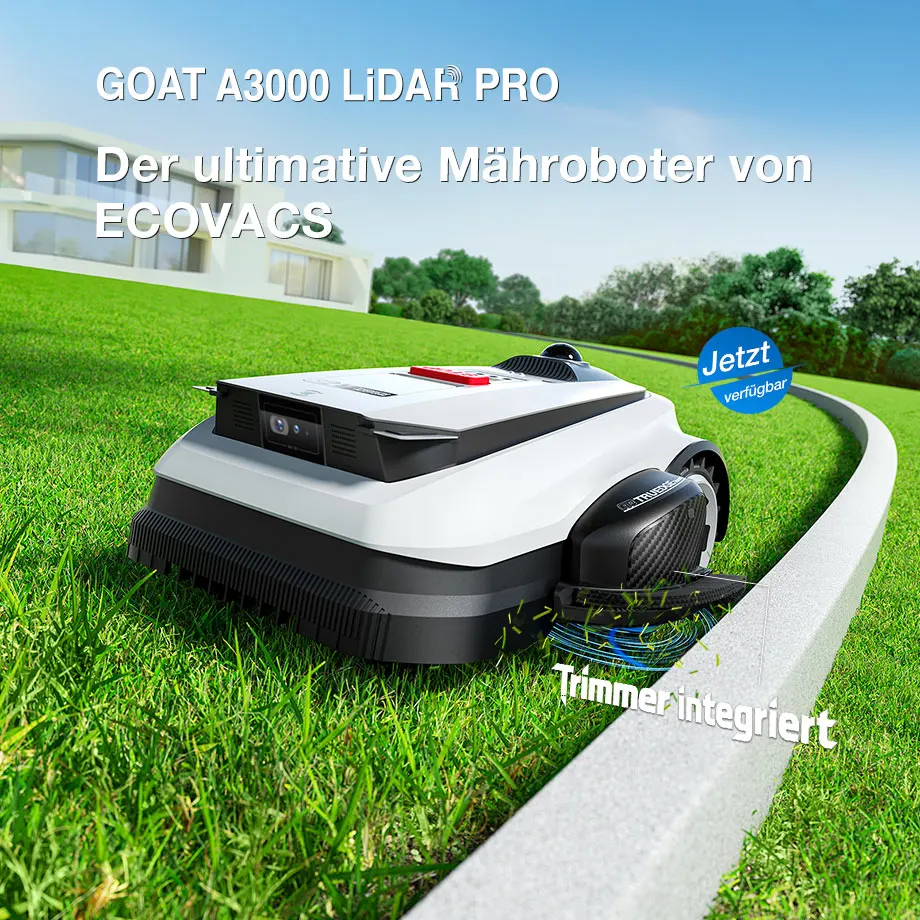
The critical reports focus on recurring points: The TrueEdge trimmer works reasonably well on simple straight edges at times, but disappoints on fences, curved garden beds, and difficult edge areas. Obstacle detection can be very cautious and then leaves unmown rings around trees or bushes. Some users report stripes in the lawn, while others struggle with app timeouts, gray maps, zone management, or interrupted mapping.
From a workshop perspective, it’s important: not every poor cutting pattern is a blade problem. Frayed grass tips, gray blades, and uneven cut surfaces often indicate dull or damaged mowing blades. But if entire lines, rings, or edge strips occur, the cause with the A3000 LiDAR PRO is often more likely to be in navigation, trimmer logic, zone planning, or obstacle detection.
| Area | Manufacturer’s idea | Practical observations from user reports | Workshop assessment |
|---|---|---|---|
| Mower blade | Regular base cut using rotating blades | Base cut is often rated positively | Sharp replacement blades remain essential, but they don’t solve mapping issues |
| TrueEdge trimmer | Edge trimming close to the border up to the edges | Straight edges sometimes work well, but curves and fences are often critical | String module is additional support, not a guaranteed replacement for manual trimming |
| LiDAR navigation | Wireless mapping without RTK visibility problems | Interesting around trees, but depends on software and environment | Plan station, map, zones, and obstacles properly |
| 2WD drive | Driving on normal lawn and slopes | Grooves, roots, curbs, and turning points can cause problems | For difficult terrain, check all-wheel-drive models |
| App and firmware | Maps, zones, schedules, and updates | Timeouts, greyed-out maps, and mapping dropouts are reported | Check before purchase whether the current firmware improves known weaknesses |
Practice-based catchphrase: If individual blades are frayed, first think about the blades. If entire edge areas, rings, or strips are left standing, navigation, mapping, or trimmer logic is usually behind it.
Does the TrueEdge trimmer really replace manual edge trimming?
No, in many gardens the TrueEdge trimmer does not fully replace manual edge trimming. That’s exactly the most common frustration point in user reports: The module is practical when there’s a straight, cleanly mapped edge, but it’s not a magic wand that perfectly handles every fence line, flowerbed curve, lawn edge, and every curb.
You have to separate the tasks clearly: The mowing blades under the robot cut the area. The side trimmer line is meant to do what normal robotic mowers can’t reach due to housing width and safety distance. This new logic is fundamentally sensible, because edge strips are a constant problem for almost all robotic mowers. Only in everyday life it’s not the term “TrueEdge” that decides, but the distance the robot is allowed to drive in the first place.
Many users report that the trimmer works well on straight lines, but it becomes noticeably weaker on curves, fences, flowerbeds, pools, sheds, and internal no-go zones. A common objection is essentially this: If you still have to go out afterward with a string trimmer, the comfort gain shrinks. It’s tough, but understandable—because it’s precisely the follow-up trimming step that buyers of the Pro model want to avoid.
In our cutting disc and blade tests, we repeatedly see this: A clean primary cut is relatively easy to control. Blade angle, sharpness, mounting, and blade clearance can be checked. When trimming edges, however, geometry and driving behavior come into play as well. The robot must be close enough to the edge, but it must not fall off, hit the ground, churn up soil backward, or slam the trimmer into hard obstacles.
For the owner, this means: plan the TrueEdge trimmer as a reduction of manual work, not as a complete replacement. If you have a garden with long paving edges at lawn level, you can benefit more. If you have many fence posts, curved garden borders, roots, steps, and tight corners, you should expect some remaining work.
How close should you map the GOAT A3000 LiDAR PRO to a curb, fence, or garden bed?
As a rough rule of thumb: first map conservatively, then move closer to critical edges in small steps. Users report that tighter mapping can improve the trimmer performance, but that’s exactly where new risks arise: the mower can slip off the curb when turning, get stuck on a bed edge, or damage the lawn at recurring turning points.
In reports, the automatic mapping is sometimes described as cautious. That’s not surprising. A wire-free robotic mower has to decide during the first mapping where it can drive safely. If it detects an edge, a step, or an obstacle too defensively, more grass will remain later. If you drive closer to the edge during manual mapping, you may gain cutting closeness, but you lose safety margin.
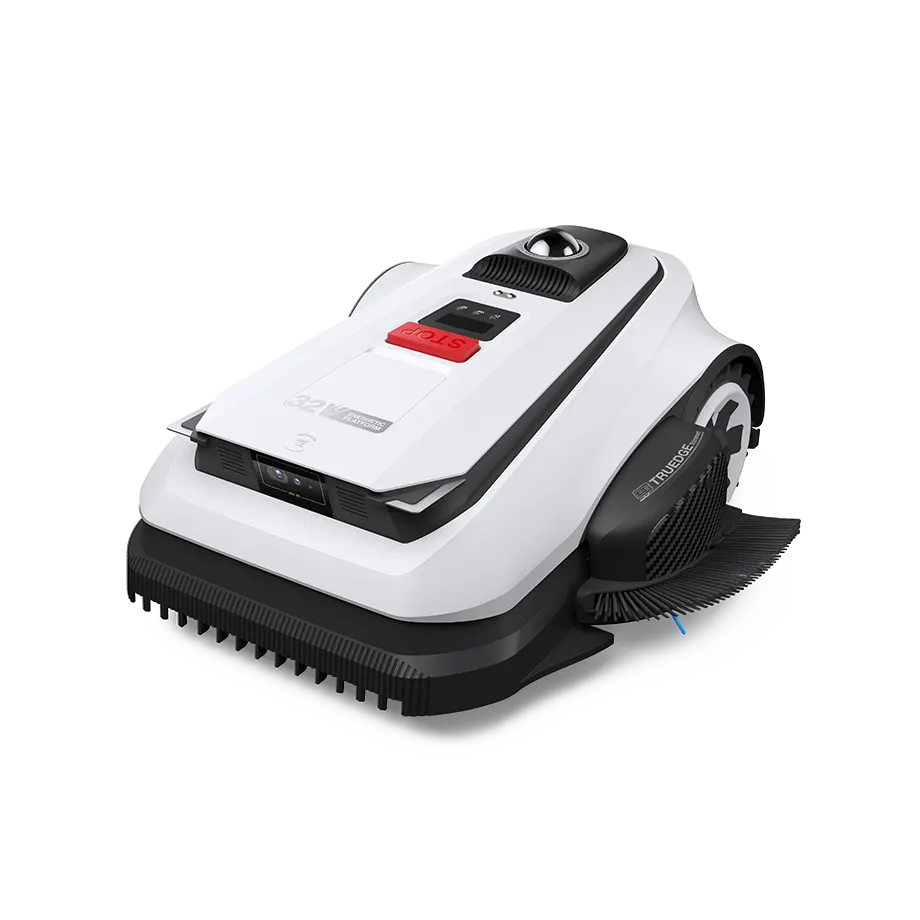
Edges with height differences are particularly critical: curbs, sunken paving joints, lawn edge stones, drainage channels, and garden bed borders. A good trimmer isn’t enough there if the robot slips with a wheel while turning. Several users report spinning wheels, getting stuck in grooves, or soil that was churned up when reversing. In a garden with a neatly bordered, level mowing edge, the risk is significantly lower.
Our recommendation from service practice: during the first mapping, don’t force maximum proximity right away. After two to three mowing runs, mark the areas where grass truly remains. Then refine specific edge sections in a targeted way instead of aggressively shifting the entire map. This way, you can tell whether a problem is caused by a particular edge or whether the trimmer logic is generally too cautious.
If, in one spot, holes, scuff marks, or brown turning points keep appearing, then the edge is too tight or the ground is too soft. In that case, no new trimmer line helps—and neither does a sharper mowing blade. The robot needs more space there, a changed zone, or a de-escalated lawn edge.
Catchphrase from practice: Mapping closer brings better edges, but less reserve. A perfect lawn edge is of little use if the robot slips off every second time or tears up the grass.
Tall grass, trees, and no-go zones: Why the GOAT sometimes leaves areas untouched
Unmown rings around trees, shrubs, or tall grass islands are not a classic cutting disc problem with the A3000 LiDAR PRO. Users report that obstacle detection works very cautiously in some situations. This is understandable for safety reasons, but in the garden it can mean that visible leftover areas remain around tree trunks, bushes, lawn toys, or dense tall grass.
With tall grass, a second effect comes into play: the robot is supposed to maintain a care area, not mow down overgrown first growth. Several users therefore recommend pre-trimming conventionally before the first proper robot run. This matches our experience with robotic lawnmower blades: Long, damp, or lying stems put more strain on blades, the motor, and the chassis. Even sharp blades then work worse because the stem is not held upright cleanly.
No-go zones are a chapter of their own with the A3000 LiDAR PRO. In user reports, there was particular discussion about whether the trimmer can cleanly handle not only outer edges but also inner restricted zones such as trees, pool areas, sheds, and flower beds. There are indications that firmware updates for related LiDAR Pro models improved the trimmer function around no-go zones. That is exactly why, with the A3000 LiDAR PRO, you should check not only the model, but also the firmware version and the app’s feature status.
In practice, you can see three typical patterns:
- Ring around an obstacle: The robot avoids trees, bushes, or objects with a safety distance. The cutting disc does not reach the area, and the trimmer is not used appropriately there.
- Standing stripes across the area: Users associate this with path planning, charging interruptions, obstacles, or zones that are too large.
- Leftover grass in corners and curves: The robot cannot mechanically get close enough, or the map is designed too conservatively.
A practical workaround from user communities is to split large areas into smaller zones. Once a zone is finished in a run, the risk decreases that charging pauses, restarts, or planning changes leave behind thin stripes. It’s not an elegant solution, but in everyday use it’s often more effective than restarting the same large overall area ten times.
Software, app, and firmware: maps, zones, timeouts, and update hope
The A3000 LiDAR PRO hardware is not generally rated poorly by many users. The bigger frustration is often in the software: maps load only in gray, zones can’t be changed or deleted reliably, app actions time out, mapping stops, or changes are only applied correctly after restarts. With a wired mower, that would be annoying; with a wireless LiDAR mower, it’s central—because the map is essentially the invisible boundary wire.
Mapping is especially frustrating when the robot gets stuck on grooves or the connection breaks off during manual mapping. Users report that interruptions during mapping can set the process back. This is more than just a comfort issue in a real garden: if you have to re-scan a large, intricate area with multiple zones, narrow passages, and obstacles, you quickly lose an afternoon.
Firmware can improve things like this. There are reports that updates to the trimmer logic and No-Go zones have helped. At the same time, that means: a user report without a firmware version is only of limited value. Two owners can experience the same A3000 LiDAR PRO differently if one is running older software and the other is already using a corrected version.
That’s why, before buying or when problems occur, you shouldn’t just search for “A3000 LiDAR PRO problem,” but check specifically:
- Which firmware version is installed?
- Does the report apply to A3000 LiDAR, A3000 LiDAR PRO, A2000 LiDAR PRO, or the O-series?
- Is the device the EU, US, or another market version?
- Was it mapped automatically or manually?
- Are there multiple zones, many No-Go areas, or long return trips to the station?
If the app freezes every time you open a map, you shouldn’t first swap the cutting disc or experiment with the trimmer line. The right sequence is: update the app, check the firmware, cleanly restart the device and the station, verify WLAN coverage, and only then change the map. If the connection breaks repeatedly, it’s worth testing the area again in a stable, small section before deleting the entire garden map.
Key takeaway from real-world use: With the A3000 LiDAR PRO, the map is not a side issue. If the map, zones, and firmware don’t run smoothly, even if the blades and trimmers are excellent—the result will still be unreliable.
Is the A3000 LiDAR PRO suitable for slopes, grooves, roots, and uneven lawns?
For normal, stable grass with moderate inclines, the 2WD drive may be enough. But with grooves, roots, soft edge areas, curbs, and steeper sections, users report spinning wheels, getting stuck, or the desire for AWD. That’s a classic difference between manufacturer specs and a real garden.
You shouldn’t mix up AWD and LiDAR. LiDAR helps the robot with navigation and obstacle detection. AWD helps with traction. So a mower can very well know where it is and still get stuck on a damp root or at a worn-out turning spot. Conversely, an all-wheel-drive unit can drive powerfully, but choose the wrong lines if navigation is poor.
With the A3000 LiDAR PRO, turning maneuvers near edges come into play. The closer you get for the trimmer to the boundary, the more often the robot has to maneuver in critical edge zones. Some users report tire tracks, holes, and torn-up areas after repeated turns. This fits especially well with soft ground, narrow edges, and slippery grass.
Our terrain check before purchase:
- Level ground, large area with few obstacles: a good candidate, especially if RTK would be difficult due to trees.
- Many edges at lawn level: TrueEdge can be useful, as long as it’s mapped cleanly.
- Many curved garden beds, posts, and tight turns: expect to do manual touch-ups.
- Roots, ruts, soft slopes: carefully check 2WD; compare AWD alternatives.
- Curbs and steps directly next to the lawn: map with a safety margin, otherwise there’s a risk of slipping.
You shouldn’t completely ignore sunlight when it comes to LiDAR and camera sensor technology either. In German forums, the topic of LiDAR interference in strong sunlight is discussed. Without reliable detailed analysis, you shouldn’t make a blanket assumption of weakness from that—but keeping the station in the shade and mowing times outside the harsh midday sun is generally sensible practice for sensor-based mowing robots. It’s not only about air temperature, but also about overheated housings, sensor areas, and sharp light contrasts.
Spare parts, support, and long-term risk: the underestimated purchase-decision point
With new mowing robots, many people talk first about navigation, the app, and area performance. But in the workshop, after the first season, the blunt question comes up: Will I be able to get cutting disc, screws, trimmer line, brushes, wheels, sensor covers, battery parts, or charging contacts? This is exactly where several users express concerns with the A3000 LiDAR PRO and related GOAT models.
In the reports, it is repeatedly criticized that spare parts other than blades and individual trimmer components may be difficult to obtain. For a robotic lawnmower, this is a real selling point—not just a side note. A device that mows well technically, but cannot be repaired economically after the warranty due to a small component, quickly becomes expensive.
For blades and trimmer line, the rule is: these are wear parts. The mowing blades should be checked regularly and replaced in pairs or sets when they are dull, bent, rusty, or unevenly worn. With our CUT GUARD cutting discs and replacement blades, we pay close attention to clean mounting, free movement, and the cutting pattern, because even small imbalances or stiff blades can worsen the mowing result.
With the A3000 LiDAR PRO, the trimmer line is added as well. It must not be confused with the mowing blades. If the area looks frayed, check the mowing blades. If only the edge looks poor, first check the trimmer line, the trimmer module, the edge card, and the distance to the edge. Many wrong purchases arise exactly from this mix-up.
Frequently asked questions
Does the TrueEdge trimmer on the ECOVACS GOAT A3000 LiDAR PRO replace manual touch-up trimming?
No, in many gardens it reduces touch-up trimming rather than completely replacing it. Especially near fences, curved flower beds, curbs, and internal obstacles, users continue to report leftover grass.
Why do strips remain in the lawn with the A3000 LiDAR PRO?
Stripes usually occur due to path planning, obstacles, charging interruptions, or zones that are too large—not just because the blades are dull. A sensible test is to split large areas into smaller zones so that a zone can be completed in a single run.
Do you need to mow tall grass manually before the first use?
Yes, a pre-cut is definitely recommended. Tall, dense, or lying grass can interfere with obstacle detection, put strain on the mowing system, and produce an untidy cutting pattern.
Does the A3000 LiDAR PRO also trim around trees and no-go zones?
That depends heavily on the firmware, the map, and the blocked-off zone you set up. User reports show that trimming around internal objects was a sticking point, and that updates can bring improvements.
When should you change the blades on the A3000 LiDAR PRO?
Replace the blades as soon as you can see the blades fraying, they look gray, or individual blades are dull, bent, or damaged. With normal robotic operation, it’s a good idea to do a regular visual inspection every few weeks. In sandy soil, with branches and cones, you should check more often.
Conclusion: Who the A3000 LiDAR PRO makes sense for—and who should be careful
The ECOVACS GOAT A3000 LiDAR PRO is an exciting robotic mower because it addresses a real everyday problem: the edge. The combination of LiDAR navigation, planned area travel, mowing blades, and an integrated trimmer can be very convenient in suitable gardens. It’s especially interesting for larger areas with poor satellite visibility, many trees, and fairly level, neatly laid-out borders.
Owners of gardens with lots of curbs, steps, soft turning points, roots, grooves, tight curves, and complex no-go zones should be careful. It’s not the datasheet that decides there, but whether the robot can drive close enough to the edge safely. The TrueEdge trimmer is a good idea, but it’s no guarantee of zero manual work.
From a maintenance perspective, the most important distinction remains: mowing blades are responsible for the cutting pattern on the surface, while the trimmer line is for edge work. If you mix the two up, you’re looking in the wrong place. Clean blades, suitable spare parts, up-to-date firmware, thoughtful mapping, and realistic expectations make the difference with the A3000 LiDAR PRO between a “powerful helper” and a “pricy device with green fringes at the edge.”
Update (July 2026): Matching CUT GUARD cutting discs (double pack) with 7 blades each are now available for the GOAT A3000 LiDAR & LiDAR PRO (as well as A1600 RTK, A2500 RTK and A1600 LiDAR PRO).
Comments