
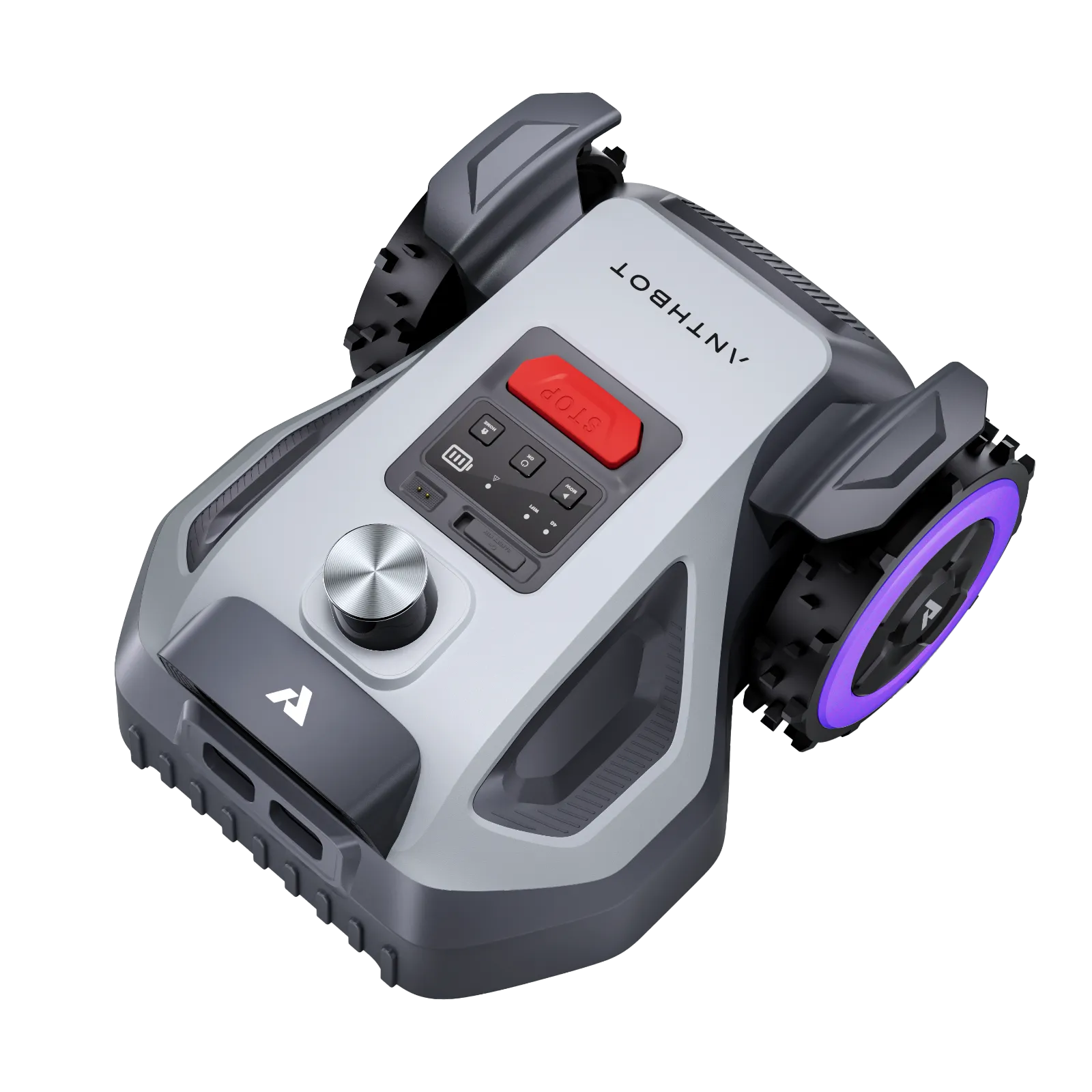
The ANTHBOT drives cleanly into the charging station, but the app still shows 0 % battery. Or it mows properly, yet leaves 15 cm of grass standing by the wall. Such cases repeatedly appear in user reports about Genie 600, Genie 3000, M5 LiDAR, and M9. This does not mean that the devices are fundamentally bad – but they are not classic wire robots that you set up once and then forget for years.
ANTHBOT is particularly interesting for users who do not want to lay boundary wire and are willing to deal with app, maps, RTK, LiDAR, or vision navigation. Everyone should be cautious if they have a very convoluted garden, many hard edges, narrow zone connections, poor radio coverage, or little patience with firmware updates. From a workshop perspective, a wireless lawn mower is only as good as its setup, its sensors, and its cutting area under the device.
ANTHBOT Models at a Glance: Genie 600, Genie 1000, Genie 3000, M5, M9, and M5 LiDAR
With ANTHBOT, you first need to separate the series. The Genie models work with RTK and camera support, are aimed at larger areas according to the manufacturer, and are offered in the variants Genie 600, Genie 1000, and Genie 3000. The M series is more compact: M5 and M9 rely on RTK/vision, while the M5 LiDAR operates without an RTK station and works with 360-degree LiDAR plus camera. This distinction is important because the typical problems differ: RTK is more affected by antenna location and signal loss, while LiDAR is more affected by detection, edge logic, and software tuning.

The manufacturer’s areas should not be read one-to-one as actual garden size. A rectangular, open lawn comes closer to the specification. A garden with narrow passages, multiple zones, shade, trees, long return paths, and slopes needs a buffer. If you have 800 m² of complicated area, you often do better in practice with a model above the 800 m² class, rather than pushing the smallest device to its limits.
Key Data in Practice
| Model | Manufacturer Area | Navigation | Strengths | Weaknesses from User Reports | Practical Assessment |
|---|---|---|---|---|---|
| ANTHBOT Genie 600 | up to approx. 900 m² | RTK + Camera, Wi-Fi | affordable entry, quiet, interesting for smaller areas | smaller battery, charging/defect reports, support in warranty cases can be sluggish | rather 500–700 m² with reserve instead of 900 m² in difficult gardens |
| ANTHBOT Genie 1000 | up to approx. 2000 m² | RTK + Camera, 4G depending on variant | better battery reserve than Genie 600, good price-performance feedback | fewer deep problem reports found, app/RTK remains an issue | makes sense for medium gardens if RTK location can be solved cleanly |
| ANTHBOT Genie 3000 | up to approx. 3600 m² | RTK + Camera, 4G | strong for larger areas, users praise mowing performance with good setup | charging issues after moisture/cleaning, remapping with shifted RTK station | for large but well-planned gardens; mount RTK station securely |
| ANTHBOT M5 | up to approx. 500 m² | RTK + Vision | compact, designed for smaller areas | app not always self-explanatory, object detection can be too cautious | for open, smaller gardens; check tight edge details carefully |
| ANTHBOT M9 | up to approx. 1000 m² | RTK + Vision + 4G | good runtime according to user report, compact design | 15–20 cm edge grass possible at walls, object detection with target conflict | for medium-sized areas, if edge rework is acceptable |
| ANTHBOT M5 LiDAR | up to approx. 500 m² | 360° LiDAR + Dual Vision | no RTK needed, good obstacle detection with typical objects | 0-% battery display, charging pauses, early position problems, corners/edges | exciting for small, enclosed gardens with shade – but pay attention to software version |
What to do if the ANTHBOT does not charge or shows 0 % battery?
If an ANTHBOT does not charge, one should first check the charging station, contacts, plug, and moisture – do not immediately replace the battery. In several user cases, the mower was correctly positioned in the station but did not charge or continued to show 0 % in the app. For the Genie 3000, a charging issue after mowing and cleaning was resolved by reconnecting a lower plug. For the M5 LiDAR, a 0-% display even blocked the necessary firmware update, although the station appeared to be active.
In practice, we always proceed in this order for such errors: disconnect the station from power, remove the mower, clean the contacts with a dry cloth, remove visible grass debris, check the connections, let the device dry completely, and only then dock again. Wet grass, water on the charging contacts, or cleaning right before charging are not a good combination. If the app shows an incorrect battery status, sometimes a complete restart of the robot and app helps; if a firmware update is blocked due to 0 %, one should take screenshots and contact support with the serial number, app version, and error image.
Cleaning is important. Users frequently ask about the Genie 3000, M9, and M5 LiDAR whether water is allowed. The safe workshop rule is: no high-pressure cleaner, no hard water lance on contacts, camera, LiDAR, seals, or display. The underside and mowing disc may appear more robust depending on the model, but even there, a brush, wooden spatula, and a soft water stream are sufficient. Camera lenses, LiDAR cover, and contacts should be cleaned dry or at most slightly damp.
Mnemonic: Charging problems after rain or cleaning are not an exotic error with ANTHBOT. First dry, clean contacts, and check the plug – then address the app, firmware, and support.
App, Firmware, and Setup: What Works – and Where It Stumbles
Many users report that the ANTHBOT hardware performs better than the app explanation. This is a typical pattern with young wireless lawn mowers: The mower can generally navigate, but terms, timers, zone logic, maps, and update processes are not always clearly explained. In forums, it was described that early software versions of the M5 LiDAR lost position multiple times. After several updates, the device ran more stably, but minor translation errors and unclear operating logic remained an issue.
When setting up, one should take their time. Before the first mapping, no-go zones, hard boundaries, open paths, flat transitions, pond edges, play areas, and problematic corners should be mentally prepared. A lawn mower without a wire does not automatically recognize every garden boundary as a human sees it. Especially with vision and LiDAR systems, shadows, dark lawn edges, round flower beds, walls, and similarly colored paths can complicate orientation.
Before each major update, we recommend taking screenshots of the map, zones, mowing plan, cutting height, edge mode, and no-go zones. If many users report similar app problems on the same day after an update, a server or synchronization issue is more likely than a faulty mower. Then, do not rush to remap, but first close the app, restart the robot, check the connection, and wait to see if the map loads again.
How well do M5 LiDAR and M9 mow at edges, walls, and inside corners?
M5 LiDAR and M9 mow adequately at edges, but not like a handheld lawn trimmer. User reports particularly mention inside corners, walls, hedges, and traversable edges. With the M5 LiDAR, small areas are sometimes left uncut at inside corners because the robot takes curves generously and does not pull deep enough into the corner. A user reports about 15–20 cm of unmowed grass at walls with the M9, even though the robot approaches quite closely. The reason often lies not only in the navigation but also in the position of the mowing deck under the housing.
This is a common misconception with compact cordless robots: “It drives close to the wall” does not automatically mean “the blade cuts all the way to the wall.” What matters is how far the blade disc is offset to the side, how large the safety distance of the housing remains, and whether the edge is traversable. Paving at lawn level is significantly easier than a vertical wall, a raised bed, or a dense hedge.
If the ANTHBOT drives reliably but the cutting pattern appears too thin at edges, it is worth looking not only at clean mapping but also at the blade area: In dense grass, uneven edge growth, or frequent stops at the edge, a compatible blade with 7 blades can help make the cut more even per pass without overestimating the robot’s edge logic.
From a workshop perspective, it is important: A better blade does not replace a missing edge cut. However, it can improve the result where the robot actually reaches the area. If 20 cm next to a wall is completely outside the blade path, the only solution is to reshape the lawn edge, adjust the boundary, or occasionally trim it.
Object detection in practice: safe, but sometimes too cautious
The object detection of the ANTHBOT models is rated ambivalently. The M5 LiDAR is positively noted for recognizing and avoiding typical objects like toys or dog toys. At the same time, M9 users report that detection at a higher level can be too cautious. Then the robot avoids level sidewalk slabs, bare spots, or small depressions that could actually be mowed without any issues.
This is not just an ANTHBOT problem, but the conflict of interest in every AI detection: High sensitivity better protects against objects but leaves more area unmowed. Low sensitivity mows more completely but recognizes smaller obstacles poorly. Those with children, pets, toys, or many changing objects in the garden should start with higher safety and observe the missed spots. Those with a very tidy garden with defined lawn edges can cautiously test lower.
We would not send a Vision or LiDAR robot completely unattended into a messy garden. Especially flat objects, cords, small balls, animal droppings, garden hoses, and half-buried lawn edges remain challenging. The robot is a helper, not a quality inspector.
RTK or LiDAR – which ANTHBOT system is suitable for which garden?
RTK is better suited for open gardens with good sky visibility, while LiDAR is more appropriate for small, enclosed gardens with shade, walls, or areas where an RTK station would be inconvenient. With Genie 600, Genie 1000, Genie 3000, M5, and M9, much depends on the signal: Antennas or stations must not be randomly placed but need as clear a view as possible. Roof edges, balconies, house walls, tall hedges, tree canopies, and narrow courtyards can lead to GPS loss, track deviation, or interrupted journeys.
A specific user case with the Genie 3000 shows a typical RTK issue: If the RTK stand is slightly moved, a remapping may be necessary. This makes sense because the map belongs to the reference position. Therefore, the RTK station should not be “just moved around.” A fixed mast, wall mount, or a permanently marked location is more sensible than a wobbly tripod that gets shifted during mowing, watering, or playing.
LiDAR has different strengths. The M5 LiDAR does not require an RTK station and can be interesting in shady, smaller gardens. However, it needs to be able to read its surroundings clearly. Very uniform surfaces, dark edges, glass, tight corners, low obstacles, and changing light conditions can still pose problems. In early reports, the M5 LiDAR sometimes lost its position, but later updates significantly improved its behavior.
Key point: RTK needs a stable, good antenna location. LiDAR needs recognizable surroundings and clear boundaries. Wireless does not mean limitless.
Battery and Area Performance: Why Model Choice Matters
The battery and area performance differ significantly. In the Genie 600, the smaller battery is often mentioned as a limit; users who want more reserve tend to look towards the Genie 1000. There have been reports with the M5 LiDAR of short mowing phases with charging breaks, while a M9 user positively highlighted a runtime significantly over 100 minutes. Such experiences show: It’s not just the square meter count that matters, but also return paths, zone changes, slope, grass density, and how often the robot travels through already mowed areas.
For convoluted areas, we prefer to calculate conservatively. For 500 m² with multiple zones, bottlenecks, and inclines, a 500 m² model quickly reaches its limit. For the 900 m² manufacturer specification, one should rather set a comfortable limit of 600–700 m² in a real garden. The Genie 3000 has a large area of interest, but only if RTK, charging station, and paths between the zones function stably.
The cutting pattern also influences the perceived performance. If the robot hits more blades due to dull blades than it cuts cleanly, the area looks patchier, and the user often unnecessarily increases the mowing frequency. In denser growth or when visible tracks remain despite correct mapping, a precise 9-blade cutting disc for ANTHBOT can be a sensible option, as more cutting points are created per rotation.
With our CUT GUARD cutting discs, we pay close attention to these practical points: free gaps against grass buildup, blades that fit snugly, robust material thickness, and compatible geometry. However, more blades are not a magic trick. Those who mow too infrequently or send the robot through wet, tall grass will not achieve a perfect result even with a better blade carrier.
Support, spare parts, and long-term risk
Many users are satisfied as long as the ANTHBOT is running. It becomes critical when a device does not charge new, an app display is blocked, an update does not go through, or a warranty case arises. For the Genie 600, a replacement was only achieved after prolonged escalation through several channels. Users report slow support with many follow-up questions for the M5 LiDAR. The mowing performance of the Genie 3000 is praised, but there is a desire for better availability of spare parts and easier access to small components.
Before purchasing, one should check: Are there available blades, cutting discs, batteries, garages, RTK accessories, and support documents? Is the app usable in your country? Is there 4G service when you need it? How is the warranty handled? Especially with cloud- and app-dependent robots, not only the device is crucial, but also the supply over multiple seasons.
For wear parts, it is better to replace blades regularly than to wait until the lawn frays. After contact with stones, roots, or bent blades, the lawn mower robot should not continue running. An unbalanced cutting disc puts stress on motor bearings and can create vibrations. Those who take the robot out of winter storage in spring should carefully check the cutting disc, screws, blades, contacts, and wheels before the first mowing schedule.
Frequently Asked Questions
Can you clean the ANTHBOT Genie, M9, or M5 LiDAR with water?
Yes, careful cleaning is possible depending on the area, but high-pressure cleaners should be off-limits. Contacts, camera, LiDAR, display, and seals should only be cleaned dry or with a slightly damp cloth. It is better to first free the underside from grass with a brush and wooden spatula.
Why does my ANTHBOT show 0 % battery, even though it is in the station?
Usually, contact issues, moisture, connection problems, app errors, or a blocked charging state are to blame. First, dry and clean the contacts, restart the station, and dock the mower correctly again. If a firmware update is blocked as a result, document the error and contact support with screenshots.
Do I need to remap after moving the RTK station?
Yes, this may be necessary if the reference position of the RTK station has changed. The map is tied to the fixed location of the station. Therefore, the RTK antenna should be permanently mounted and not moved seasonally or accidentally.
Which model is suitable for 600 m² of lawn?
For 600 m² of simple, open area, a smaller model may suffice; in a convoluted garden, the Genie 1000 or M9 is more realistic than a narrowly sized mower. Key factors are zones, slopes, narrow passages, and return paths. It’s better to plan for a 20–30 % reserve than to operate at the battery limit daily.
Do M5 LiDAR and M9 really cut to the edge of the lawn?
No, there is often touch-up work needed at walls, raised beds, and tight inner corners. Driveable lawn edges at paving level work significantly better. The blade can only cut where the robot can actually reach with its cutting path.
Conclusion: Who ANTHBOT is suitable for – and who should be cautious
ANTHBOT Genie 600, Genie 1000, Genie 3000, M5, M9 and M5 LiDAR are interesting for users who want to mow wirelessly and are willing to take setup, app, maps, and sensors seriously. The biggest real problem areas are not the pure mowing performance, but charging, moisture, app/firmware logic, edge behavior, object detection, and support in case of errors.
The Genie 600 is more suitable for smaller areas with a price focus, the Genie 1000 offers more reserve, the Genie 3000 is exciting for large gardens but requires a clean RTK setup. M5 and M9 are compact RTK/Vision devices for smaller to medium areas, while the M5 LiDAR becomes particularly interesting where RTK is difficult. Those expecting perfect edges without rework will be disappointed. Those who plan realistically, keep contacts dry, do not blindly install updates, and regularly check blades and blade discs can achieve a good cutting pattern with the ANTHBOT models.
Tip: You will find all matching replacement blade discs and mowing plates for ANTHBOT in our overview: Blade discs for ANTHBOT.
Comments