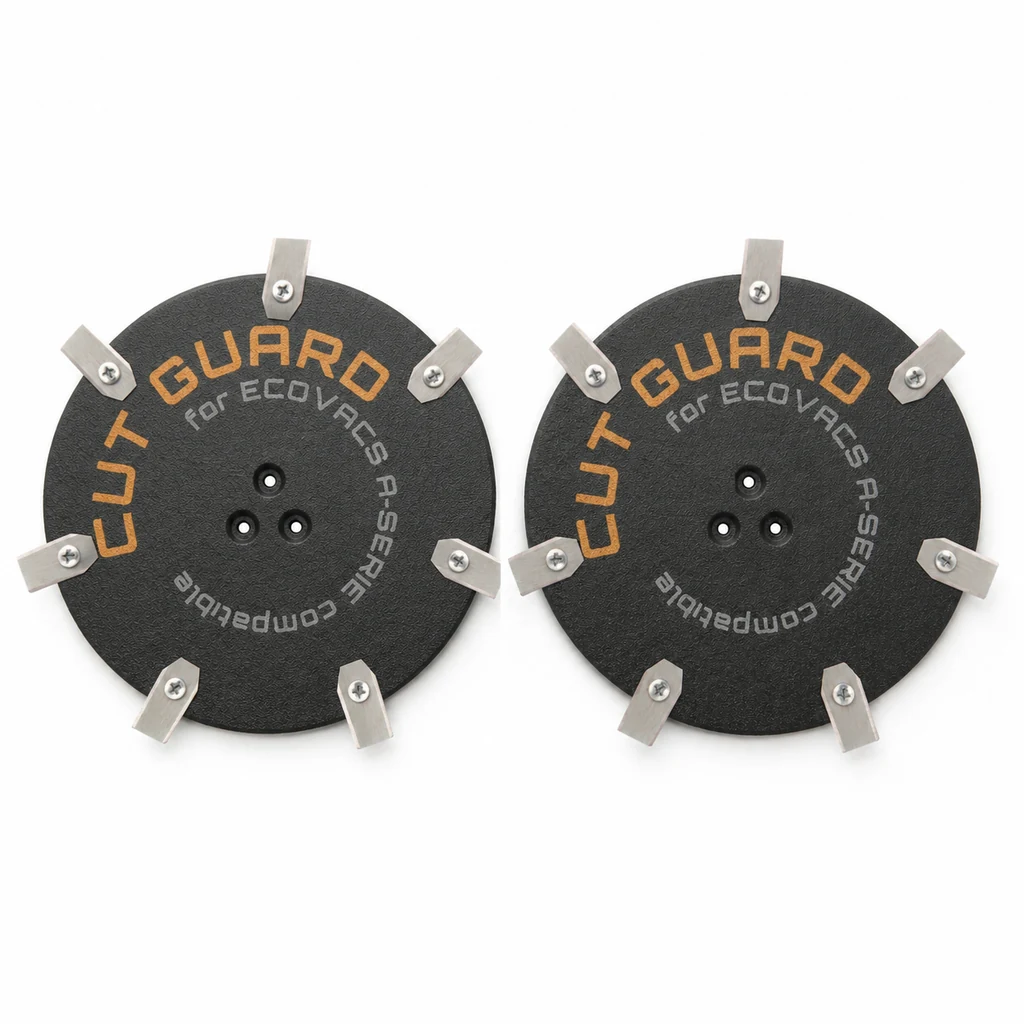
Ein Mähroboter, der plötzlich brummt und dessen Haube spürbar zittert, hat fast immer ein mechanisches Problem im Mähwerk – nicht im Motor. Das ist die gute Nachricht, denn Messer, Schrauben und Messerscheibe kann man selbst prüfen, ohne Werkstatt und ohne Spezialwerkzeug. Die schlechte: Wer weiterfahren lässt, riskiert Lagerschäden am Mähmotor, und die kosten ein Vielfaches einer Messerscheibe.
Husqvarna beschreibt in der eigenen Wissensdatenbank einen konkreten Auslöser, der überraschend häufig vorkommt: zwei Klingen an einer Schraube. Beim Wechsel rutscht eine alte Klinge nicht ab, die neue kommt darüber – und der Teller läuft unwuchtig. Das Ergebnis ist ein Summen, das Besitzer oft mit einem Bienenschwarm vergleichen. Kein Defekt, sondern ein Montagefehler, der sich in fünf Minuten beheben lässt.
Zuerst klären: Klappern oder echte Unwucht?
Nicht jedes Geräusch ist ein Schaden. Die Klingen von Mährobotern hängen bewusst frei beweglich an ihren Schrauben. Das ist Absicht: Trifft der Roboter auf einen Stein oder eine Wurzel, klappt die Klinge weg, statt Motor und Getriebe die volle Wucht abzubekommen. Auf Beton, Pflaster oder Asphalt schlagen diese frei hängenden Klingen hörbar gegen den Teller.
Dieses Klappern ist Konstruktion, kein Fehler. Der Unterschied zur echten Unwucht lässt sich in dreißig Sekunden feststellen:
| Normal | Unwucht – handeln |
|---|---|
| Klappern nur auf harter Fläche, auf Gras leise | Brummen auch auf Rasen, wird mit der Zeit lauter |
| Gehäuse ruhig | Haube zittert sichtbar oder fühlbar |
| Schnittbild sauber | Grasspitzen ausgefranst, teils grau |
| Geräusch seit jeher gleich | Änderung nach Messerwechsel oder Winterpause |
| Roboter fährt normal weiter | Fehlermeldung oder Abschaltung des Mähmotors |
Der aussagekräftigste Punkt ist der zeitliche Zusammenhang. Ein Geräusch, das seit dem ersten Tag da ist, gehört meist zur Bauart. Ein Geräusch, das nach einem Eingriff oder nach der Winterpause auftaucht, hat eine Ursache, die man finden kann.
Die fünf Ursachen, geordnet nach Häufigkeit
1. Zwei Klingen auf einer Schraube
Der Klassiker nach dem Messerwechsel. Beim Lösen bleibt eine alte Klinge an der Schraube hängen, die neue wird darübergeschraubt. An einer Position sitzen dann zwei Klingen, an einer anderen fehlt möglicherweise eine – der Teller ist aus dem Gleichgewicht. Husqvarna führt genau das als eigenen Punkt in der Fehlersuche.
So prüfen Sie: Roboter ausschalten, Sicherheitsschlüssel ziehen, umdrehen. Dann jede Schraubposition einzeln durchgehen und zählen. Bei einer Sechser-Scheibe müssen es sechs Schrauben mit je genau einer Klinge sein. Nicht flüchtig hinschauen – zwei aufeinanderliegende Klingen sehen von oben aus wie eine.
2. Gemischte oder ungleiche Klingen
Drei neue, drei alte. Oder Klingen von zwei Herstellern mit unterschiedlichem Gewicht. Bei mehreren tausend Umdrehungen pro Minute wirkt jedes Gramm Differenz als Unwucht – der Teller wird an einer Stelle stärker nach außen gezogen als an der anderen.
Das ist der Grund, warum Klingen grundsätzlich als kompletter Satz getauscht werden, auch wenn nur eine beschädigt aussieht. Der Preisunterschied zwischen einer und sechs Klingen ist gering, der Unterschied im Laufverhalten deutlich.
3. Grasreste unter dem Teller
Feuchtes Schnittgut verklebt zwischen Messerscheibe und Gehäuse und trocknet dort zu einer harten Schicht. Verteilt sich diese ungleichmäßig – und das tut sie fast immer – läuft der Teller unrund. Nach der Winterpause ist das die häufigste Ursache überhaupt, weil Reste über Monate ausgehärtet sind und sich mit dem Finger nicht mehr lösen lassen.
So prüfen Sie: Teller von Hand drehen. Er soll sich gleichmäßig bewegen, ohne zu schleifen oder an einer Stelle zu haken. Wer genau hinsieht, erkennt die Kruste am Rand des Tellers oder in den Aussparungen.
4. Verbogene oder gerissene Messerscheibe
Ein Aufprall auf Wurzel, Randstein, Gartenschlauchkupplung oder vergessenes Werkzeug kann die Scheibe verziehen. Ein Riss am Rand ist mit bloßem Auge zu erkennen, eine leichte Verformung nicht immer – besonders bei Kunststoffscheiben, die sich unter Belastung elastisch verhalten.
So prüfen Sie: Scheibe abnehmen und auf eine ebene Fläche legen, etwa eine Tischplatte oder Fliese. Sie muss plan aufliegen. Wackelt sie oder lässt sich an einer Ecke andrücken, ist sie verzogen. Zusätzlich die Schraubaufnahmen kontrollieren: Sind die Bohrungen oval statt rund, ist das Material ausgeschlagen und die Klingen bekommen zu viel Spiel.
5. Lagerschaden am Mähmotor
Bleibt das Geräusch nach allen vorherigen Schritten, sitzt das Problem tiefer. Die Kugellager unter dem Mähmotor können durch Korrosion oder Verschleiß rau laufen. Der Klang unterscheidet sich deutlich: Ein Lagerschaden mahlt und rattert, eine Unwucht summt und brummt.
So prüfen Sie: Teller langsam von Hand drehen und dabei auf das Gefühl achten. Ein intaktes Lager läuft glatt durch. Ein defektes hakt, rattert oder fühlt sich körnig an. Das ist ein Fall für die Werkstatt – Lager tauscht man nicht im Garten.
Fehlersuche in der richtigen Reihenfolge
Die Reihenfolge ist wichtig, weil sie vom Einfachsten zum Aufwendigsten geht. Wer gleich die Scheibe bestellt, gibt möglicherweise Geld aus, obwohl nur Gras unter dem Teller klebte.
- Roboter ausschalten und Sicherheitsschlüssel ziehen. Die Klingen sind rasiermesserscharf. Handschuhe sind hier keine Übervorsicht, sondern Selbstschutz – die häufigsten Verletzungen entstehen beim Hantieren am umgedrehten Gerät.
- Umdrehen und Teller reinigen. Getrocknete Grasreste mit Bürste und Holzspatel lösen. Kein Hochdruckreiniger – das Wasser drückt in die Lager und beschleunigt genau den Schaden, den man vermeiden will.
- Schraubpositionen zählen. Eine Klinge pro Schraube. Nicht mehr, nicht weniger.
- Klingen als vollständigen Satz tauschen. Alle, nicht nur die auffällige. Die Schrauben handfest anziehen, nicht mit Gewalt – überdrehte Gewinde im Kunststoff sind ein häufiger Folgeschaden.
- Teller von Hand drehen. Läuft er rund, ohne Schleifen und ohne Haken?
- Probelauf ohne Last. Roboter auf eine harte, freie Fläche stellen und kurz laufen lassen. Vibration weg? Dann war es einer der ersten vier Punkte.
- Erst danach die Scheibe verdächtigen. Auf Planlage und Risse prüfen.
Wann die Messerscheibe wirklich getauscht werden muss
Hier weichen wir bewusst von dem ab, was viele Shops schreiben. Eine Messerscheibe ist kein Verschleißteil im gleichen Sinn wie die Klingen. Sie trägt die Klingen und dreht sich – mehr nicht. Solange sie plan ist, keine Risse hat und die Klingenaufnahmen nicht ausgeschlagen sind, kann sie über Jahre laufen.
Was regelmäßig getauscht gehört, sind die Klingen. Husqvarna und Gardena nennen für ihre Modelle Intervalle von ein bis drei Monaten, abhängig von Fläche und Mähstunden. Diese Angaben beziehen sich auf die kleinen Schneidmesser, nicht auf den Teller darunter.
Die Scheibe selbst wird zum Fall, wenn:
- sie nach einem Aufprall verzogen ist und nicht mehr plan aufliegt,
- ein Riss sichtbar ist – meist am Rand oder an einer Schraubaufnahme,
- die Bohrungen ausgeschlagen sind und die Klingen zu viel Spiel haben,
- die Schraubgewinde nicht mehr greifen,
- ein Befestigungssteg abgebrochen ist.
Bei normalem Betrieb ohne Beschädigung sprechen wir eher von einem bis zwei Jahren – bei vielen Kunden deutlich länger. Wer alle drei Monate eine neue Scheibe kauft, gibt Geld für ein Bauteil aus, das noch völlig in Ordnung ist.
Warum man mit Unwucht nicht weiterfahren sollte
Eine Unwucht ist kein kosmetisches Problem. Die Schwingung wirkt direkt auf die Motorwelle und die darunterliegenden Kugellager. Diese Lager sind für gleichmäßige Rotation ausgelegt, nicht für seitliche Schläge. Läuft der Roboter wochenlang unwuchtig weiter, wird aus einem Klingensatz für wenige Euro ein Mähmotorschaden – und der bedeutet je nach Modell entweder eine teure Reparatur oder einen neuen Roboter.
Gardena und Husqvarna empfehlen in ihren Hilfe-Artikeln übereinstimmend, den Betrieb bei starken Vibrationen einzustellen und die Ursache zu suchen, bevor weitergemäht wird. Das ist keine Vorsichtsformel, sondern folgt aus der Mechanik.
Was Sie nach der Reparatur kontrollieren sollten
Nach dem Zusammenbau lohnt ein kurzer Testlauf auf harter Fläche. Achten Sie auf drei Dinge: Läuft der Teller ruhig? Bleibt die Haube ohne spürbare Vibration? Klingt der Mähmotor wie vorher?
Danach eine normale Mährunde auf dem Rasen und anschließend das Schnittbild prüfen. Saubere, gerade Schnittkanten an den Grashalmen zeigen, dass Klingen und Teller wieder rund laufen. Bleiben die Spitzen ausgefranst oder verfärben sich nach ein bis zwei Tagen gräulich, waren die Klingen entweder schon vorher stumpf oder das Problem ist nicht behoben.
Häufige Fragen
Der Roboter brummt erst seit dem Messerwechsel – was ist passiert?
Mit hoher Wahrscheinlichkeit sitzt an einer Position eine Klinge zu viel, oder es wurden neue mit alten gemischt. Beides erzeugt Unwucht. Alle Positionen einzeln kontrollieren und im Zweifel den kompletten Satz neu setzen.
Muss ich alle Klingen tauschen, wenn nur eine kaputt ist?
Ja. Eine neue Klinge neben fünf abgenutzten wiegt anders und erzeugt genau die Unwucht, die man vermeiden will. Klingen sind Verbrauchsmaterial und werden im Satz gewechselt.
Kann ich die Messerscheibe reinigen statt tauschen?
In den meisten Fällen ja. Getrocknetes Gras ist die häufigste Ursache für unrunden Lauf und lässt sich mit Bürste und Holzspatel entfernen. Erst wenn die Scheibe verzogen oder gerissen ist, hilft Reinigen nicht mehr.
Wie fest zieht man die Klingenschrauben an?
Handfest mit dem mitgelieferten Werkzeug, nicht mit Kraft. Die Klinge muss sich nach dem Anziehen noch frei um die Schraube bewegen lassen – das ist gewollt. Zu fest angezogene Schrauben blockieren die Beweglichkeit und beschädigen bei Kunststoffscheiben das Gewinde.
Wie erkenne ich einen Lagerschaden?
Ein defektes Lager klingt rau und mahlend, nicht summend. Beim Drehen des Tellers von Hand spürt man ein Rattern oder Haken. In dem Fall gehört der Roboter in die Werkstatt – das ist keine Selbstreparatur.
Darf ich den Roboter mit dem Gartenschlauch reinigen?
Von unten mit wenig Druck und ohne direkten Strahl auf die Motoreinheit. Kein Hochdruckreiniger: Das Wasser wird in die Lager gedrückt und beschleunigt Korrosion – ausgerechnet dort, wo später der teure Schaden entsteht.
Wie oft muss die Messerscheibe wirklich getauscht werden?
Bei unbeschädigtem Betrieb hält sie ein bis zwei Jahre, oft länger. Sie ist kein Verschleißteil wie die Klingen. Getauscht wird sie bei Rissen, Verzug oder ausgeschlagenen Bohrungen – nicht nach Kalender.
Kommentare