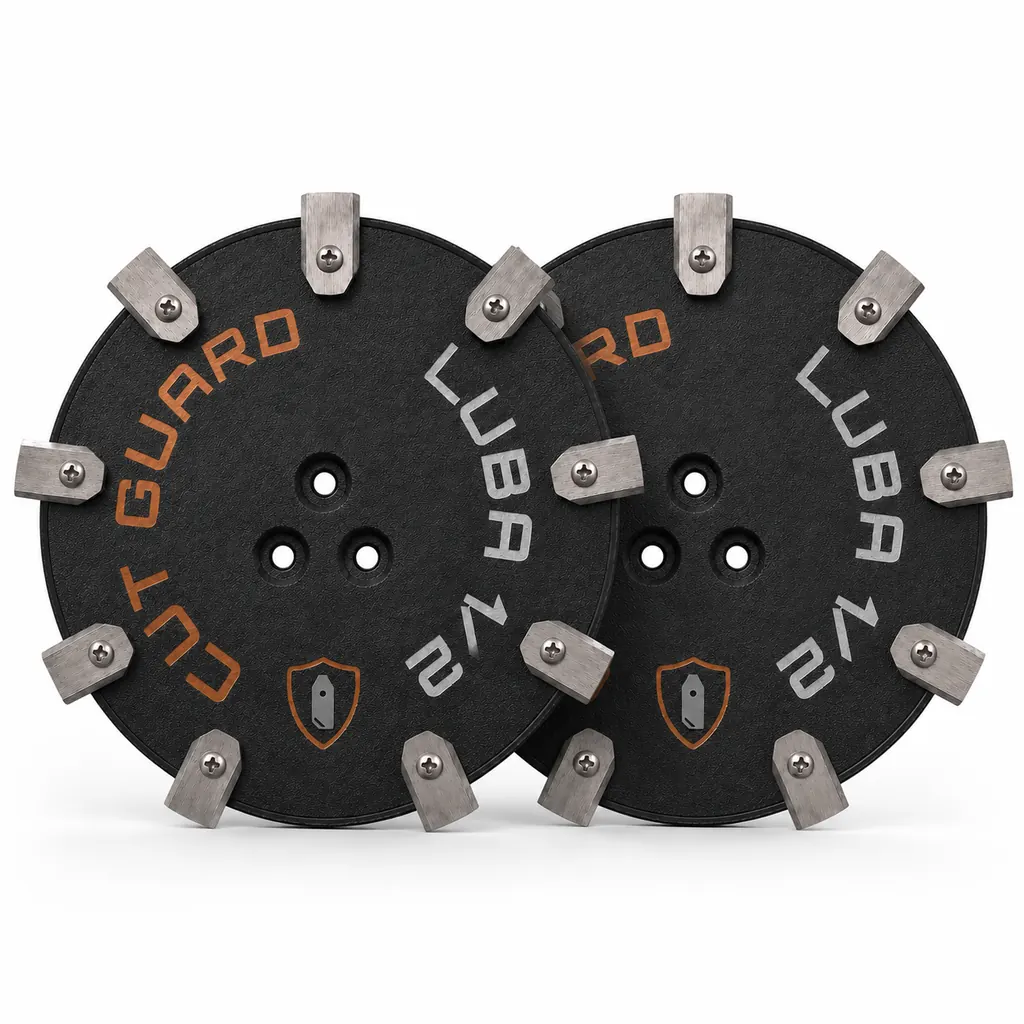
Mammotion baut zwei sehr unterschiedliche Maschinen. Der Luba AWD ist ein Allradfahrzeug mit über 15 Kilogramm Gewicht, ausgelegt auf Hänge bis 80 Prozent Steigung. Der Yuka Mini wiegt einen Bruchteil davon und arbeitet auf kleinen, ebenen Flächen. Beim Klingenwechsel führt das zu einem praktischen Unterschied, der oft übersehen wird: Beim Luba müssen Sie ein schweres Gerät sicher auf den Rücken legen, beim Yuka Mini genügt eine Hand.
Der Vorgang selbst ist bei allen Mammotion-Modellen gleich aufgebaut. Klingen sitzen einzeln verschraubt auf einer rotierenden Scheibe, jede an ihrer eigenen Schraube, jede frei beweglich. Was sich unterscheidet, ist die Zahl der Positionen und der Aufwand beim Handling.
Klinge und Messerscheibe sind zwei verschiedene Teile
Diese Unterscheidung entscheidet darüber, was Sie tatsächlich kaufen müssen – und was nicht.
Die Klingen sind Verschleißteile. Sie bestehen aus dünnem Federstahl, treffen bei jeder Umdrehung auf Grashalme, Sand und gelegentlich auf einen Stein. Husqvarna und Gardena, die für ihre Modelle seit Jahren verbindliche Wartungsangaben veröffentlichen, nennen ein bis drei Monate Standzeit je nach Fläche und Betriebsstunden. Diese Größenordnung gilt physikalisch auch für Mammotion – ein Stahlblech von wenigen Zehntelmillimetern Dicke stumpft unabhängig vom Markenlogo.
Die Messerscheibe ist der Träger. Sie rotiert, sie hält die Klingen, sie ist deutlich massiver. Sie schneidet nichts. Entsprechend nutzt sie sich auch nicht ab. Bei normalem Betrieb sind ein bis zwei Jahre eine konservative Annahme, häufig hält sie erheblich länger.
Ersetzt wird die Scheibe nach einem konkreten Ereignis, nicht nach Kalender:
- sichtbarer Riss, meist vom Rand oder von einer Bohrung ausgehend
- Verformung – die Scheibe liegt auf einer ebenen Fläche nicht mehr plan auf
- ausgeschlagene Bohrungen: die Löcher sind oval statt rund, die Klingen haben zu viel Spiel
- Aufprall auf einen festen Gegenstand mit anschließend verändertem Laufgeräusch
Wer alle drei Monate eine neue Scheibe kauft, wirft Geld weg. Wer eine gerissene Scheibe weiterfährt, riskiert, dass sich eine Klinge unter Last löst.
Mammotion-Modelle und Klingenzahl
| Modell | Bauart | Klingen pro Scheibe | Besonderheit beim Wechsel |
|---|---|---|---|
| Luba AWD / Luba 2 AWD | Allrad, schwer | 3 bzw. 6 je nach Ausführung | Gewicht – zu zweit wenden oder abstützen |
| Luba 3 AWD | Allrad, schwer | je nach Scheibenvariante | wie oben, zusätzlich mehr Bodenfreiheit |
| Luba Mini AWD | Allrad, kompakt | 6 (gängige Variante) | einhändig kippbar |
| Yuka / Yuka Mini | Zweiradantrieb, leicht | 6, teils 7 oder 9 als Zubehörscheibe | einfachster Zugang aller Modelle |
Die Zahl der Klingen ist keine Modelleigenschaft, sondern eine Eigenschaft der montierten Scheibe. Wer auf 7 oder 9 Klingen wechseln will, tauscht die Scheibe mit – Klingen nachrüsten geht nicht, weil die Bohrungen fehlen.
Der Wechsel Schritt für Schritt
- Gerät ausschalten und Sicherheitsschlüssel ziehen. Nicht nur in den Standby oder über die App pausieren. Der Mähmotor muss stromlos sein, bevor Sie in den Bereich der Klingen greifen.
- Handschuhe anziehen. Die Klingen sind an der Schneidkante scharf, auch die abgenutzten. Die typische Schnittverletzung entsteht nicht beim Schneiden, sondern beim Abstützen am umgedrehten Gerät.
- Roboter umdrehen. Beim Luba AWD ist das der eigentliche Aufwand. Legen Sie ihn auf eine weiche Unterlage – Karton, alte Decke, Rasen –, damit Haube und Sensorfenster keine Kratzer bekommen. Bei einem Allradmodell mit dem Gewicht des Luba lohnt sich eine zweite Person oder eine Werkbank auf Hüfthöhe.
- Grob reinigen. Bürste, Holzspatel oder Plastikschaber. Angetrocknetes Schnittgut sitzt vor allem zwischen Scheibe und Gehäuse. Solange dort eine harte Schicht klebt, lässt sich weder das Laufverhalten beurteilen noch sauber schrauben.
- Alte Klingen abschrauben. Meist Kreuzschlitz oder Torx, je nach Baujahr. Nehmen Sie alle Klingen ab und legen Sie sie beiseite – nicht in den Rasen, wo sie später jemand mit bloßem Fuß findet.
- Position für Position prüfen. Jede Bohrung ansehen: rund oder oval? Jede Schraube ansehen: Kopf noch intakt, Gewinde nicht überdreht? Schrauben gehören zum Klingensatz und werden mitgetauscht, wenn sie mitgeliefert sind.
- Neue Klingen montieren. Eine Klinge pro Schraube. Handfest anziehen, mehr nicht.
- Beweglichkeit prüfen. Jede montierte Klinge muss sich noch mit dem Finger um ihre Schraube drehen lassen. Sitzt sie fest, ist die Schraube zu stark angezogen.
- Scheibe von Hand drehen. Sie soll gleichmäßig laufen, ohne zu schleifen oder zu haken.
- Gerät aufstellen, Schlüssel einsetzen, kurzen Testlauf starten. Auf Rasen, nicht auf Pflaster – auf hartem Untergrund schlagen die frei hängenden Klingen ohnehin an und Sie hören nichts Verwertbares.
Warum die Schrauben nicht fest angezogen werden
Die Klingen hängen bei allen Mährobotern absichtlich lose. Trifft die Maschine auf einen Stein, eine Wurzel oder eine vergessene Schlauchkupplung, klappt die Klinge nach hinten weg. Die Energie geht in die Bewegung statt in Motor und Getriebe. Eine festgezogene Klinge kann nicht ausweichen – dann trifft der Schlag die Motorwelle.
Das erklärt auch das Klappern, das viele Besitzer beunruhigt: Fährt der Roboter über Beton oder Pflaster, schlagen die frei beweglichen Klingen hörbar gegen die Scheibe. Das ist Konstruktion, kein Defekt. Auf Rasen verschwindet das Geräusch.
Was bei den schweren Luba-Modellen anders ist
Der Allradantrieb bringt mehr Masse und mehr Bodenfreiheit mit. Beides wirkt sich auf die Wartung aus.
Mehr Masse heißt mehr Wucht bei Kollisionen. Ein 15-Kilo-Gerät, das mit Steigungsdrehmoment gegen einen Randstein fährt, belastet die Messerscheibe stärker als ein 7-Kilo-Gerät. Nach einer erkennbaren Kollision lohnt eine Sichtprüfung der Scheibe, auch wenn der Roboter normal weiterfährt.
Hangbetrieb heißt anderer Verschleiß. An Böschungen und Hangkanten arbeitet der Mäher näher am Erdreich, weil das Gelände unter ihm kippt. Sand und Erde in den Halmen stumpfen Stahl deutlich schneller als Gras allein. Wer überwiegend Hang mäht, liegt eher am unteren Ende des Intervalls.
Mehr Bodenfreiheit heißt besserer Zugang. Ein Vorteil: Bei den Luba-Modellen kommen Sie an die Unterseite heran, ohne das Gerät vollständig auf den Rücken legen zu müssen. Ein stabiles Kippen zur Seite reicht oft – vorausgesetzt, jemand hält dagegen.
Yuka und Yuka Mini: der einfachste Fall
Beim Yuka Mini ist der Wechsel eine Sache von zehn Minuten. Das Gerät lässt sich mit einer Hand anheben und umdrehen, die Scheibe liegt frei, und mit sechs Klingen ist die Zahl der Schrauben überschaubar.
Weil die Maschine leicht ist und typischerweise auf kleineren, gepflegten Flächen läuft, ist der Klingenverschleiß hier meist geringer als beim Luba. Das verlängert das Intervall – ersetzt aber nicht die Kontrolle. Auch ein kleiner Roboter, der über eine sandige Stelle fährt, stumpft dort ab.
Wann die Klingen wirklich fällig sind
Der Kalender ist der schlechtere Indikator. Zuverlässiger ist der Rasen selbst.
Das Schnittbild: Eine scharfe Klinge trennt den Halm glatt. Eine stumpfe reißt ihn. Der gerissene Halm verliert an der Bruchstelle Feuchtigkeit, trocknet aus und wird an der Spitze grau oder bräunlich. Wer aus zwei Metern Entfernung auf die Fläche sieht und einen matten Grauschleier bemerkt, hat stumpfe Klingen – nicht Trockenheit, nicht Pilz.
Der Einzelhalm: Nehmen Sie einen Halm zwischen die Finger und sehen Sie sich die Schnittkante an. Glatt und quer abgeschnitten ist in Ordnung. Ausgefranst, zerfasert oder schräg gerissen bedeutet: wechseln.
Die Laufzeit: Stumpfe Klingen brauchen mehr Kraft. Wenn der Luba plötzlich einen Ladezyklus mehr für dieselbe Fläche braucht und weder Gras noch Wetter sich geändert haben, ist der erhöhte Schnittwiderstand ein plausibler Grund.
Typische Fehler beim Mammotion-Klingenwechsel
Nur die beschädigte Klinge tauschen
Eine neue Klinge neben fünf abgenutzten erzeugt einen Gewichtsunterschied. Bei mehreren tausend Umdrehungen pro Minute reicht das für spürbare Unwucht. Die Folge ist ein Brummen, das viele für einen Motorschaden halten, und eine Dauerbelastung der Lager im Mähmotor. Immer als Satz wechseln.
Zwei Klingen an einer Schraube
Husqvarna führt diesen Fall als eigenen Punkt in der Fehlersuche, weil er häufig vorkommt. Beim Abschrauben bleibt eine alte Klinge hängen und wird beim Zusammenbau übersehen – die neue kommt darüber. Von oben sehen zwei aufeinanderliegende Klingen aus wie eine. Das Ergebnis ist ein Summen, das Besitzer oft mit einem Bienenschwarm vergleichen. Zählen Sie nach dem Wechsel jede Position einzeln durch.
Klingen verschiedener Hersteller mischen
Unterschiedliche Blechstärken bedeuten unterschiedliche Gewichte. Auch wenn beide Sorten passen, führt die Mischung zur Unwucht. Ein Satz kommt von einem Hersteller.
Schrauben zu fest anziehen
Nachvollziehbarer Reflex, falsches Ergebnis. Eine festgezogene Klinge verliert ihre Schutzfunktion. Zusätzlich kann bei Kunststoffscheiben das Gewinde ausreißen – dann ist die Scheibe hin, obwohl sie mechanisch in Ordnung war.
Hochdruckreiniger benutzen
Der Wasserstrahl treibt Feuchtigkeit an den Lagern und Wellendichtungen vorbei. Das Ergebnis zeigt sich nicht sofort, sondern Wochen später als rau laufendes Lager. Bürste, Spatel und ein feuchtes Tuch reichen. Bei hartnäckigen Resten hilft Einweichen, nicht Druck.
Häufige Fragen
Wie oft muss ich beim Luba AWD die Klingen wechseln?
Als Orientierung dienen die Herstellerangaben aus der Branche: ein bis drei Monate im laufenden Betrieb. Bei Hangbetrieb mit sandigem Boden eher am unteren Ende, bei kleiner ebener Fläche eher darüber. Verlässlicher als jede Zahl ist die Sichtprüfung an der Schnittkante der Grashalme.
Kann ich beim Luba die Messerscheibe gleich mitwechseln?
Sie können, müssen aber in aller Regel nicht. Die Scheibe schneidet nicht und verschleißt entsprechend kaum. Getauscht wird sie bei Riss, Verformung oder ausgeschlagenen Bohrungen. Ein bis zwei Jahre sind eine vorsichtige Annahme, oft hält sie länger.
Mein Yuka klappert auf der Terrasse. Ist die Scheibe defekt?
Sehr wahrscheinlich nicht. Die Klingen hängen konstruktionsbedingt lose und schlagen auf harten Flächen gegen die Scheibe. Entscheidend ist, ob das Geräusch auch auf Rasen auftritt und ob die Haube dabei spürbar zittert. Nur dann liegt eine Unwucht vor.
Passen Klingen vom Luba auf den Yuka Mini?
Das hängt von Lochbild und Blechmaß ab, nicht vom Hersteller. Prüfen Sie Bohrungsabstand und Klingenlänge, bevor Sie bestellen. Passt es geometrisch nicht, hilft auch Gewalt nicht weiter – die Klinge muss sich frei drehen können.
Muss ich die Schrauben mitwechseln?
Wenn sie im Satz enthalten sind: ja. Die Schraube läuft an der Klinge mit und nutzt sich am Schaft ab. Eine eingelaufene Schraube gibt der Klinge zu viel Spiel. Kosten spielen hier keine Rolle, das Risiko einer gelösten Klinge unter Last schon.
Der Roboter brummt seit dem Wechsel. Was habe ich falsch gemacht?
Drei Kandidaten, in dieser Reihenfolge prüfen: eine Position mit zwei Klingen, eine vergessene Position ohne Klinge, oder ein gemischter Satz aus alten und neuen Teilen. Alle drei erzeugen dasselbe Symptom und sind in wenigen Minuten behoben.
Kann ich stumpfe Klingen nachschärfen?
Technisch möglich, praktisch keine gute Idee. Beim Schleifen tragen Sie Material ab – und zwar an keiner Klinge exakt gleich viel. Sechs unterschiedlich schwere Klingen ergeben eine Unwucht, die Sie nicht sehen, aber die Lager schon. Der Materialwert eines Klingensatzes steht in keinem Verhältnis zu einem Lagerschaden am Mähmotor.
Kommentare